18
4. Adjust the Settings
In the recording screen, touch the panel to wake up function bar.
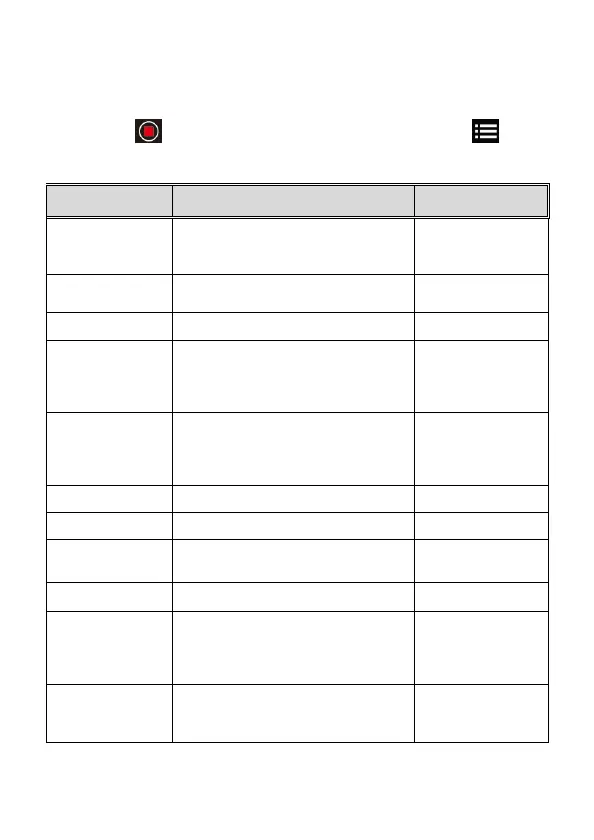
Touch icon on function bar to stop recording. Touch icon to
enter Menu setting.
Followings is available menu options.
Menu Description Available option
Resolution Setting of video resolution
1080P / 720P
Record Interval
Set the recording duration for each
recorded video file
1 min/ 2 min/
3 min
Voice Record
Setting for voice record in the video. On / Off
Parking Mode
To keep recording after engine turns off.
Once Parking Mode is activated, it will
start 1fps time-lapse recording.
*This feature needs to install ACC cable in
On/ Off
Fatigue Driving
Driving is enabled, audible
alert and screen message will be
activated 1 hour after the camcorder is
powered on, with a repetition every 30
minutes.
On/ Off
Key Tone Set up sound of icon touch. On/ Off
Date/time Set up date and time
Language Set the on-screen display menu language
According to ship to
area
Anti-flicker Reduce flicker on LCD 60Hz / 50Hz
LCD setting
Set LCD off time. Camcorder screen will
be off after a set time if no operation is
detected. Press any button will switch it
on. (Recording is not affected when
screen is off).
On / 1 min off / 3 min
off
Collision Detection
The camcorder will automatically trigger
emergency recording when tremor of a
collision is detected. The sensitivity level
can be adjusted.
Off / Low / Middle /
High


 To Next Page