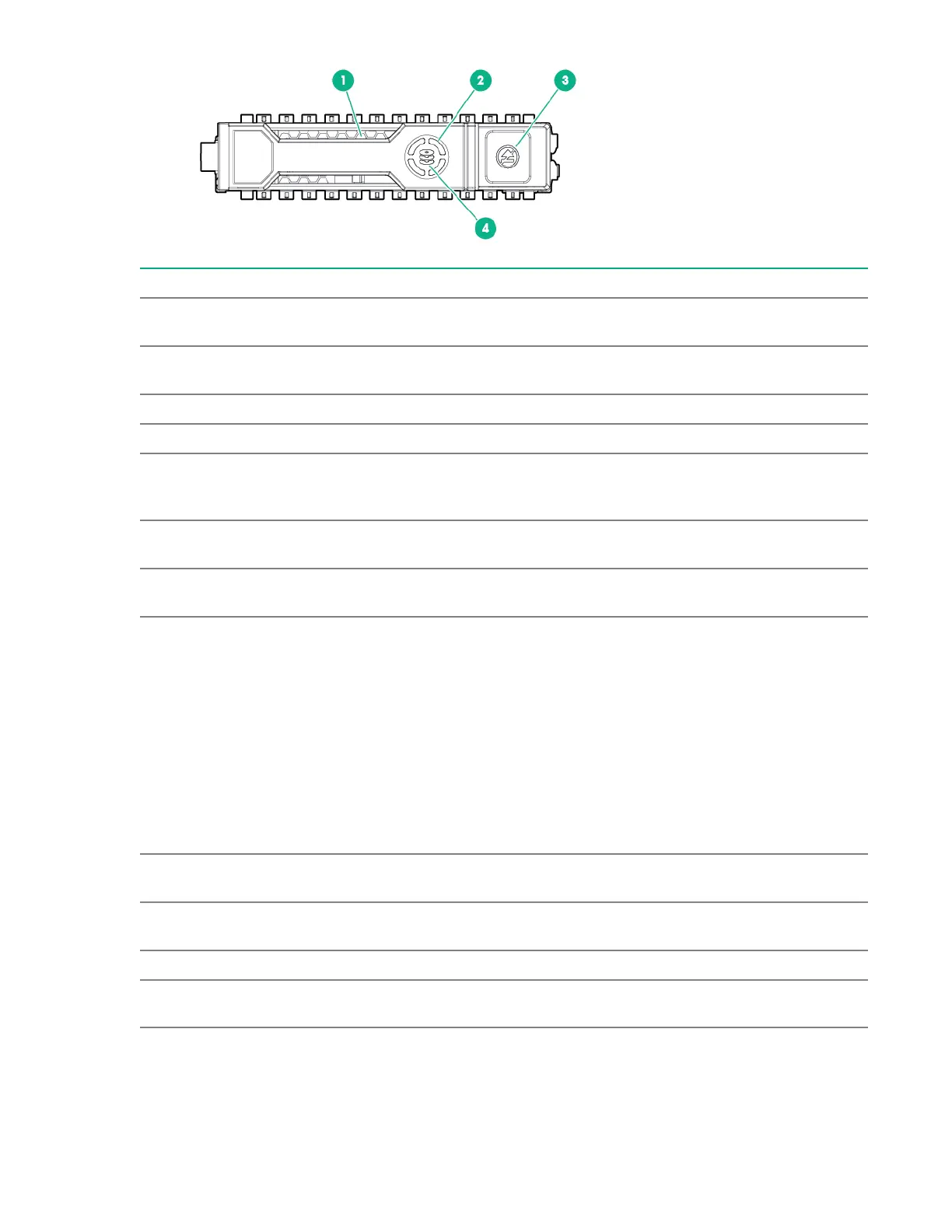
Item LED Status Definition
1 Locate
1
Solid blue The drive is being identified by a host
application.
Flashing blue The drive carrier firmware is being updated
or requires an update.
2 Activity ring Rotating green Drive activity
Off No drive activity
3 Do not remove Solid white Do not remove the drive. Removing the
drive causes one or more of the logical
drives to fail.
Off Removing the drive does not cause a logical
drive to fail.
4 Drive status Solid green The drive is a member of one or more
logical drives.
Flashing green The drive is doing one of the following:
• Rebuilding
• Performing a RAID migration
• Performing a capacity expansion
• Performing a logical drive extension
• Erasing
• Spare drive activation
Flashing amber/green The drive is a member of one or more
logical drives and predicts the drive will fail.
Flashing amber The drive is not configured and predicts the
drive will fail.
Solid amber The drive has failed.
Off The drive is not configured by a RAID
controller or is a spare drive.
1
The blue Locate LED is behind the release lever and is visible when illuminated.
22 Features


 To Next Page
 Loading...