Unboxing
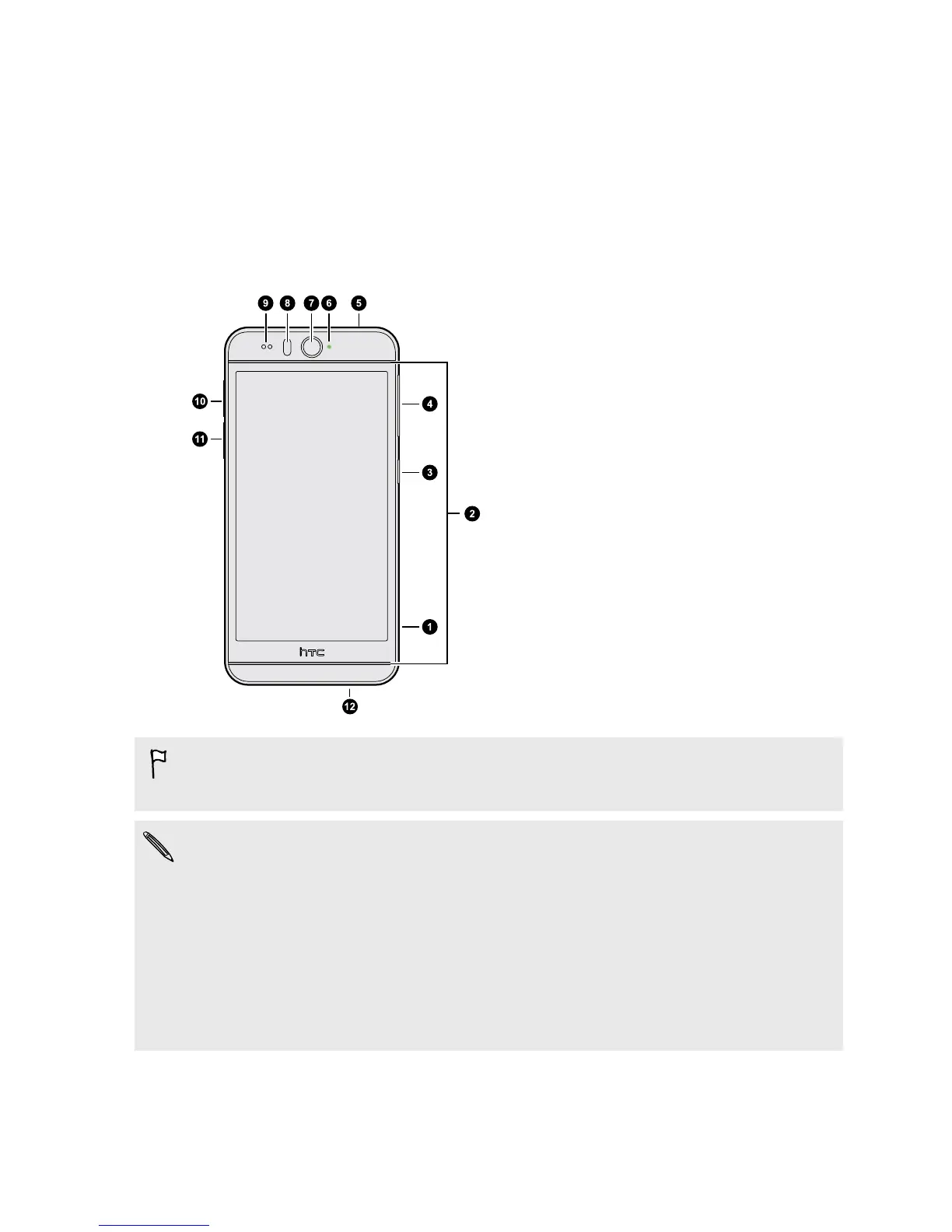
HTC Desire EYE
1. CAMERA button
2. Dual speakers
3. POWER button
4. VOLUME buttons
5. 3.5mm headset jack
6. Notification LED
7. Front camera
8. LED flash
9. Proximity sensor
10. nano SIM slot
11. microSD
™
slot
12. USB connector
You need a 4G/LTE
™
plan to use your operator's 4G/LTE network for voice calls
and data services. Check with your operator for details.
§ If you want to use a case or screen protector, don’t cover and block the proximity
sensor. Purchase a case or screen protector designed for HTC Desire EYE.
§ Avoid connecting third-party headsets or accessories with metallic charms that
dangle near the headset jack. Using these may affect signal reception.
§ Some jack accessories such as earphone plugs and charms may be falsely
recognized as a headset when inserted into the headset jack. Headset mode may
then be turned on, and the earpiece or speaker volume turned off. If this happens,
remove the accessory.
13 Unboxing



 To Next Page