Mounting VIVE Tracker (3.0) to Rover
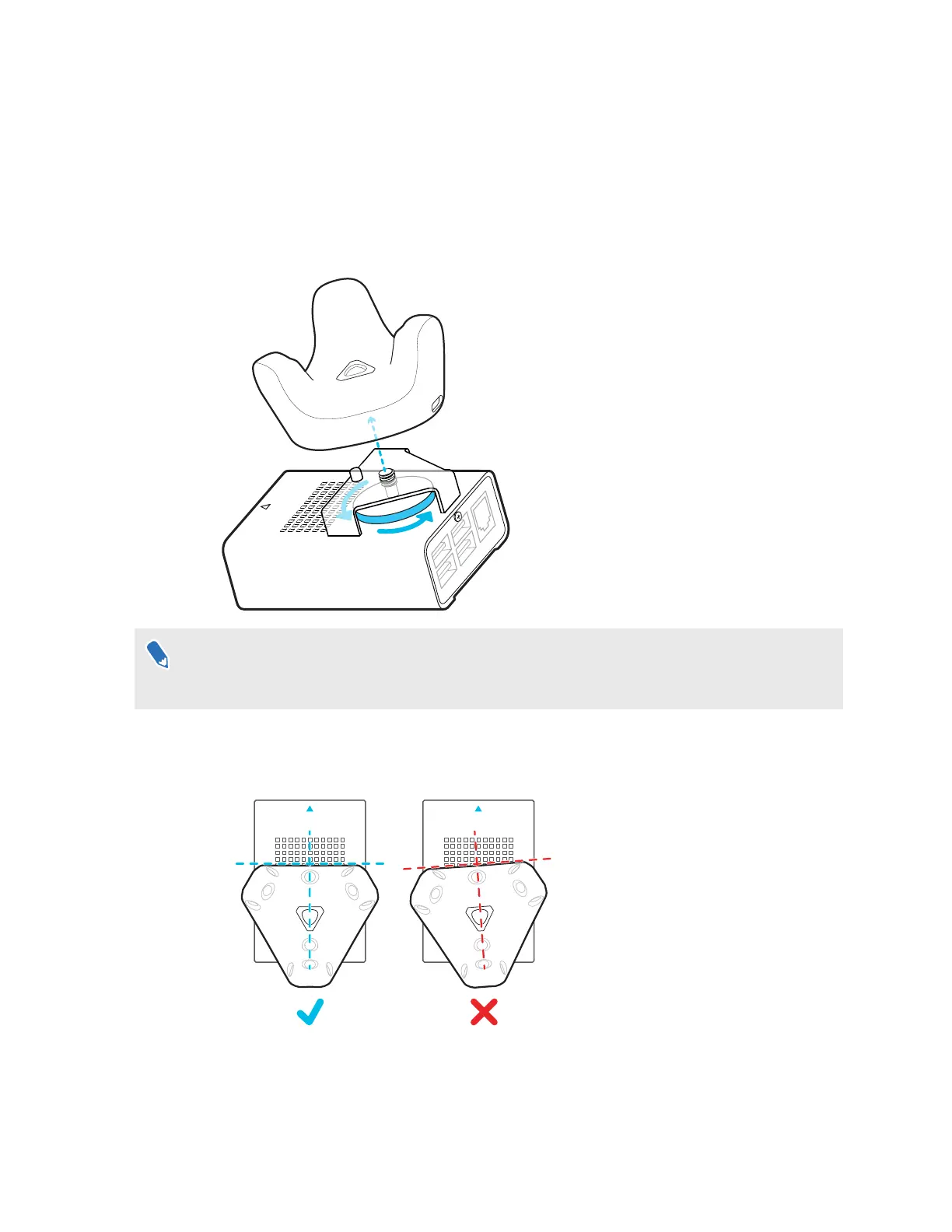
Rover comes installed with a mounting plate for mounting VIVE Tracker (3.0) to Rover.
1. Align the mounting screw on Rover with the screw hole on the bottom of VIVE Tracker
(3.0).
2. Attach VIVE Tracker (3.0) to Rover and rotate the mounting screw counterclockwise until it
is securely fastened.
Make sure the front edge of the tracker is parallel to the front side of Rover, which is indicated
by the blue arrow on the chassis. Failure to properly align the tracker may reduce the accuracy
of camera calibration.
3. Connect the Type-C end of a 10-cm USB Type-C to Type-A cable to the USB Type-C port
on VIVE Tracker (3.0), and then connect the Type-A end to a USB Type-A port on Rover.
15 System setup



 To Next Page