The operating step is as the following:
8.2. Emissivity setting
Matt (e=0.95)
Emissivity
Semi-matt (e=0.85)
Semi-glossy (e=0.60)
Glossy (e=0.30)
Custom
0.01
8. Introduction to “emissivity” sub-menu
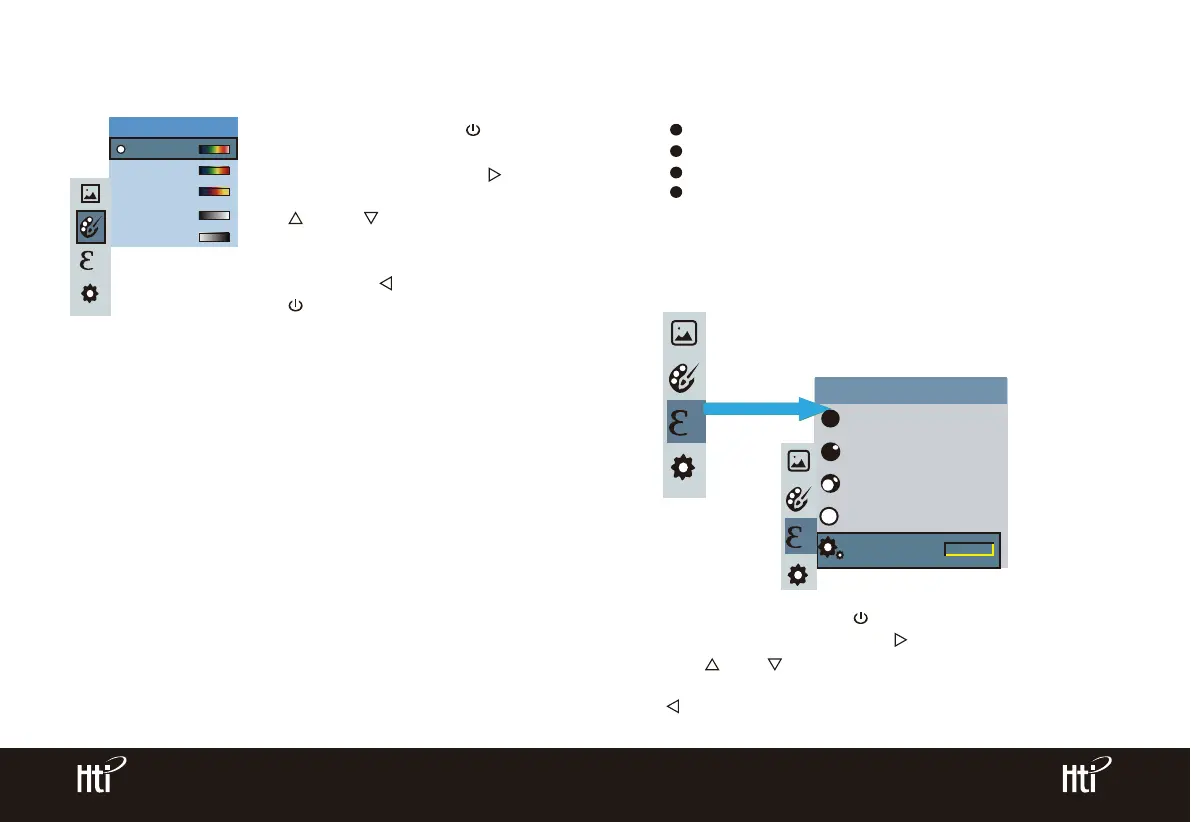
7.2 Application of color palette
8.1 Emissivity Description
Spectra
Iron
Cool
White
Black
Color palette
As shown in the figure, press “ /MENU”
key to enter the main menu and select
“color palette” option and press “ ”
key to enter the color palette list. Press
“ ” and “ ” keys in navigation to
select the color palette. Then press
“SELECT/ENTER” key to select the color
palette. Press “ ” to return. Press
“ /MENU” key to exit from the menu.
The emissivity of the product can be adjusted from 0.01 to 1.00 with the
default value of 0.95. Many common objects and materials (such as timber,
water, skin and textile fabric) can reflect the heat energy effectively. So it is
easy to obtain relatively correct measurement value. The emissivity is usually
set as 0.95 when the coarse objects that are easy to give out energy. For
semi-matte objects that give out less energy, the emissivity is usually about
0.85 and the emissivity of semi-gloss objects is 0.6. The shiny objects are
divided into materials with low radiation coefficient. The emissivity is usually
set as 0.3 at the time of measurement. Correct setting of the value of
emissivity is very important for you to carry out the most correct temperature
measurement. The surface emissivity will produce giant impact on surface
temperature measured by the product. Understanding the surface emissivity
will enable you to obtain correct temperature measurement result.
The product is provided with four types of object measurement modes:
Coarse object (0.95)
Semi-matte object (0.85)
Semi-shiny object (0.60)
Shiny object (0.30)
According to the characteristics of the measured objects, users may set the
emissivity value through the “self-define” option (please refer to the table of
“emissivity of common materials”).
As shown in the figure, press “ /MENU” key to enter the main menu and
select “emissivity” option and press “ ” key to enter the emissivity list.
Press “ ” and “ ” keys in navigation key to select the emissivity. Then
press “SELECT/ENTER” key to determine selection of the emissivity. Press
“ ” key again to return.
www.xintest.com.cn
10
www.xintest.com.cn
11



 To Next Page