This document describes the HT-06 Thermal Imaging Camera, a device designed for real-time thermal measurement and thermal image analysis. It integrates surface temperature measurement with real-time thermal imaging, offering a comprehensive solution for various applications including industrial inspection, electric power, metallurgy, petro-chemistry, machinery, coal, traffic, fire control, and national defense.
Function Description
The HT-06 is an infrared camera that captures visible light images and infrared thermal images simultaneously. It features a central point measurement cursor to quickly and accurately measure the temperature of the target object. The device supports real-time thermal detection and can store both visible light and thermal images. These images can be transferred via USB to a computer for report generation or further analysis. The camera is designed for ease of use and has strong functionality, making it suitable for professionals in various fields.
Important Technical Specifications
The HT-06 thermal imaging camera boasts a robust set of technical specifications:
- Infrared Detector Type: Vanadium Oxide Uncooled Infrared Focal Plane
- Infrared Resolution: 256x192
- Infrared Response Band: 8 to 14µm
- Cell Size: 12µm
- NETD: <50mK @ F#1.0
- Thermal Imaging Frame Rate: ≤25Hz
- Lens Focal Length: 3.2mm
- Emissivity Setting: Adjustable from 0.01 to 1.00
- Field Angle: 35°x27°
- Focus Mode: Non-heating fixed focus lens
- Temperature Measurement Range: -20 ℃ to +550 ℃ (-4 ℉ to 1022 ℉)
- Measurement Accuracy: ±2 ℃ or ±2%
- Temperature Measurement Mode: Center point/hot and cold spot tracking
- Color Palette: Rainbow, iron, cold color, white hot, black hot
- Display Size: 2.8-inch (240x320)
- Image Display Mode: Infrared/visible light/dual light fusion
- Lighting System: LED fill light
- Device Storage: Built-in 4G eMMC (user available storage space is about 3G)
- Storage Image/Video Format: JPG/MP4
- Image/Video Export Method: USB connection to computer export
- Image Analysis Function: Support offline analysis on PC
- Menu Language: English, Chinese, Italian, German
- Battery Type: Removable Rechargeable Lithium Battery (18650)
- Battery Capacity: 2000mAh
- Working Time: 2 to 3 hours
- Power Interface: Micro USB
- Power Configuration: 5 minutes / 20 minutes / no automatic shutdown
- Work Temperature: 0 ℃ to +45 ℃ (32 ℉ to 113 ℉)
- Storage Temperature: -20 ℃ to +60 ℃ (-4 ℉ to 140 ℉)
- Relative Humidity: 10% to 85%RH (non-condensing)
- Product Weight: 389g
- Product Size: 96mm×72mm×226mm
Usage Features
The HT-06 is designed for intuitive operation with a user-friendly interface.
- Initial Operation: To power on, press and hold the "MENU/☊" button for more than 3 seconds. The screen will display the thermal imaging status.
- Display Description: The display shows the central point temperature, maximum and minimum temperature cursors, battery power, and color code. The color code indicates the relative temperature from low to high in the field of vision.
- Key Description: The device features a keypad with Menu/On/Off key, Selection key/Entry key, and navigation keys (Up, Down, Left, Right) for easy menu navigation and setting adjustments.
- LED Lighting Lamp: The LED lighting lamp can be turned on/off by holding down the "image capture" key for about 3 seconds.
- Witching Between Infrared Thermal Image and Visible Image: Users can switch between infrared thermal images and visible images, or blend them, with fusion degrees of 0%, 25%, 50%, 75%, and 100%.
- Image Capture: Press the image capture key to save an image. Successful captures prompt a "store photo?" message. Images can be saved or discarded.
- Video Recording: The device supports video recording. Users can start and stop recording via the "MENU/☊" button and "SELECT/ENTER" key.
- Read Images: Images can be viewed on the device or transferred to a computer via USB. The device is compatible with Windows operating systems (winxp, win7, win8, win10) and Apple systems.
- Menu Navigation: The main menu includes "image overlapping," "image," "video," "color palette," "emissivity," and "setting" submenus.
- Image Overlapping: This feature allows for the fusion of infrared images with aligned visible images, enhancing understanding of temperature distribution.
- View Image/Video: Users can browse captured images and videos, view previous or next files, and delete unwanted files.
- Color Palette: The device offers various pseudo-color display options (rainbow, iron, cold color, white hot, black hot) to enhance temperature differences.
- Emissivity Setting: Emissivity can be adjusted from 0.01 to 1.00, allowing for accurate temperature measurement on different materials. A table of common material emissivities is provided for reference.
- Settings Menu: This menu allows users to configure auto shutdown, intensity (brightness), language, unit (Celsius/Fahrenheit), temperature range, time format, set time, and spot (hot/cold spot display) settings.
- Wireless WiFi: The device supports WiFi connectivity for mobile device integration. Users can view images, adjust parameters, and stream infrared video via a mobile application.
Maintenance Features
Proper maintenance ensures the longevity and optimal performance of the HT-06.
- Cleaning: The product should be cleaned with a damp cloth or diluted soapy water. Avoid abrasives, isopropyl alcohol, or solvents. For optical lens cleaners, use professional cleaners.
- Lens Maintenance: Clean the infrared lens carefully. Avoid force when cleaning to prevent damage to the anti-reflection coating. Use a cleaning solution for lens maintenance, such as alcohol-based commercial lens cleaners, alcohol, and a lint-free cloth or paper towel. Compressed air tanks can be used to remove loose particles.
- Battery Charging: The product has built-in rechargeable 18650 lithium batteries. The battery level is displayed on the top right of the screen. Charge the battery via Micro USB interface.
- Battery Performance: The lithium ion battery can play the perfect performance by charging on the charger exceeding 24 hours. The thermal imaging device should be charged for two hours at least every three months to extend the battery service life to the greatest extent. Avoid discharging the battery in extremely cold environments.
- General Safety Precautions:
- Ensure the plug of the adapter is inserted into the specified power socket.
- When the plug of the adapter or wire is damaged, stop using immediately.
- Do not touch the electric wire with wet hands.
- Forbid dipping the product into water caught in rain.
- Avoid that the product is impacted (such as collision and falling, etc.).
- Long-time storage and regular charging.
- Personnel search and rescue in fire, and fire command.
- Analyze the location and heat loss of leak points in heat pipes and heating equipment.
- Determining the location of the heating fault of the operating train; Security department night monitoring.
- Warning:
- If the product case is damaged, don't use it continuously.
- During the process of use, if the product is found with smoke, spark and the burnt smell, please stop using at once.
- Don't remodel the adapter and the data line.
- Don't weld the battery without permission.
- Avoid that the battery is impacted (such as collusion and falling, etc.).
- Clean the dust on the adapter plug and the data line.
- Please use the original adapter of the company to charge the product.
- Don't use abradant, isopropanol or solvent to clean the enclosure of the device.
- The product temperature may increase after a long time of charging.
- Problem caused by water condensation.

 Need help?
 General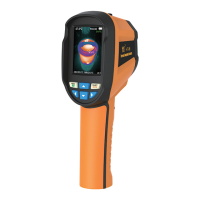

 To Next Page








