3231
6.9. Wireless WIFI on and off
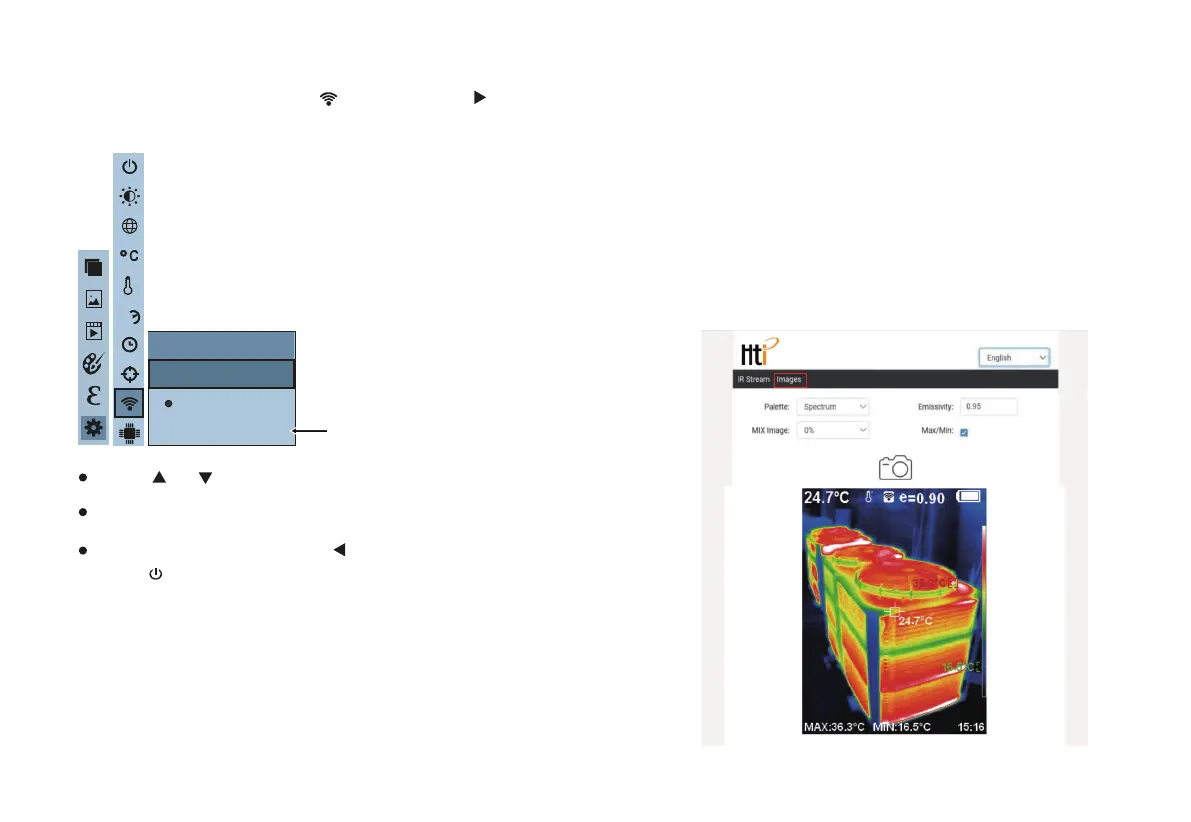
As shown in the figure, after selecting “ ” (WiFi), press the “ ”
button in the navigation key to enter the WIFI
setting.
Press “ ” /“ ” key to select “ on ” or “ off ” the option.
Then press “
SELECT/ENTER
” key to determine selection.
After the setting is completed,press “ ” key to return. Press
“
MENU/
” key to exit from the menu.
WiFi
Off
On
L
H
WIFI
SN:Thermal-0000
After turning on WIFI, use the mobile device to search for WIFI, the WIFI
name can be found in the local menu (as shown above); access the
device through the IP address 192.168.230.1.
In the mobile device, you can set the color palette, fusion, emissivity,
maximum/minimum value, language conversion, and then it can be
synchronized to the machine, and the settings on the machine can also be
synchronized to the mobile device (Note: If not converted, the refresh on
the device).
Click to take a photo on the mobile device, and the image will be saved on
the machine synchronously, as shown in the figure below.
Image view: click "Image" in the mobile device to enter the image list, and
click "Infrared video streaming" to return to the video streaming page.
24h


 To Next Page