2827
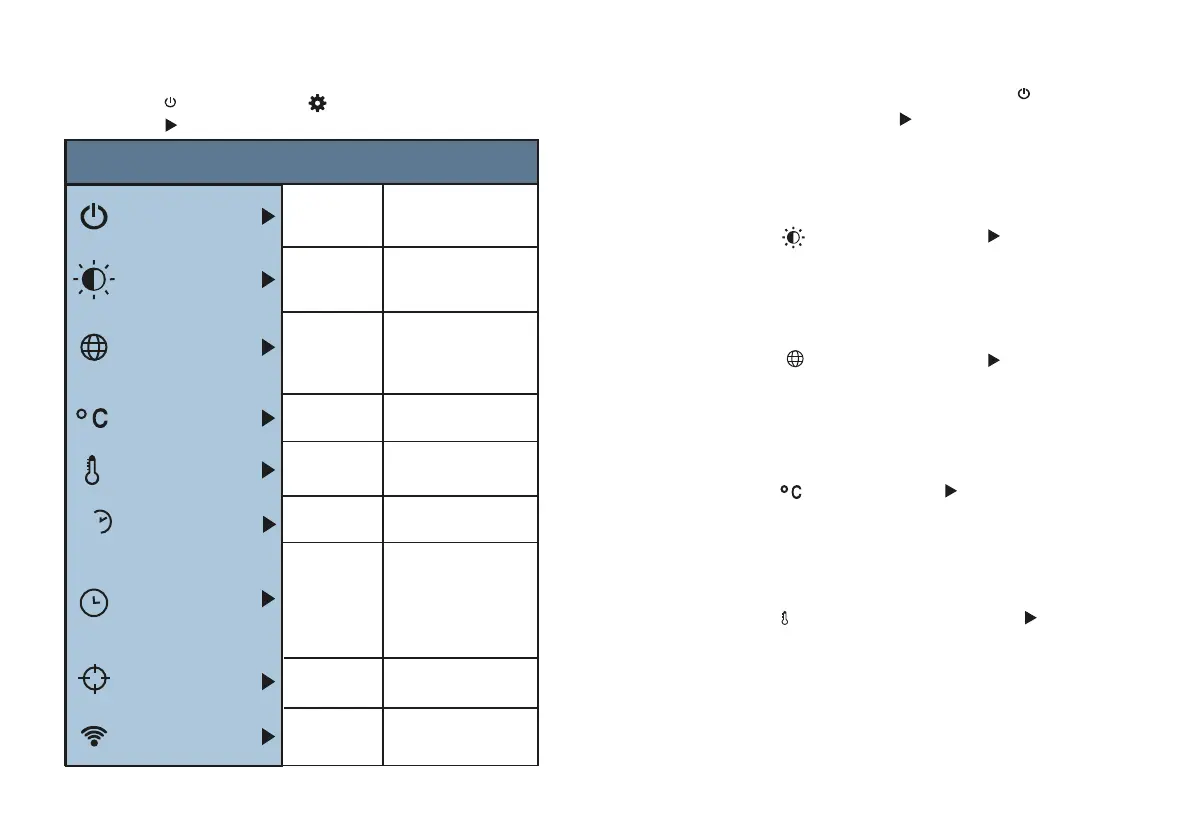
After selecting “ ” (unit), press the “ ” key in the navigation
key to enter the temperature unit setting. Can be set to Celsius or
Fahrenheit.
6.1. Auto Shutdown Setting
6.2. Intensity Settings
After entering the "Settings" sub-menu, select "
MENU/
" (automatic
shutdown), press navigationThe “ ” key in the button enters the auto
power off setting. Can be set to not automatically shut down or 5 points
the clock is turned off or turned off in 20 minutes.
After selecting “ ” (brightness), press the “ ” key in the
navigation key to enter the brightness setting. Can be set to low or medium
or bright.
6.3. Language Settings
After selecting " " (language), press the " " key in the
navigation key to enter the language setting.
Available in 4 languages: English, Chinese, Italian, German.
6.4. Unit Setting
6. Introduction to “Setting” Sub-menu
Press “
MENU/
” key to select the “ ”(setting) option in the main
menu. Press “ ” key again to enter the “setting” sub-menu.
After selecting
“ ”
(temperature range), press the
“ ”
key in the
navigation keys to enter the temperature range setting. Can be set to low
temperature (-20°C to 120°C) or high temperature (120°C to 550°C).
6.5. Tempertature Range Setting
L
H
WiFi
Settings
Auto shutdown
Auto
shutdown
Intensity
Language
Unit
Time Format
Year
Month
Day
Hour
Minute
Second
Set time
Spot
Off
On
24 hour
AM/PM
English
Chinese
Italian
German
Celsius
Fahrenheit
NO
5min
20min
Low
Medium
Hight
Intensity
Language
Unit
Temperature range
Range
Time format
Set time
Spot
2020
10
26
02
52
03
low(-20℃~120℃)
high(120℃~550℃)
24h
L
H
WiFi
Off
On
SN:Thermal-0000


 To Next Page