l Conference controls available to non-chair sites: Request chair and Request floor
l Conference controls available to chair sites: Release Chair, In Turn, Add Site, and
Extend conference
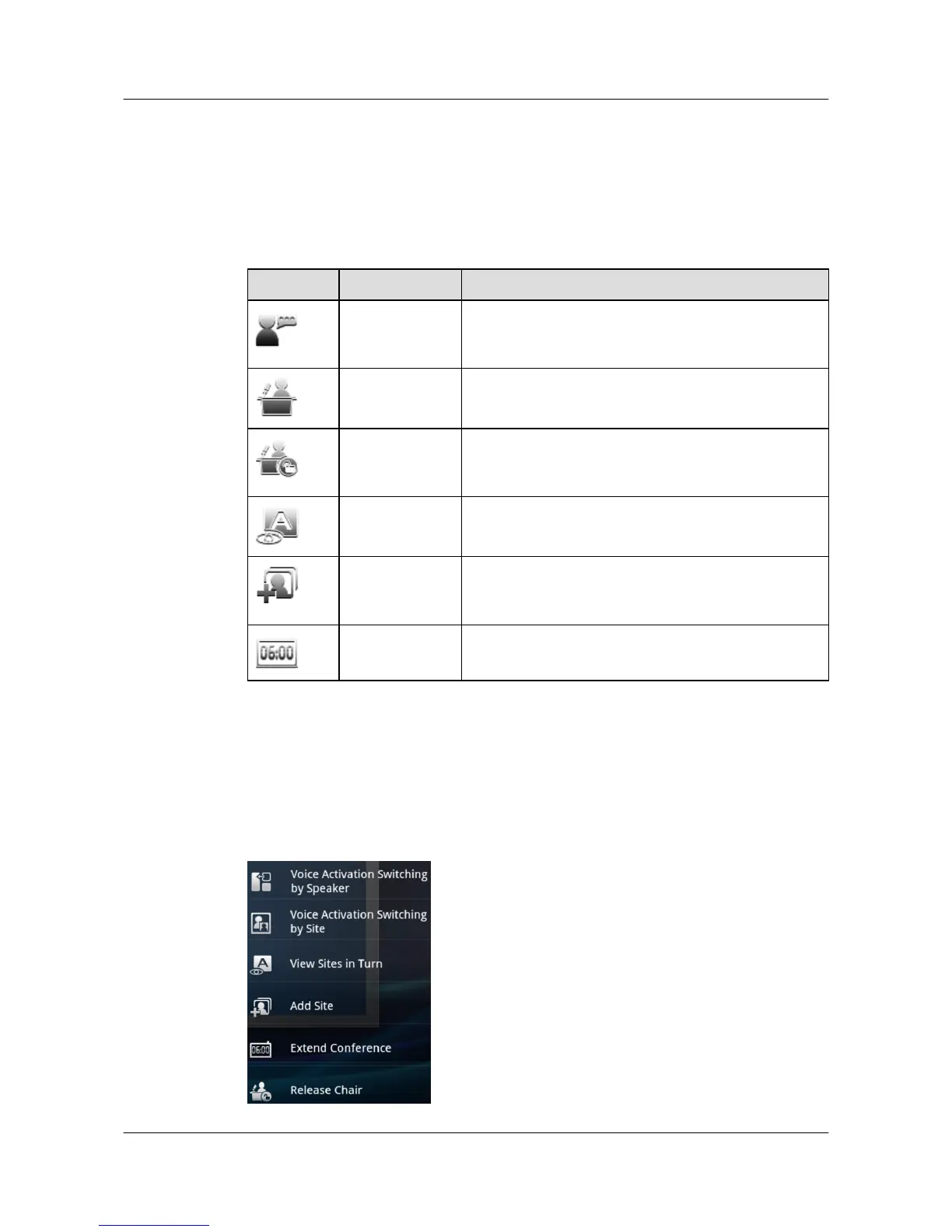
Table 3-3 describes the conference controls.
Table 3-3 Conference controls
Button Label Description
Request floor Non-chair sites use this function to request the floor from
the chair site. This function is available when the
conference has a chair site.
Request chair Non-chair sites use this function to request chair control
rights to have more conference controls.
Release Chair The chair site uses this function to release chair control
rights. Other sites can become the chair site only after the
chair control rights are released.
View Sites in
Turn
The chair site uses this function to view all sites in turn at
a predefined interval.
Add Site The chair site uses this function to add sites to an ongoing
conference. The sites join the current conference after
being added.
Extend
conference
The chair site uses this function to extend the conference.
Procedure
Step 1 Tap More to display the conference controls list on the right of the screen, as shown in Figure
3-1. For non-chair sites, only Request chair and Request floor are available.
Figure 3-1 Conference controls list
HUAWEI 9000 HD Video Terminal Touch Panel
User Guide 3 Experiencing a Conference
Issue 01 (2012-04-30) Huawei Proprietary and Confidential
Copyright © Huawei Technologies Co., Ltd.
14


 To Next Page