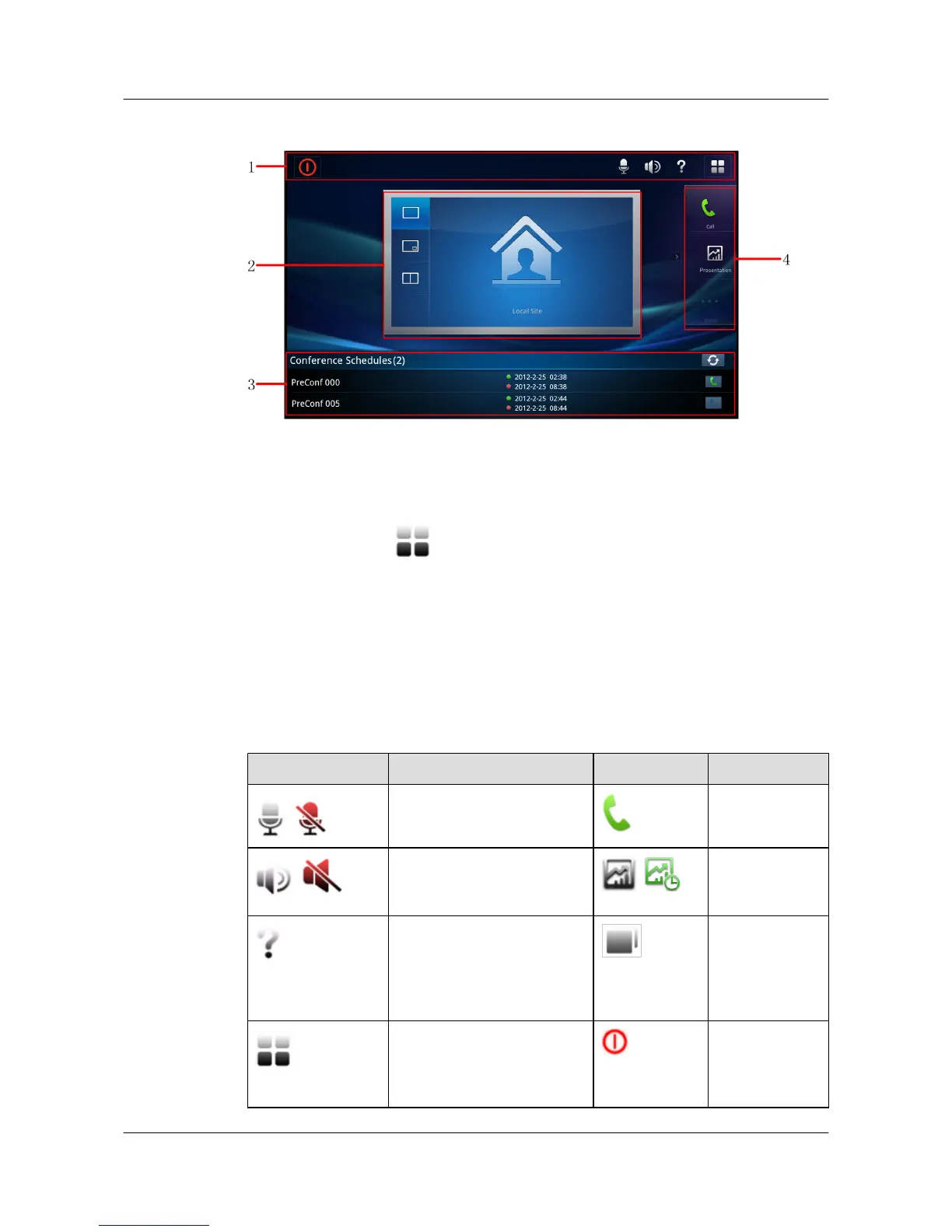
Figure 2-2 Huawei telepresence home screen
1. Task bar 2. Screen layout
control area
3. Conference Schedules
list 4. Shortcut bar
Change the connection settings, and you can connect the touch panel to another terminal. To
change the settings, tap
in the task bar and choose Settings > Advanced Settings >
Connection Settings.
2.5 Home Screen Buttons
The touch panel provides an intuitive user interface.
Table 2-2 describes the buttons on the touch panel home screen.
Table 2-2 Home screen buttons
Button Description Button Description
/
Mutes or unmutes the local
microphone.
Displays the call
screen.
/
Adjusts the local speaker
volume.
/
Starts or stops
sharing a
presentation.
Displays the help screen, from
which you can call the
administrator or access help
documents.
Displays or hides
the list of active
tasks, such as
ongoing voice
calls.
Displays the main menu. Powers the
terminal off or
puts the system
to sleep.
HUAWEI 9000 HD Video Terminal Touch Panel
User Guide 2 Using the Touch Panel
Issue 01 (2012-04-30) Huawei Proprietary and Confidential
Copyright © Huawei Technologies Co., Ltd.
5


 To Next Page