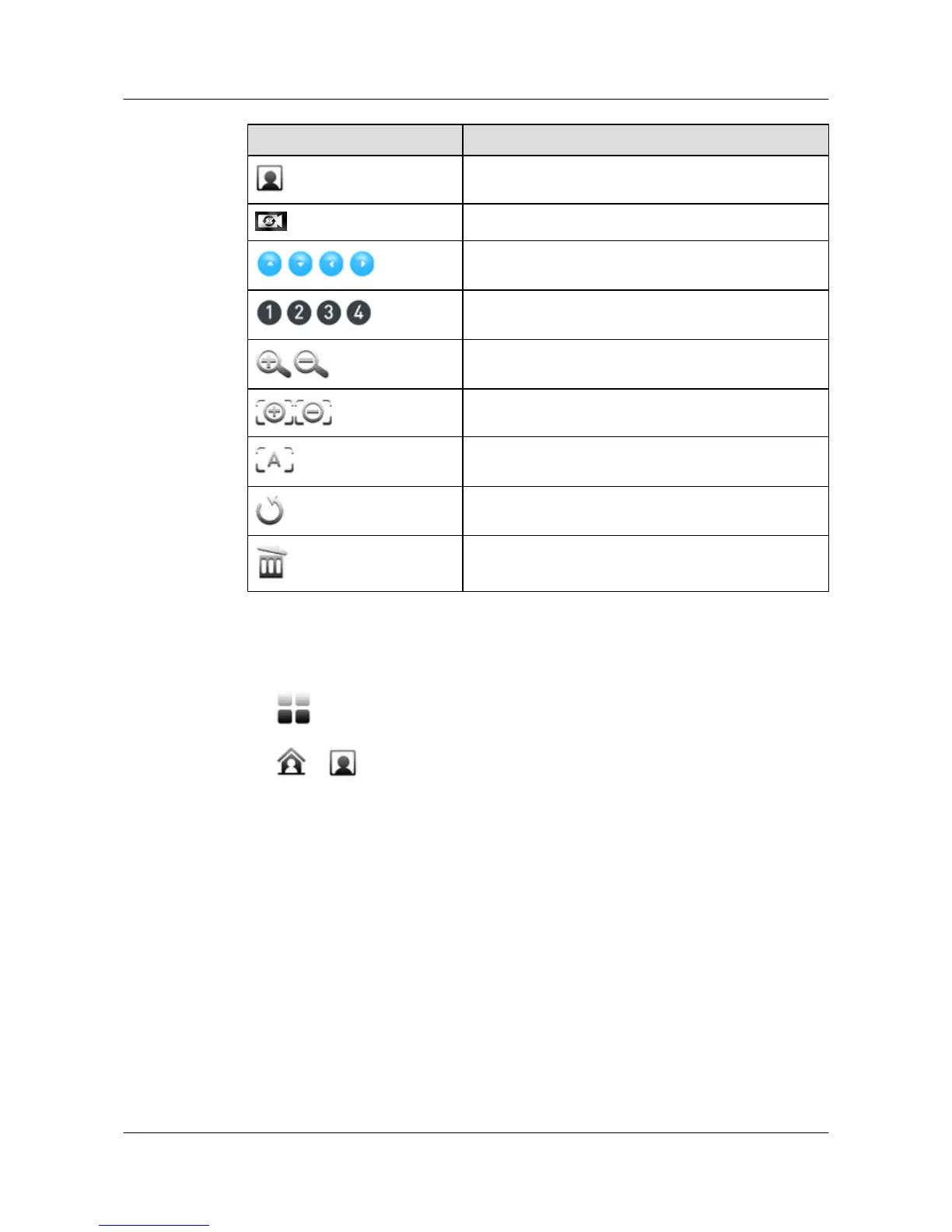
Button Description
Select the remote camera.
select video input sources.
Pans or tilts the camera.
Camera presets. You can save 30 presets for the local
camera and six presets for a remote camera.
Zooms video images in or out.
Manually adjusts the focal length.
Enables the camera to automatically adjust the focal
length.
Undoes the last operation.
Deletes the current camera preset.
Procedure
Step 1 Tap
in the task bar to display the main menu and tap Control Camera.
Step 2 Tap
or to select the local or remote camera.
Step 3 Tap the buttons described in Table 4-1 to control the camera.
----End
4.3 Saving a Camera Preset
You can move a camera to a desired position and save the settings as a camera preset.
Context
Each camera preset stores the pan, tilt, and zoom settings of the camera. You can set these presets
in advance.
For details about how to move a camera to a desired position, see 4.2 Selecting and Controlling
a Camera.
HUAWEI 9000 HD Video Terminal Touch Panel
User Guide 4 Controlling What You See
Issue 01 (2012-04-30) Huawei Proprietary and Confidential
Copyright © Huawei Technologies Co., Ltd.
22


 To Next Page