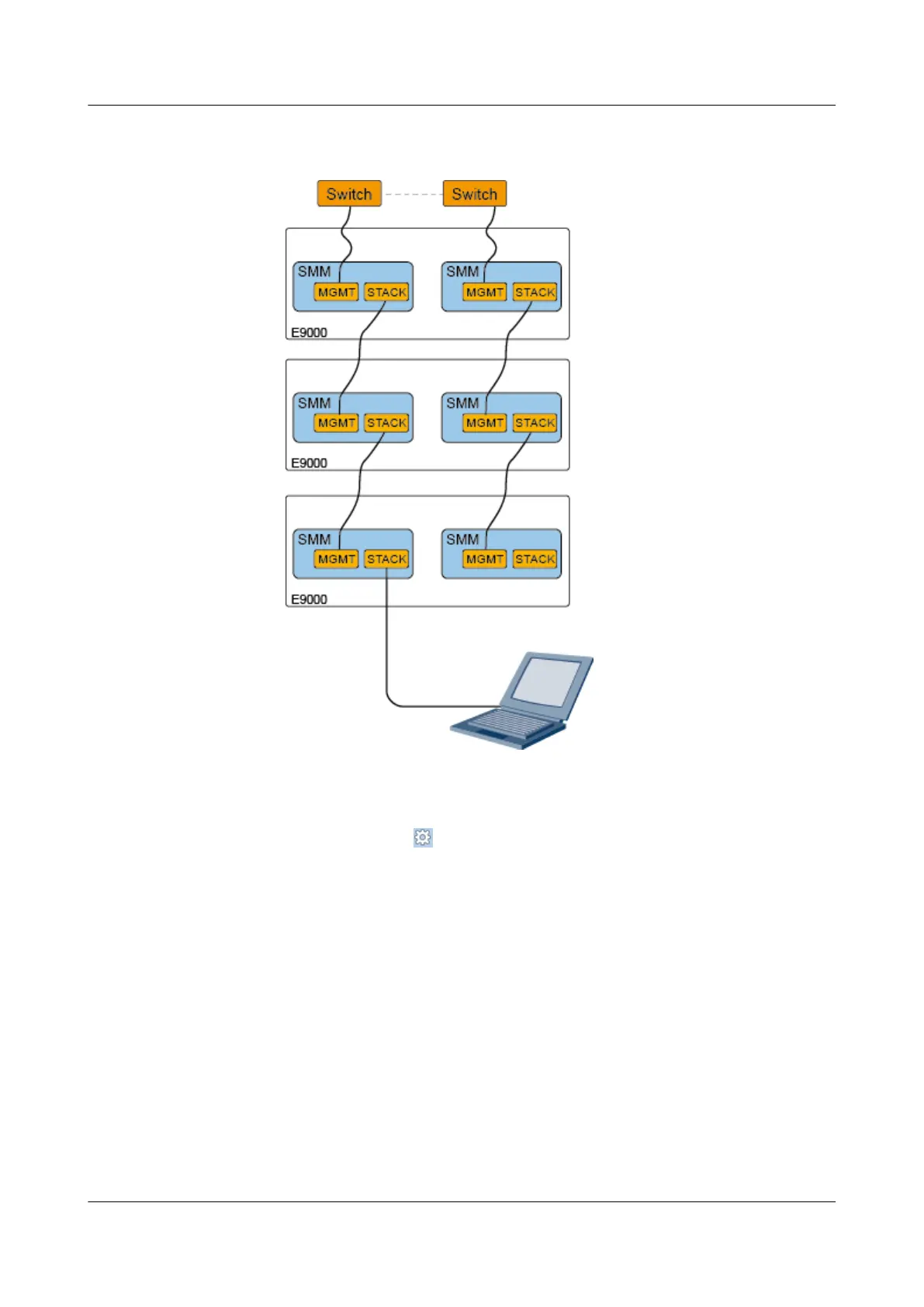
Figure 6-7 Connection between the local PC and an idle STACK port on an
MM910 stacked
Step 2 Set an IP address and a subnet mask or add route information for the PC, and ensure that the
PC can properly communicate with the MM910.
Step 3 Open Internet Explorer, click
and choose Internet Options.
The Internet Options dialog box is displayed.
Step 4 Choose Connections and click LAN Settings.
The LAN Settings dialog box is displayed.
Step 5 In the Proxy server group box, deselect Use a proxy server for your LAN and click OK.
The LAN Settings dialog box is closed.
Step 6 Click OK.
The Internet Options dialog box is closed.
Step 7 Open Internet Explorer again, enter https://MM910 floating IP address, for example https://
192.168.2.3, in the address box, and press Enter.
CX320 Switch Module
User Guide
6 Common Operations
Issue 09 (2019-08-02) Copyright © Huawei Technologies Co., Ltd. 95



 To Next Page