ESXi
Step 1 Copy host_okc.sh from /vmware in the package to /scratch/hio/.
Step 2 Log in to the OS as an administrator or a member in the administrator group.
Step 3 Run the sh /scratch/hio/host_okc.sh command.
Step 4 Obtain all log files from the /scratch/hio/okc directory.
Step 5 (Optional) Delete the log file after use to free disk space.
----End
5.8 Securely Erasing SSD Data
Operation Scenario
Collect SSD logs when maintaining SSD devices.
Preparations
Before performing operations, stop all I/O services of the SSD and perform the following:
l For Linux OSs, unmount all logical disks.
l For ESXi OSs, delete all partitions of all logical disks.
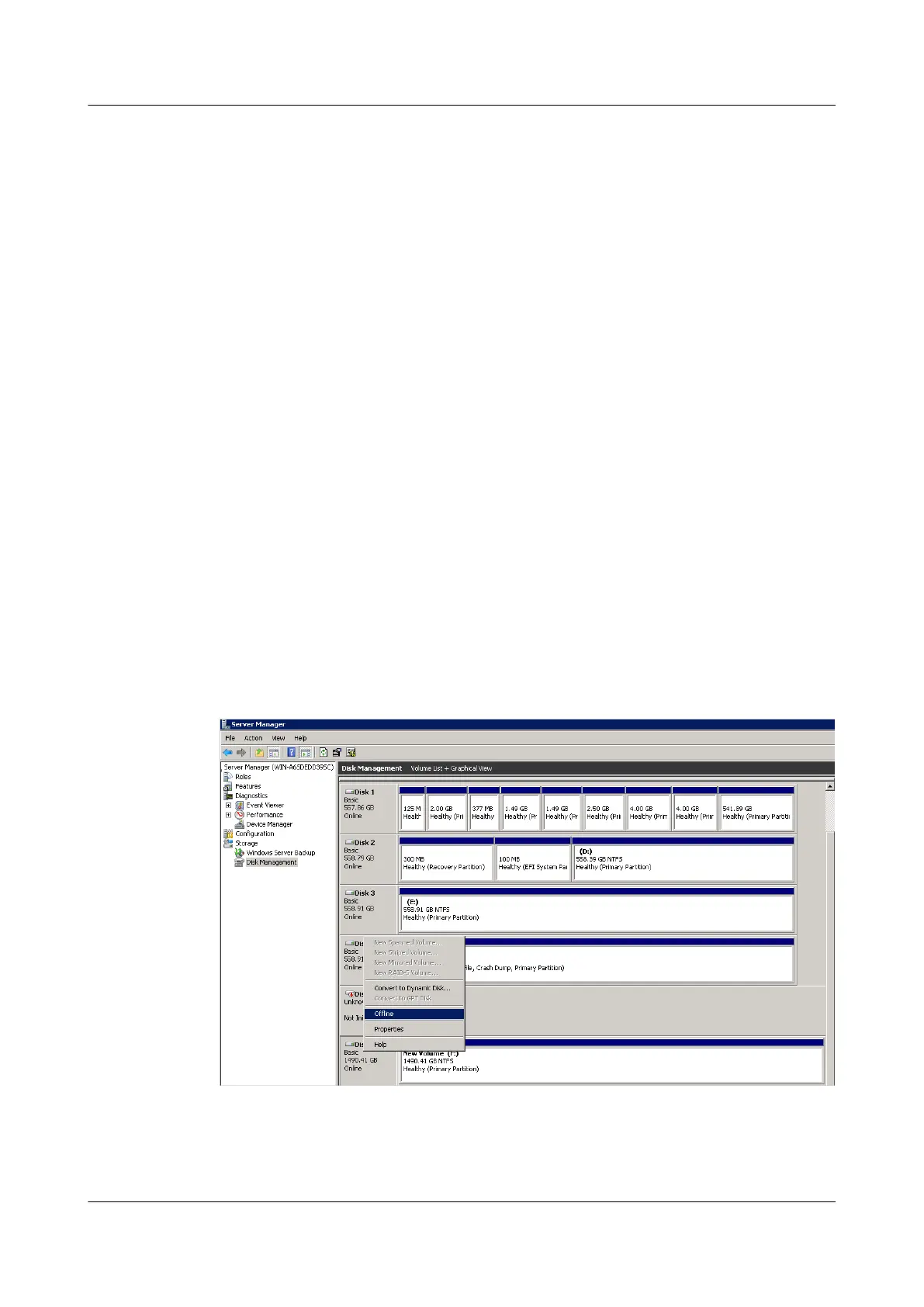
l For Windows OSs, make all logical disks offline, as shown in Figure 5-5.
Figure 5-5 Making all logical disks offline
Procedure
Step 1 Log in to the OS as an administrator or a member in the administrator group.
ES3000 V3 NVMe PCIe SSD
User Guide
5 Maintenance and Upgrade
Issue 20 (2019-02-27) Copyright © Huawei Technologies Co., Ltd. 80








 To Next Page