EasyManua.ls Logo

Huawei SUN2000-8K-LC0 - User Manual

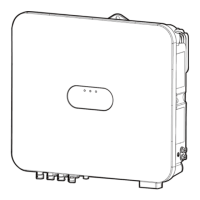
Huawei SUN2000-8K-LC0
140 pages
Print Icon
To Next Page IconTo Next Page
Loading...
SUN2000-(8K, 10K)-LC0 Series
User Manual
Issue 01
Date 2023-09-15
HUAWEI DIGITAL POWER TECHNOLOGIES CO., LTD.

Table of Contents

Other manuals for Huawei SUN2000-8K-LC0

Questions and Answers

  • J
    Jennifer JohnsonNov 25, 2025
    Why does my Huawei Network Hardware show Grid Undervoltage?
    • M
      mwilliamsNov 25, 2025
      If your Huawei Network Hardware displays a Grid Undervoltage error, it means the grid voltage is either below the lower threshold or the low voltage duration has exceeded the limit specified by low voltage ride-through (LVRT). If this happens occasionally, it may be due to a temporary issue with the power grid, and the device should automatically recover. If it happens frequently, check if the power grid voltage is within the allowed range and contact the local power operator if it is not. If the voltage is within the allowed range, you can modify the grid undervoltage protection threshold via the mobile app or network management system (NMS), but only with the consent of the local power operator. Also, check the connection between the AC switch and the output power cable if the problem pe...
  • C
    Christopher SpencerAug 23, 2025
    How to fix Huawei Network Hardware String Reversed error?
    • S
      Shannon ChavezAug 25, 2025
      If your Huawei Network Hardware displays a String Reversed error, first check if the PV string is connected with reverse polarity. If it is, wait for the PV string current to drop below 0.5 A, then set the DC SWITCH to OFF and correct the PV string polarity. If the problem continues, try resetting the device using the local maintenance app or the WebUI of the upper-layer controller. Alternatively, power down the device by turning off both the AC and DC switches for 5 minutes, and then turn them back on.
  • S
    Samuel BrownAug 25, 2025
    What to do if my Huawei Network Hardware has a Grid Overvoltage?
    • T
      Theresa HillAug 26, 2025
      If your Huawei Network Hardware reports a Grid Overvoltage, there are a few things you can check. If the alarm appears only occasionally, it could be due to a temporary issue with the power grid, and the device should automatically recover when the grid returns to normal. However, if the alarm is frequent, verify that the power grid voltage is within the acceptable range; if it's not, contact your local power operator. If the voltage is within range, you can adjust the grid overvoltage protection threshold using the mobile app or network management system (NMS), but only with the consent of the local power operator. Also, check for high peak voltages on the power grid. If the problem persists, contact your power operator.
  • K
    Kelsey GardnerAug 27, 2025
    What causes Huawei Network Hardware to have String Voltage High?
    • D
      dmccarthyAug 27, 2025
      A String Voltage High error on your Huawei Network Hardware usually means that the PV array is not configured correctly. Too many PV modules might be connected in series in the PV string, causing the open-circuit voltage to exceed the device's maximum operating voltage. To fix this, check the serial connection configuration of the PV string to ensure the PV string open-circuit voltage does not exceed the device's maximum operating voltage. Once the PV array configuration is corrected, the alarm should disappear.
  • D
    Diana PalmerAug 28, 2025
    How to troubleshoot Huawei Network Hardware AC Overcurrent?
    • P
      Paul RussellAug 29, 2025
      If your Huawei Network Hardware is showing an AC Overcurrent error, it indicates a dramatic voltage drop or a short circuit in the grid. The device is designed to detect and rectify external working conditions in real time, so it should automatically recover once the fault is cleared. However, if the alarm occurs frequently and affects the power plant's energy yield, check for a short circuit at the output. If the problem persists, contact your dealer or technical support.
  • K
    Kimberly TorresSep 19, 2025
    What to do if Huawei Network Hardware shows Grid-tied/Off-grid Controller Abnormal?
    • F
      Francisco GonzalesSep 22, 2025
      If your Huawei Network Hardware displays a Grid-tied/Off-grid Controller Abnormal error, it means the device is failing to communicate with the Smart Backup Box. To resolve this: 1. Send a shutdown command on the app. Turn off the AC output switch, DC input switch, and battery switch. 2. Check whether the power cable and RS485 cable between the Smart Backup Box and the device are normal. 3. After 5 minutes, turn on the battery switch, AC output side, AC output switch, and DC input switch.
  • M
    Monica ChurchSep 16, 2025
    What to do if Huawei Network Hardware shows Abnormal PV Module Configuration?
    • D
      Daryl CooperSep 16, 2025
      If your Huawei Network Hardware reports an Abnormal PV Module Configuration, check whether the total number of PV modules, the number of PV modules in a string, and the number of PV strings meet the required specifications. Also, check if the PV module output is reversely connected.
  • T
    Timothy JonesSep 18, 2025
    What to do if Huawei Network Hardware shows Optimizer Fault?
    • S
      Steven PalmerSep 18, 2025
      1. View the fault details on the optimizer information page. 2. Contact your dealer or technical support to replace the optimizer.
  • P
    Patricia ConradSep 8, 2025
    What does AFCI Check Failure mean for Huawei Network Hardware?
    • M
      Mr. Thomas RosalesSep 8, 2025
      If your Huawei Network Hardware reports an AFCI Check Failure, turn off the AC output switch and DC input switch, and then turn them on again after 5 minutes. If the fault persists, contact your dealer or technical support.
  • J
    James RodriguezSep 4, 2025
    What causes Huawei Network Hardware to display Grid Underfrequency?
    • G
      griffinbarbaraSep 4, 2025
      If your Huawei Network Hardware shows a Grid Underfrequency error, it means the actual power grid frequency is lower than the standard requirement for the local power grid. If this occurs occasionally, it may be due to a temporary issue with the power grid, and the device should recover automatically. If it occurs frequently, check whether the power grid frequency is within the allowed range and contact the local power operator if it isn't. If the frequency is within range, you can modify the grid underfrequency protection threshold via the mobile app or NMS with the consent of the local power operator.

Huawei SUN2000-8K-LC0 Specifications

General IconGeneral
Rated Output Power8 kW
Max. DC Voltage1100 V
Start Voltage200 V
Max. Efficiency98.6%
European Weighted Efficiency98.3%
CoolingNatural convection
Protection DegreeIP65
Number of MPP Trackers2
Maximum Input Current per MPPT13 A
Output Frequency50 Hz / 60 Hz
Maximum Input Voltage1100 V
Max. DC Power12 kW
Max. AC Power8.8 kW
Rated AC Voltage230 V
Operating Temperature Range-25 °C to +60 °C
Rated Output Voltage230 V
Maximum Input Power12 kW

Related product manuals