Need help?
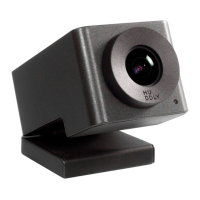
Do you have a question about the Huddly GO and is the answer not in the manual?
Guides on connecting Huddly cameras to devices, including USB 2.0 ports and troubleshooting no image issues.
Details about the Huddly App, its features, and step-by-step installation process for Windows and Mac.
Outlines initial checks for common Huddly camera issues: cables, USB ports, software updates, app errors, and VCAs.
Explains cable requirements, USB-C to USB-C compatibility, third-party cables, and how to identify USB 3.0 ports.
Covers updating Huddly software and app, checking versions, and troubleshooting common error messages.
Addresses issues with Huddly camera functionality in video client applications and ensures correct software versions.
Details steps before contacting advanced support, including essential information and Huddly Log File extraction.
 General
| USB 3.2 Gen 1 (3.1 Gen 1) Type-C ports quantity | 1 |
|---|---|
| Maximum frame rate | 30 fps |
| Supported video modes | 720p |
| Video formats supported | MPEG, YUV |
| Maximum video resolution | 1280 x 720 pixels |
| Resolution at capture speed | 1280x720@30fps |
| Supported graphics resolutions | 1280 x 720 (HD 720) |
| Product color | Gray |
| Tripod mounting supported | Yes |
| Megapixel | 16 MP |
| Sensor type | CMOS |
| Digital zoom | 4 x |
| Optical sensor size | 1/2.3 \ |
| Horizontal field of view | 120 ° |
| Field of view (FOV) angle | 150 ° |
| Input current | 0.9 A |
| DC input voltage | 5 V |
 Weight and Dimensions
| Depth | 72 mm |
|---|---|
| Width | 40 mm |
| Height | 33 mm |

 To Next Page