2.3.1.2 Mac OS X
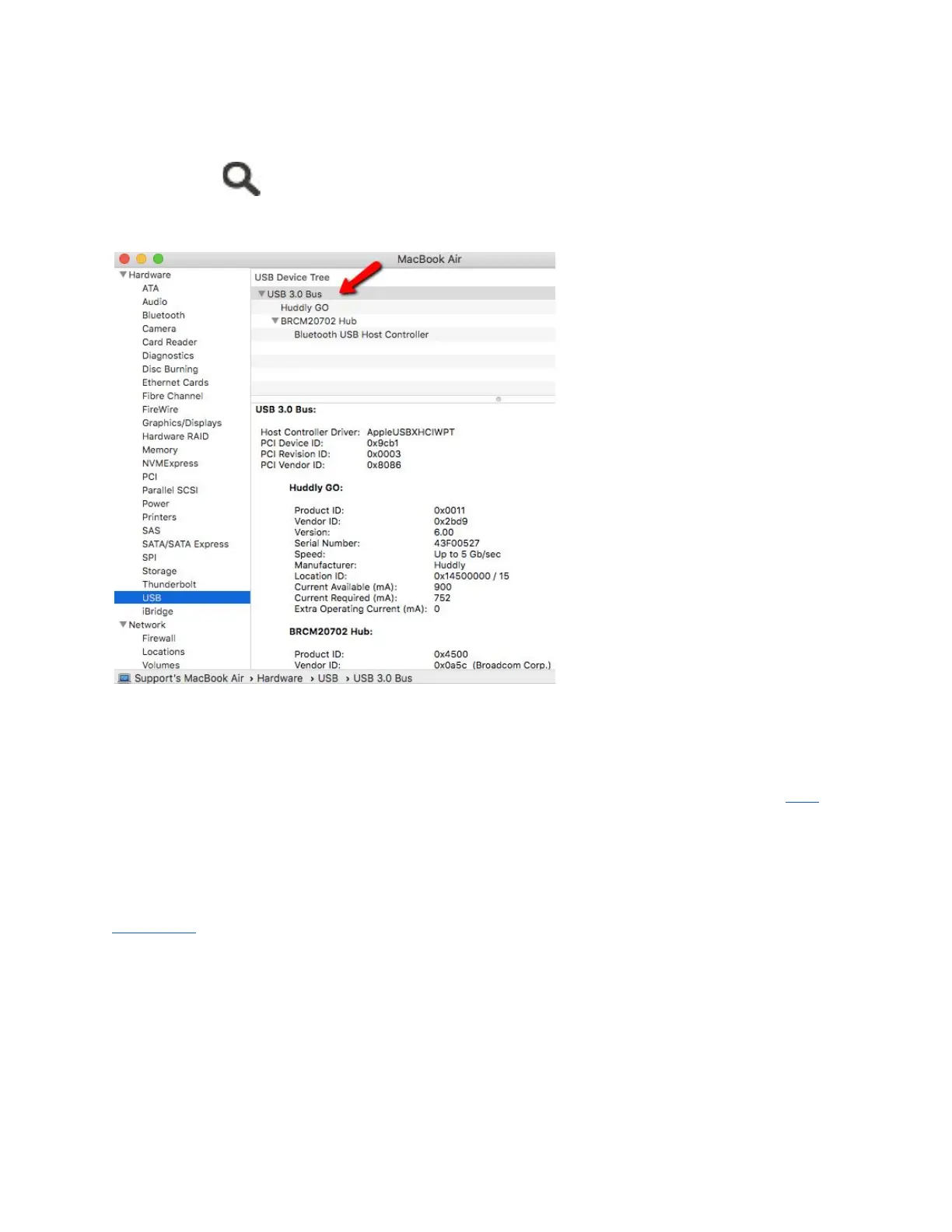
In the search option, type in System Information or System Profiler to see what type of
USB ports your MacOSX has. Refer to the image below.
Note: Having a USB 3.0 Root Hub does not guarantee that all USB ports on your computer are
USB 3.0 certified. Most computers have both USB 2.0 and USB 3.0 ports. The images above
indicates that the computer has USB 3.0. An alternative way to check is to look for a blue
(Windows only) USB port and SS mark next to it - that means it's USB 3.0 certified. Click here to
read more about connecting your camera to a USB 2.0 port.
2.3.2 Can I connect the huddly camera to a USB 3.1 certified port?
Absolutely. The main difference between the USB 3.0 and USB 3.1 is the data transfer speeds.
USB 3.0 is capable of transfer speeds up to 5Gbps, while USB 3.1 is up to 10Gbps.
USB 3.1 (known as USB 3.1 Gen 2) is backward compatible with USB 2.0 and USB 3.0
(renamed as USB 3.1 Gen 1), which means your Huddly camera will still work properly.
10


 To Next Page