EasyManua.ls Logo

Human Humalyzer 2000 - Internal Printer

Human Humalyzer 2000
60 pages
Print Icon
To Next Page IconTo Next Page
To Previous Page IconTo Previous Page
Loading...
10
Rev.
B
Internal
Printer
The
internal
printer
is a
20-column
thermal
type
device
which
prints
ASCII
characters
using
a
5
x
7
dot
matrix.
There
are
no
adjustments.
However,
a
printer
jam
can
occur
if
the
printer
paper
tears
and
becomes
lodged
in
the
printer
mechanism,
thus
preventing
the
print
head
from
moving
freely.
If
the
instrument
displays
“Printer
is
jammed!”,
or
if
the
print
head
does
not
return
to
the
home
position,
check
for
obstructions
in
the
print
head
path..
CAUTION
Do
not
apply
any
force
to
the
white
ceramic
print
head!
Do
not
scratch
the
platen
or
pry
with
sharp
objects.
This
will
destroy
the
printer!
Carefully
remove
any
paper
or
debris
with
a
pair
of
tweezers.
Turn
off
the
power
switch,
wait
5
seconds,
then
turn
on
the
power
switch.
The
print
head
should
move
to
the
right
side
and
then
return
to
home
position
at
the
left.
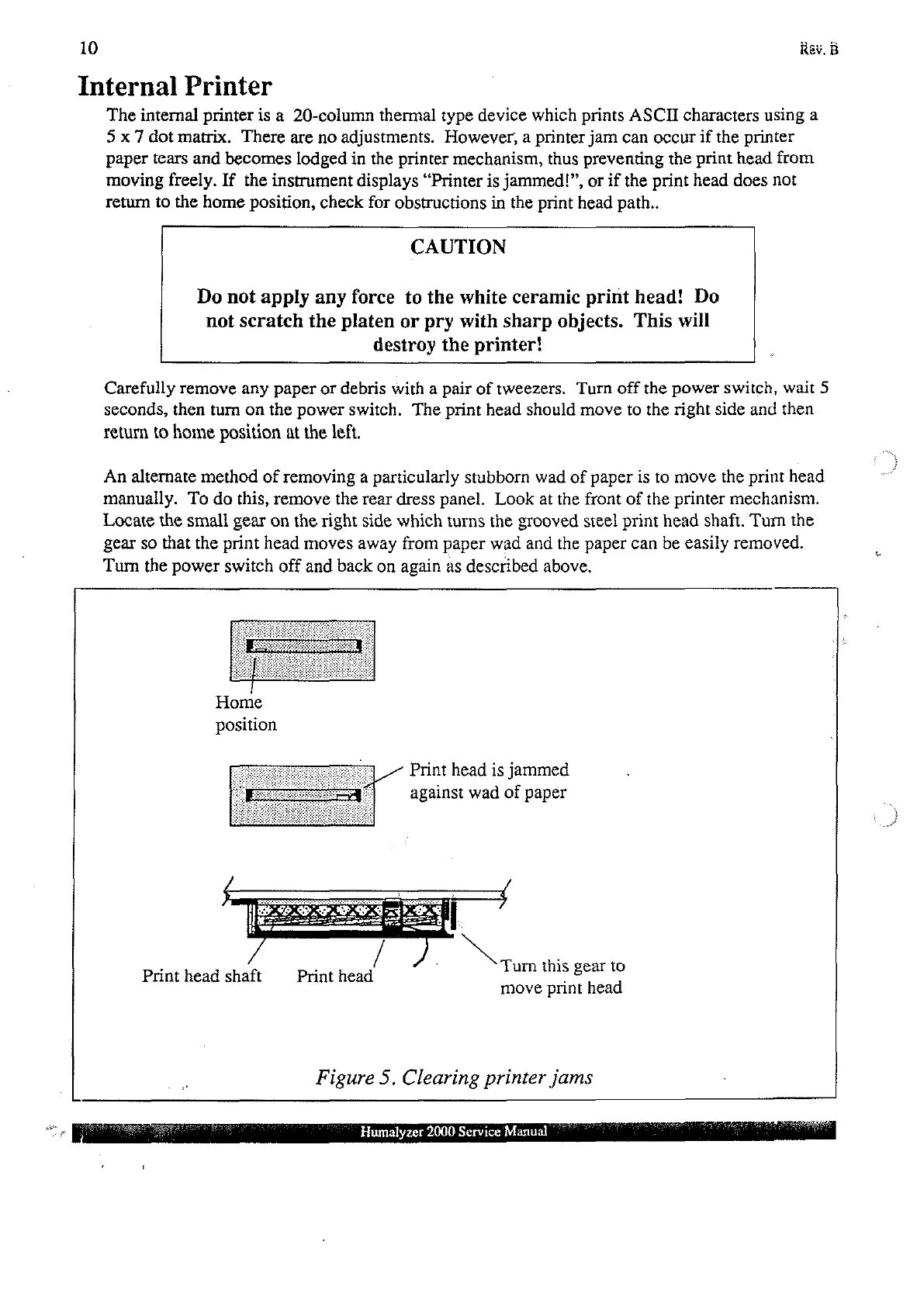
An
alternate
method
of
removing
a
particularly
stubborn
wad
of
paper
is
to
move
the
print
head
manually.
To
do
this,
remove
the
rear
dress
panel.
Look
at
the
front
of
the
printer
mechanism.
Locate
the
small
gear
on
the
right
side
which
turns
the
grooved
steel
print
head
shaft.
Turn
the
gear
so
that
the
print
head
moves
away
from
paper
wad
and
the
paper
can
be
easily
removed.
Turn
the
power
switch
off
and
back
on
again
as
described
above.
İ
Home
position
|
Print
head
is
jammed
against
wad
of
paper
Turn
this
gear
to
Print
head
shaft Print
head
.
move
print
head
Figure
5.
Clearing
printer
jams
Humalyzer
2000
Service
Manual