16
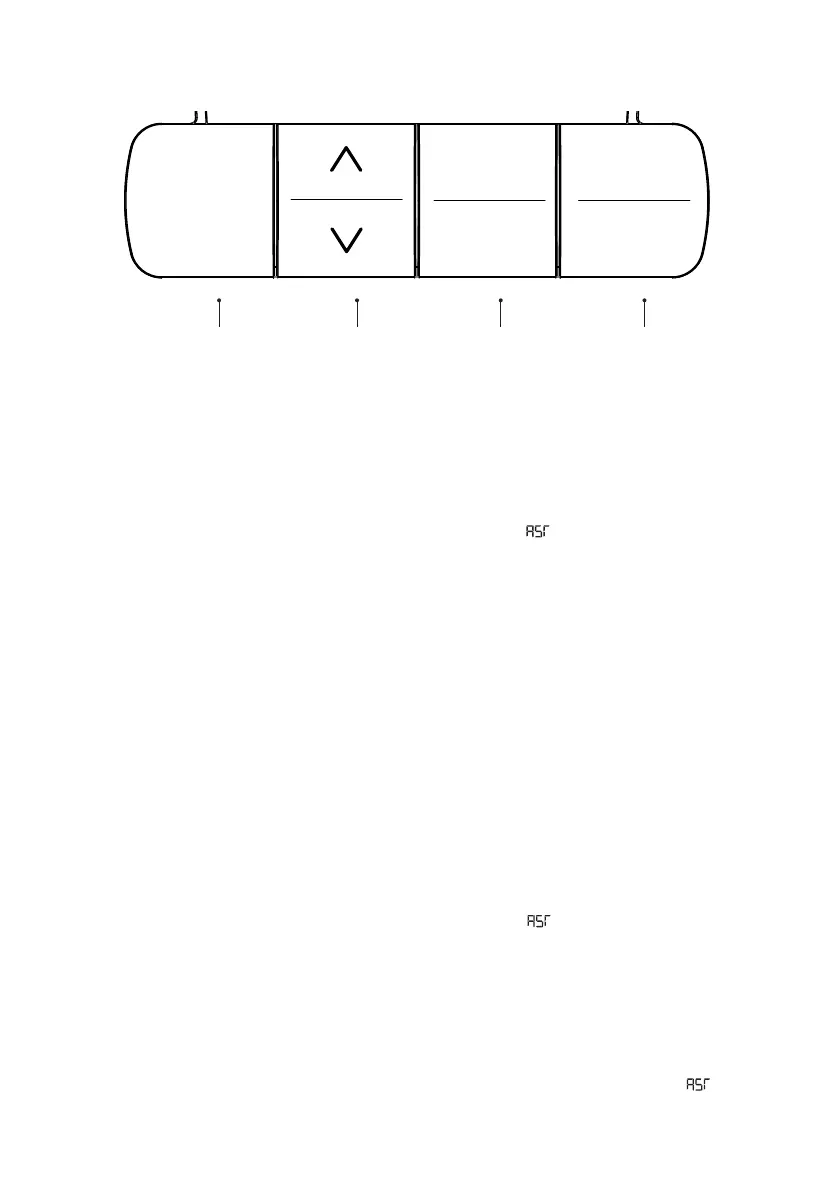
Hand Switch
Initial Setup / Reset
IMPORTANT: You must RESET the desk before use�
1� Press the DOWN button, moving the desk to its lowest position, then release�
2� Hold the DOWN button until again, the LED display reads “ “�
3� Hold the DOWN button while the desk clicks lower, slightly rises and stops�
Your desk is now ready to use� The desk can be adjusted by pressing and holding either the UP/DOWN
button until the desired height is reached�
Setting Presets
Use the up/down buttons to nd a desired height, then press “M” followed by a number 1 - 3, to set
the three presets�
CAUTION: Once a preset button is pushed, the desk will move to the programmed height�
Programming
Changing Units of Measurement
1� Press the DOWN button, moving the desk to its lowest position, then release�
2� Hold the DOWN button until again, the LED display reads “ “�
3� Hold the 2 button (about 5 seconds) to switch settings� Repeat until desired setting is
displayed�
10�3 = Metric (cm)
10�4 = Imperial (IN)
4� Once the chosen setting is displayed, wait 5 seconds for the display to return to “ “�
29.8
1
2
3
M
LED DISPLAY UP/DOWN
PRESETS
MEMORY


 To Next Page