40
Cancel navigation: From the Navigation X-Press™ menu, select Cancel
Navigation and press the RIGHT Cursor key. Canceling navigation removes the
route and any waypoints created using the GOTO key, but does not remove any
saved routes from memory. You will be prompted to save the current route
when you cancel navigation.
Add a Waypoint Target or Trolling Grid
Add or Remove a Waypoint Target: From the Waypoints submenu, select
Target and press the RIGHT Cursor key to display a list of waypoints. Select the
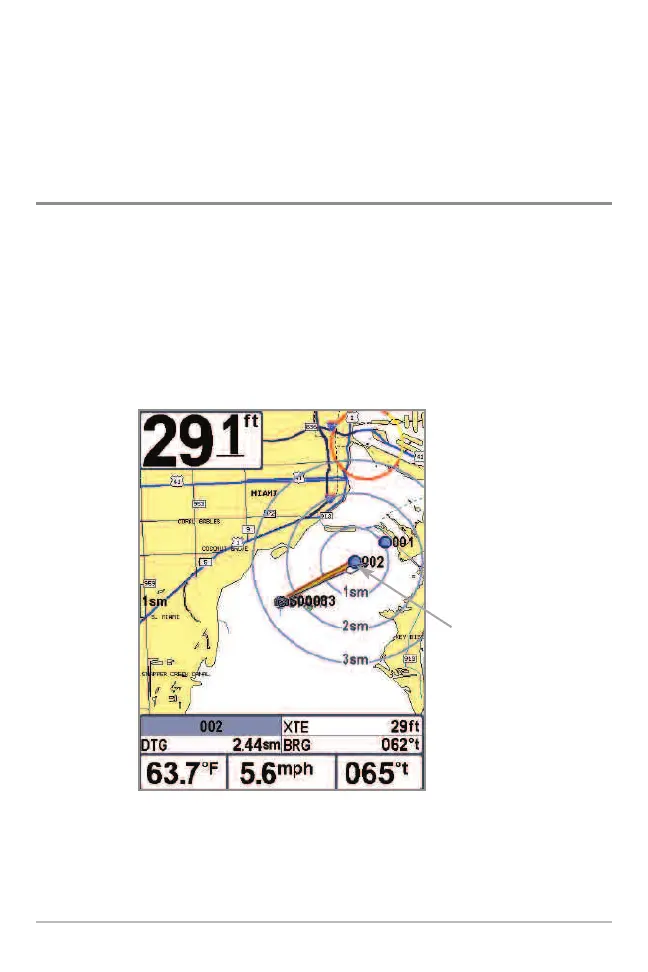
waypoint you want to target. A target consisting of concentric circles centered
on the selected waypoint will appear on all of the navigation views; the target
shows various distance ranges from the targeted waypoint. To remove the
target, choose Remove Target from the Navigation X-Press™ menu.
Chart View with Target
Waypoint
Target














 To Next Page