12
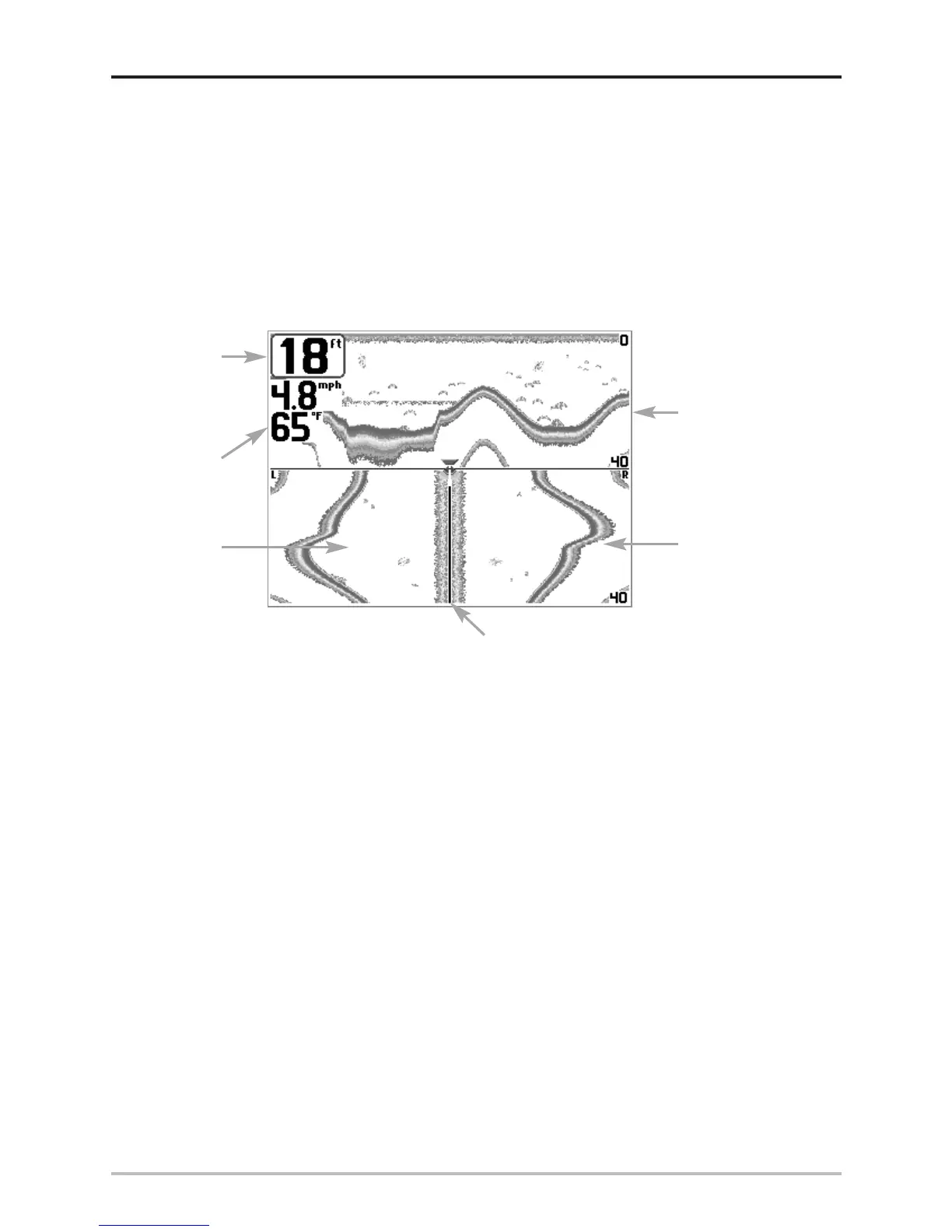
Side Beam View
Side Beam View is only available if you have connected a QuadraBeam
TM
transducer accessory and
when Transducer Select is set to QuadraBeam™ (see Sonar Menu Tab: Transducer Select). The
QuadraBeam™ transducer requires a separate purchase. This view shows sonar information from
both the left and right 90° 455 kHz beams and the 200 kHz down-looking beam in one view. The
top portion of the display presents a historical log of sonar returns from the 200 kHz down-looking
sonar. The bottom portion of the display presents a historical log of sonar returns from the 455 kHz
right- and left-looking sonar. New information appears at the top, and scrolls down the display.
The sonar information from the side-looking beams reveals bottom contour, structure and fish similar
to the down-looking beam, but the area covered is to the left and right of the area shown in the down-
looking portion, so you actually see more of the bottom. The distance covered by the right and left 90°
beams is based on the depth setting for the down-looking beam, up to a maximum of 160 feet.
Side Beam View
Depth
Temperature
Left Side 455 kHz
Sonar History
Window
Right Side 455 kHz
Sonar History
Window
200 kHz Sonar
History Window
Water Surface Line for 455 kHz
Sonar History Windows












 To Next Page