INSTALLATION
7
Mount the Installation Brackets — Inside Mount
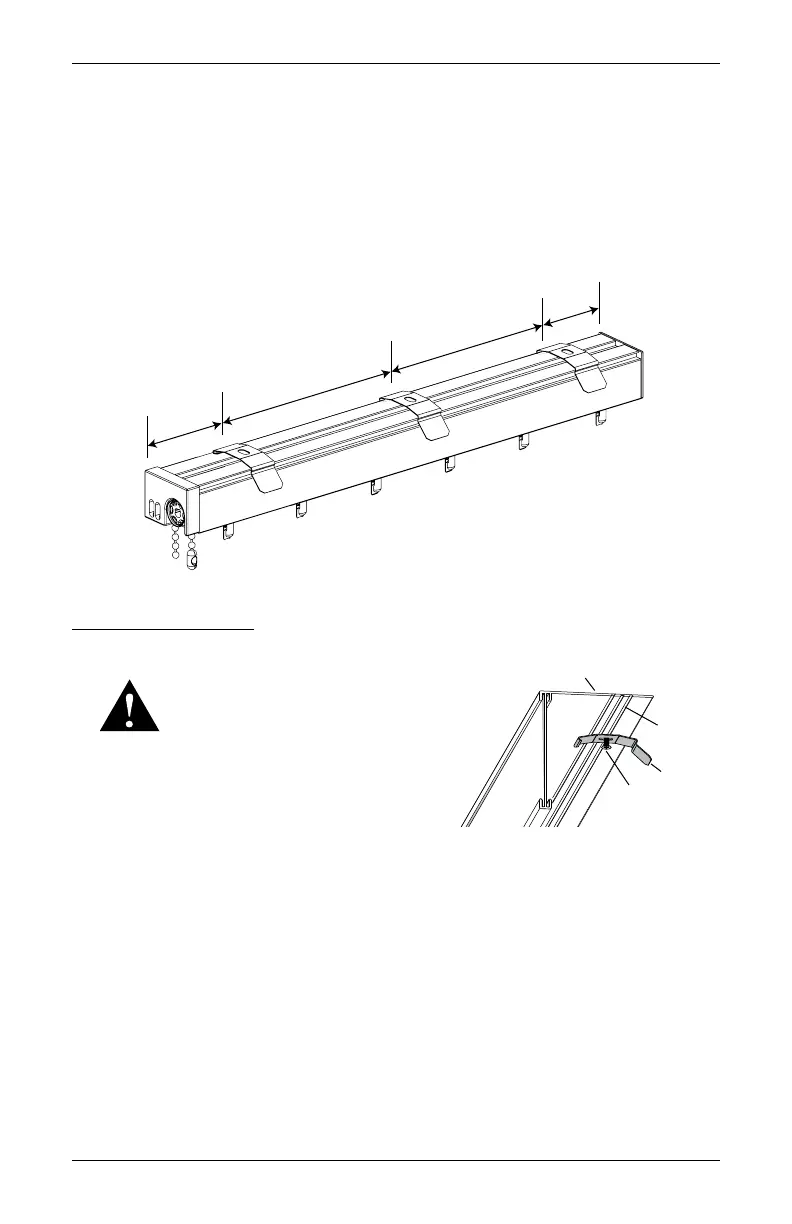
■ Mark 2" to 4" in from each jamb. Measure and mark the underside of the dust cover, if
ordered.
➤ If more than two installation brackets came with your order, space additional bracket(s)
evenly in 24" to 30" intervals between the end brackets and mark their location. Mount
into wood whenever possible.
IMPORTANT: Allow ½" clearance between vane and window.
Install Mounting Clips
■ Drill the screw holes using a
3
∕
32
" drill bit.
WARNING: Product is heavy. Mount
into wood/metal studs or into concrete
with concrete anchors. Drywall anchors
are not recommended.
➤ If you did not order a valance, drill directly into
the ceiling/head jamb.
➤ If you ordered a dust cover valance, drill through the rear groove of the dust cover
valance then into the ceiling/head jamb.
■ Attach the mounting clip using the screws provided.
➤ Hold the valance in position, the screw will go (through the valance, if ordered) into the
ceiling/head jamb.
2 to 4"
2 to 4"
30" Maximum
30" Maximum
Rear
Groove
Valance
Mounting
Screw
Clip



 To Next Page