FILE.MANAGER
SECTION
3.6
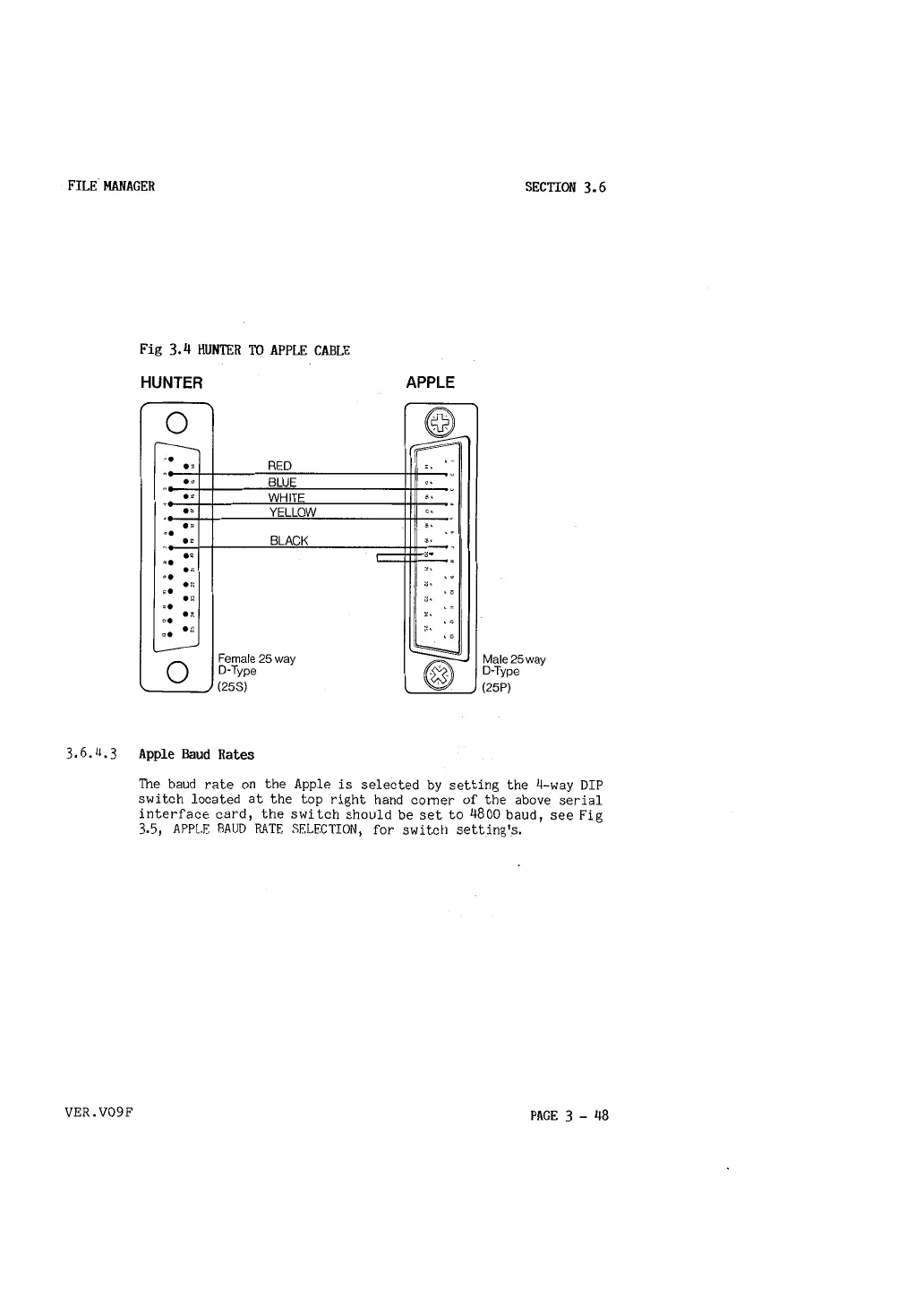
Fig 3.4 HUNTER TO APPLE CABLE
HUNTER
0
r---..______
-·
RED
.,
.
.,'.!
BLUE
'
.,
WHITE
.,
"
YELLOW
. ,
..
.,
BLACK
••
..
..
..
H
se
.,
..
.,
,.
,.
•;::
L--
Female 25 way
0
D·Type
(25S)
APPLE
@
~
•-
,.
- .
cS•
.
,.
,.
-,
, .
'°
,.
.
.-
,.., .
, .
..
I
,.
.,
, .
.a
, .
• 0
~.
• 0
~
@)
Male25way
D·Type
(25P)
3,6.4.3 Apple Baud Rates
VER.V09F
The baud rate on the Apple is selected by setting the 4-way DIP
switch located at the top right hand comer of the above serial
interface card, the switch should be set to 4800 baud, see Fig
3.5, APPLE BAUD RATE SELECTION, for switch setting's.
PAGE 3 - 48



 To Next Page