P/N 3110586_A
HUSSMANN CORPORATION • BRIDGETON, MO 63044-2483 U.S.A.
ISMGG2DAA Merchandisers
REPLACING EVAPORATOR FAN
MOTORS AND BLADES
Should it ever be necessary to service or
replace the fan motors or blades be certain
that the fan blades are reinstalled correctly.
the blAdes must be instAlled with rAised
embossing (pArt number on plAstic
blAdes) positioned As indicAted on the
pArts list.
For access to these fans:
1. Remove product and place in a refrigerated
area. Turn off power to the merchandiser.
2. Make sure there is no voltage in the
refrigerator. Remove front grille to have
acess to the machine compartment.
3. Remove condensing unit screws.
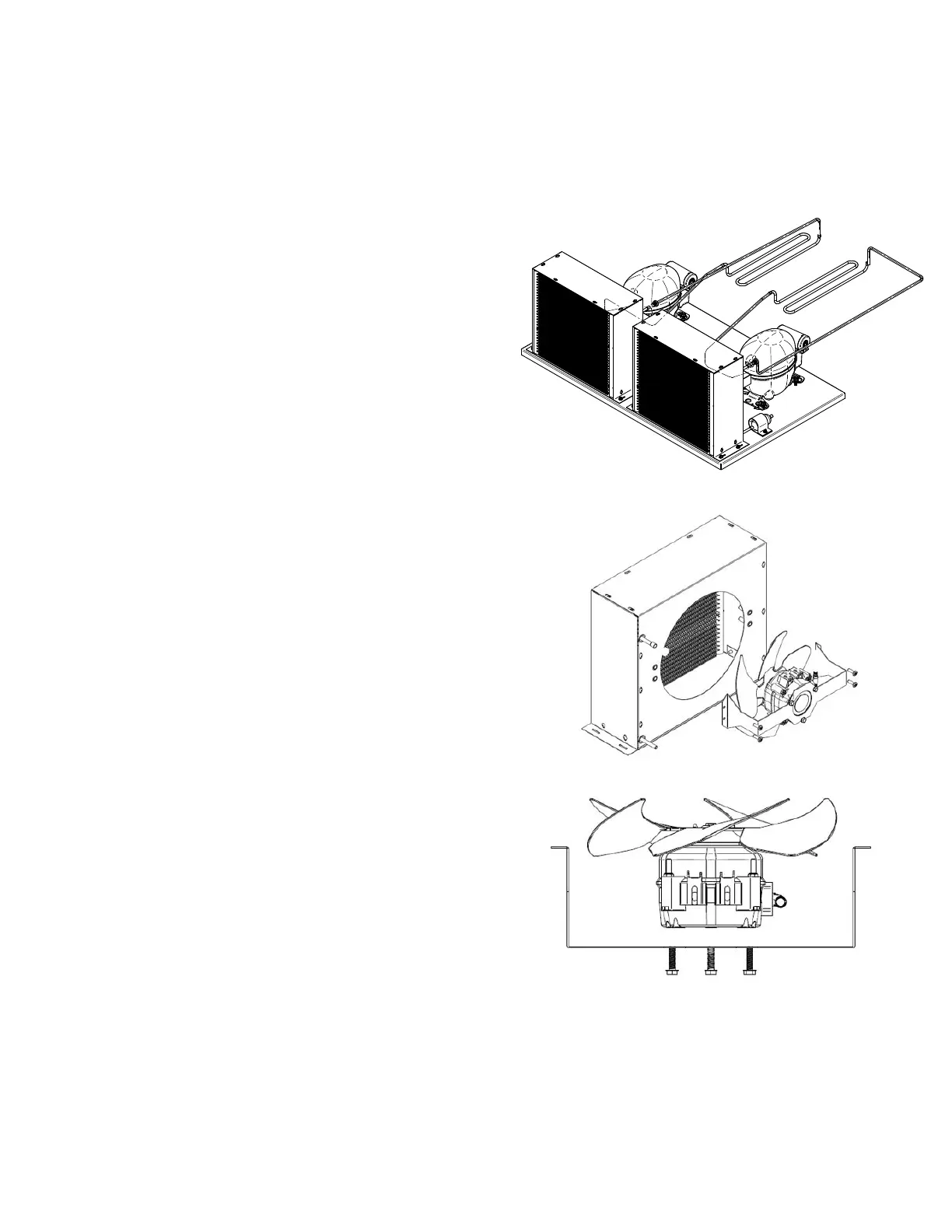
4. Slide out the condensing unit (Fig A). Be
careful using the condesing unit plate to pull
out the condensing unit. Make sure not to
stress or interfere with other parts.
5. Disconnect condenser motor harness.
6. Release screws to remove condenser fan
assembly (Fig. B).
7. Release motor screws to get to motor / blade
assembly (Fig. C).
8. Change the failed part.
9. If the only damaged part is the motor,
remove blade.
10. Reverse the process and make sure
everything is in place.
SERVICE
Figure A. Condensing Unit Screws
Figure B. Point to pull out condensing unit
Figure C. Condenser fan motor screws



 To Next Page