STE2
11
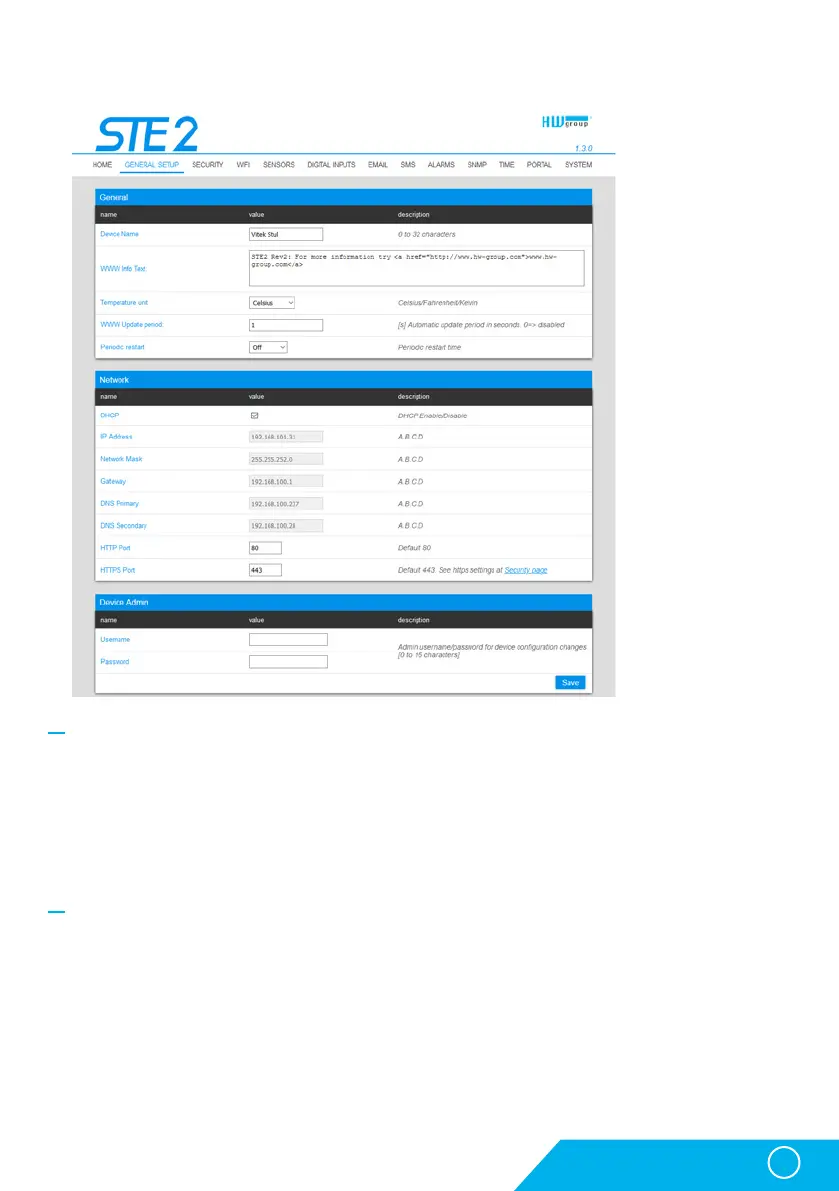
General Setup tab
General section
• Device Name – Device name (STE2), allow you to distinguish individual the device in the network.
• WWW Info Text – Text at the foot of the website.
• Temperature Unit – Unit for displaying temperature. You can choose between Celsius / Fahrenheit /
Kelvin. The Safe Range values will automatically be converted based on this option.
• Periodic Restart – Function to improve device stability in exposed networks allowing regular
automatic restart of the device.
Network section
Only the cable connection parameters (RJ-45) are set here. Wireless connection parameters
are set in the WiFi tab.
• DHCP – Permits the function of IP address setting by the DHCP server, if available. Enabling or
disabling DHCP depends on the needs of the user and network administrator.
• IP Address – IP address of the device, allocated by the network administrator.
• Network Mask – Network mask, allocated by the network administrator.
• Gateway – IP address of the default gateway, allocated by the network administrator.
• DNS Primary / DNS Secondary – IP address of the DNS server, allocated by the network administrator.
WWW interface



 To Next Page