HW group
16
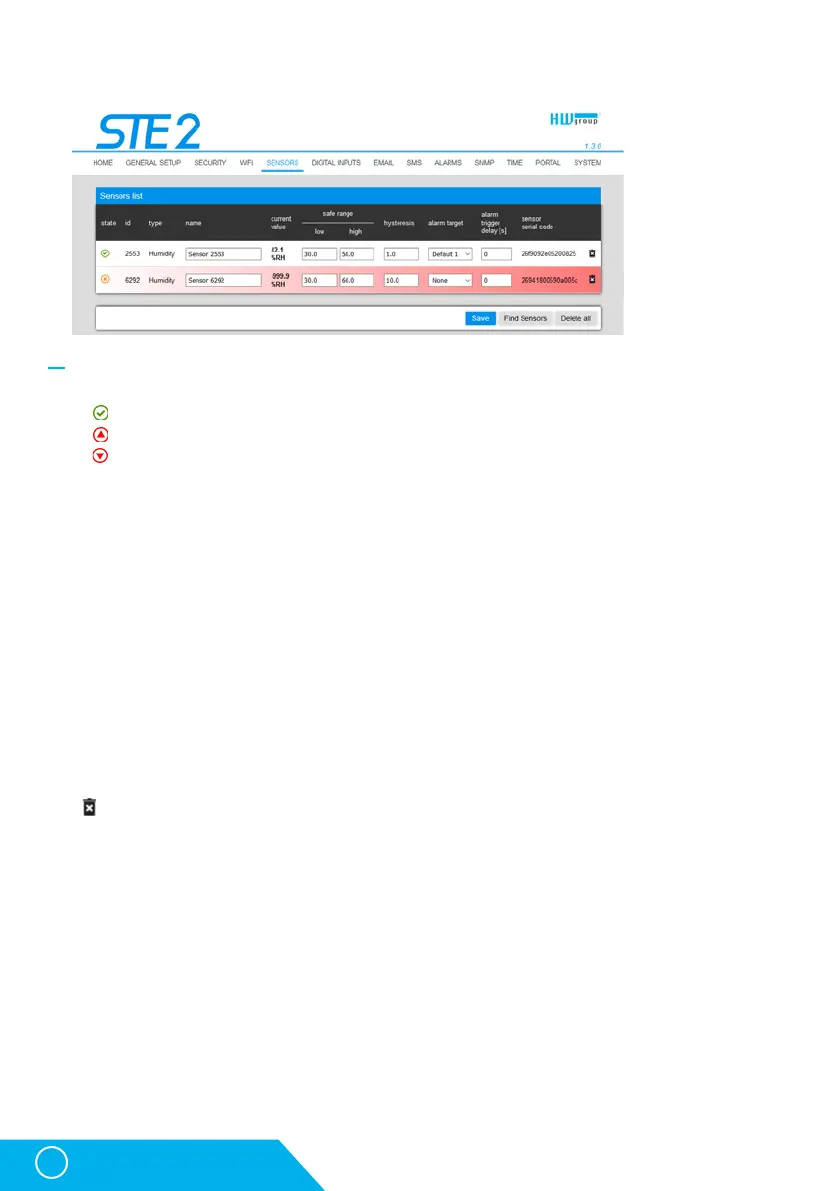
Sensor List section *
• State – Input or sensor state.
•
Normal – Idle state, all normal.
•
Alarm High – Value has exceeded permitted upper limit.
•
Alarm Low – Value has dropped below permitted lower limit.
• ID – Sensor ID identical to ID in Poseidon2 and STE2 units.
• Type – Sensor type; determine what type of sensor is in question (temperature / humidity / DI
input).
• Name – Sensor name for better identification in larger systems. The name can be set in the
Sensors or Digital Input tab.
• Current Value – Current value including unit of measure.
• Safe Range – Range of permitted values. If the current value exceeds the Safe Range, an Alarm
is activated.
• Hysteresis – Defines the insensitivity zone if the limit values are exceeded; prevents the activation
of multiple alarms if the temperature oscillates around the limit value.
• Alarm Target – Specifies the targets for alarm alerts (SMS + E-mail). Target recipients are defined
at the Alarms tab. The drop-down menu allows selecting an existing set of targets or creating
a new one.
• Alarm Trigger Delay [s] – Delays the alarm start alert by a specified time.
• Code – Full ID of the 1-Wire sensor.
• Delete – Button to delete the specific sensor.
* Sensors in Alarm state are highlighted.
Sensors tab
STE2 – User Manual



 To Next Page