2. OVERVIEW:
2.1. DEVICE – OVERVIEW
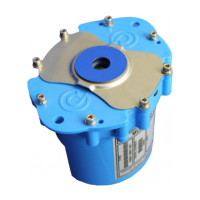
The unit supplied is a variant of the HWM Multilog 2 logger. The logger must be fixed in
position, connected to sensor equipment, and connected to an antenna on site. It must
then be programmed by the installer using a tool known as IDT (Installation Diagnostic
Tool). This includes setup of basic logging and call-in settings. Ensure any adjustments
made in IDT are saved to the logger.
IDT is used to create a ‘bulk’ file and an ‘inc’ file. These files contain the information of
the initial logger configuration. (The ‘bulk’ file is a HWM proprietary format, and the ‘inc’
file is in a standard WITS format).
The logger will be regarded as an outstation by a WITS Master Station. The ‘bulk’ and
‘inc’ files should be imported into the WITS Master Station that is responsible for the
outstation; contact your system administrator for details. After the files have been
imported, should any further configuration changes be required they can be made from
the WITS Master Station which updates the ‘inc’ file with the changes. The ‘bulk’ and ‘inc’
files are maintained to be able to remotely restore the logger configuration (in case it
reports the configuration has been corrupted, e.g., during a battery change).
The logger is not permanently connected to the network but connects periodically via a
cellular network modem to deliver its data and to check for any configuration updates.
An external battery pack (or d.c. power supply) is required to be fitted to the logger in
order to provide the required power for the additional communications overhead
imposed by the WITS (DNP3) protocol. (Refer to the Multilog 2 User Guide for details of
adding an external battery pack).



 To Next Page