2.7
PARAMETERS
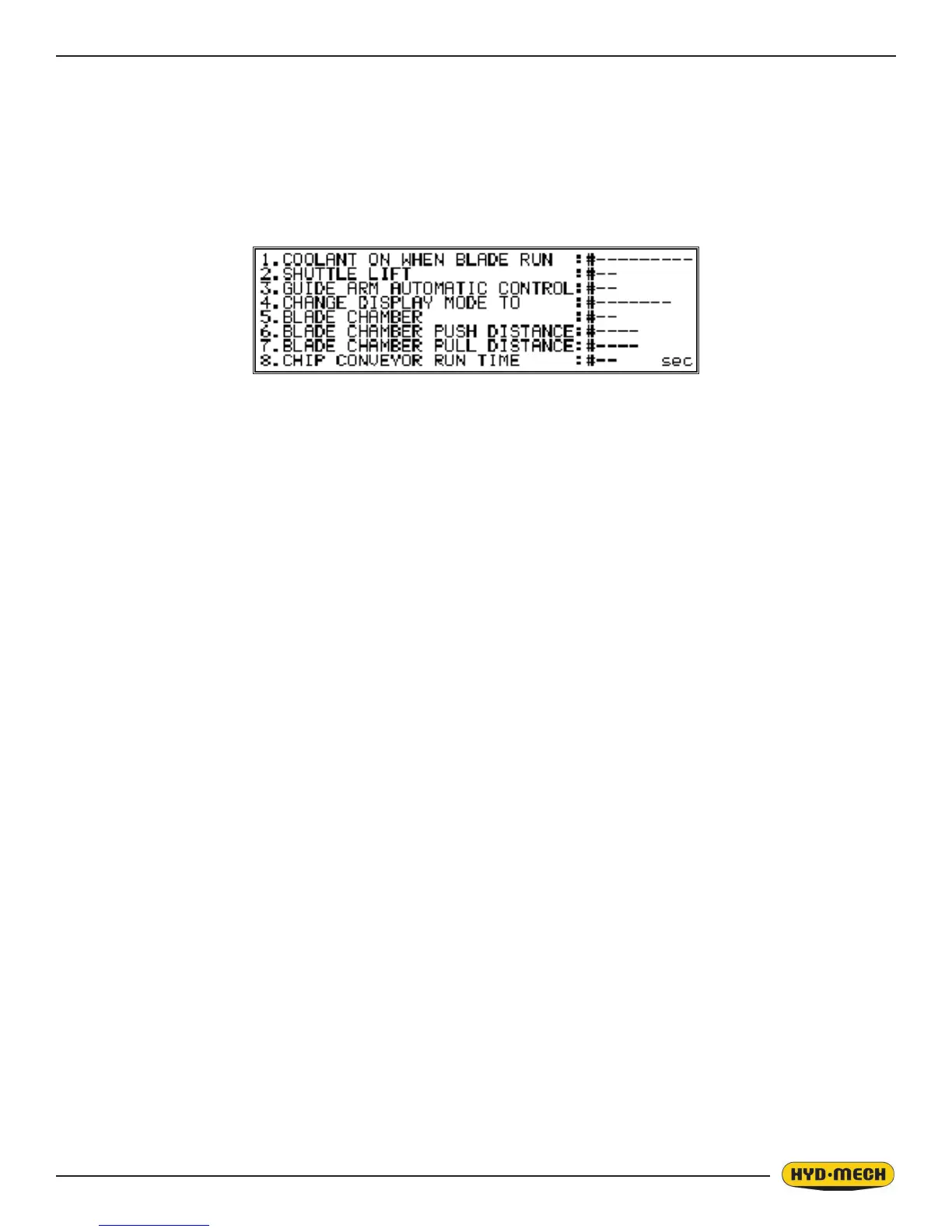
The parameters can be accessed by pressing the service mode button on the panel. These parameters can be changed
without a password.
1. COOLANT ON WHEN BLADE RUN: __ / AND HD. AD
In Automatic Mode - Allows the coolant to ow whenever the blade is running or when the blade is running and the
head advances.
2. SHUTTLE LIFT: ON / OFF
ON allows the material to be lifted up and away to ensure it will not get caught when it is shuttled forward.
3. GUIDE ARM AUTOMATIC CONTROL: ON / OFF
ON (In Automatic Mode) – The user will be prompted to enter the material height before the cycle will start. This will
automatically position the guide arm a couple of inches above the material before every cut.
4. CHANGE DISPLAY MODE TO: METRIC / IMPERIAL
Toggle the display units between metric and imperial.
5. BLADE CHAMBER: ON / OFF
If Blade Chamber is on:
• In the auto cycle, the head will make the cut and continue moving forward until it exits the material.
• Shuttle will move the stock forward (by the distance set in the BLAD CHAM PUSH DIST parameter) and
will push away the cut pieces.
• Shuttle will move back allowing the head to retract.
• Head will retract.
• Shuttle will feed the next length to cut.
• The cycle will repeat.
6. BLADE CHAMBER PUSH DISTANCE
This parameter denes the distance that the shuttle will move forward (behind the table) during the blade chamber
cycle.
7. BLADE CHAMBER PULL DISTANCE: # ----
This parameter denes the retract distance that the shuttle will move during blade chamber cycle.
8. CHIP CONVEYOR RUN TIME: # ----
This parameter denes the time that the chip conveyor will run after releasing the chip conveyor button. Chip con-
veyor will run (extracting the chips) for that preset time (to the right on the left side infeed and to the left on the right
side infeed machines). This parameter is not functioning for the reverse mode. The conveyor will move in the reverse
direction only when the button is activated, and it will stop after the button is released.
From this screen all the other parameters can be viewed, but a password will be needed to change any settings. See
“PLC Parameters” at the end of this section to view the list. HYD MECH service department should be contacted before
attempting to change any of these settings.


 To Next Page