4-5: Operating Instructions
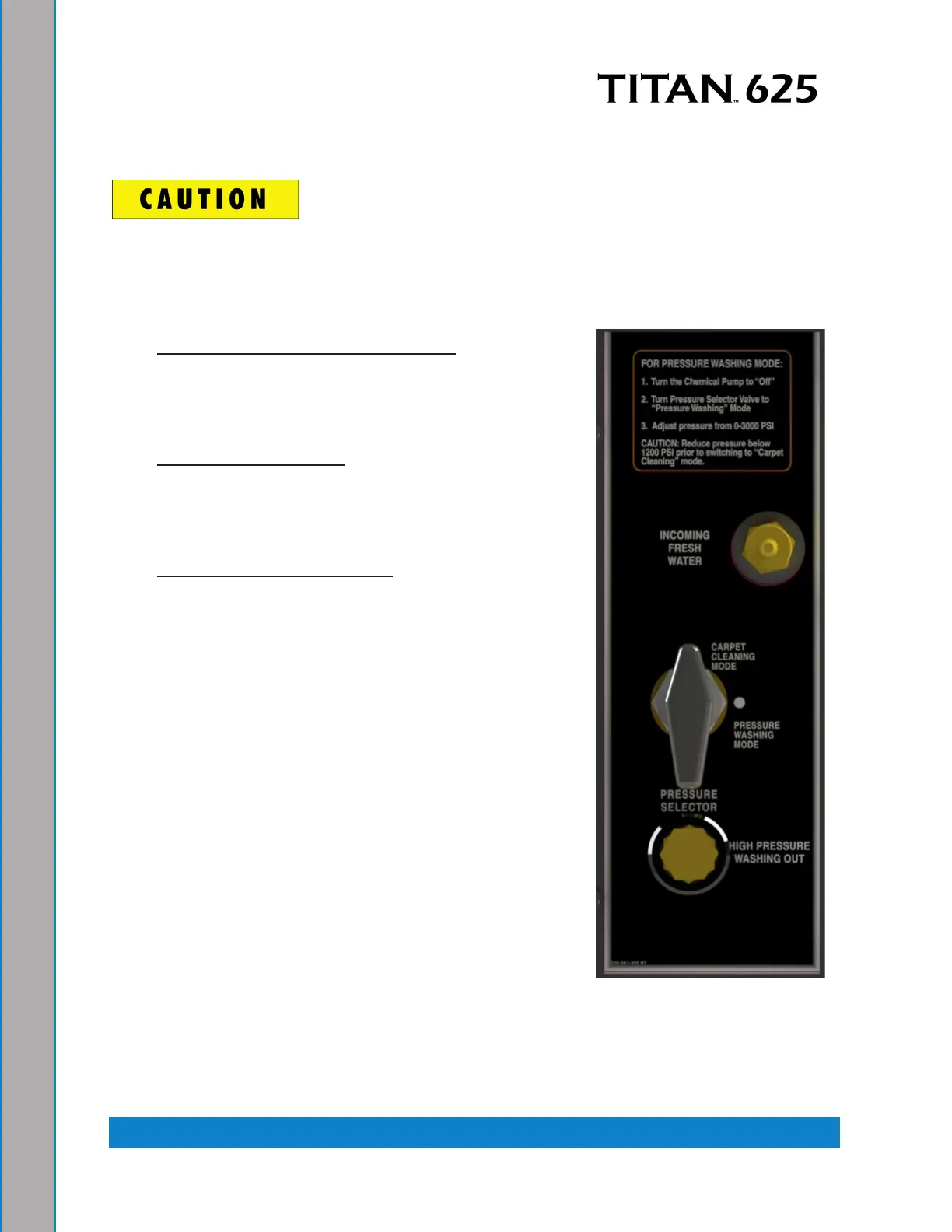
SETTING THE PRESSURE (FOR OPTIONAL HIGH PRESSURE WASHING KIT)
Lower the pressure below 1,200 psi prior to moving the “WATER PRESSURE
SELECTOR” valve to “CARPET CLEANING” mode. Failure to do so may result
in serious component or engine damage.
Set the cleaning pressure to the desired level as follows.
1. Carpet Cleaning: 300 to 400 psi: Position the
“WATER PRESSURE SELECTOR” valve to
“CARPET CLEANING” mode (if equipped). The
system is designed to shut o above 1,200 psi to
protect the heat exchanger system.
2. Hard Surface Cleaning: 1,200 psi or as indicated on
tool. Position the “WATER PRESSURE SELECTOR”
to “CARPET CLEANING” mode (if equipped). The
system is designed to shut o above 1,200 psi to
protect the heat exchanger system.
3. Pressure Washer Cleaning (if equipped): 2,000
psi or as indicated on tool. Position the “WATER
PRESSURE SELECTOR” to “PRESSURE
WASHING” mode (if equipped).
Figure 4-4. High Pressure
Control Panel


 To Next Page