35
120VAC
PV
Home
Settings
Data
Warnings
12VDC
AC Load
DC Load
11/15/XXXX 15:15
2560 W 2560 W
2500 W
120 W 330 W
AC OFF
DC OFF
100%
ECO
AC Fast Charge (AC F.C.) Mode
Important! In AC F.C. mode, do not exceed the rated limit of the power source.
For a standard 15A U.S. wall outlet, the charging power should be programmed
to 15A or less. For connections to a higher amperage outlet, such as a 30A
outlet, the AC Charging Power could be set higher.
Note: AC Output is disabled in AC Fast Charge Mode. The maximum AC Charging
Power Setting screen is disabled if the AC Output switch is set in the ON
position.
Follow these steps to set the
maximum AC power:
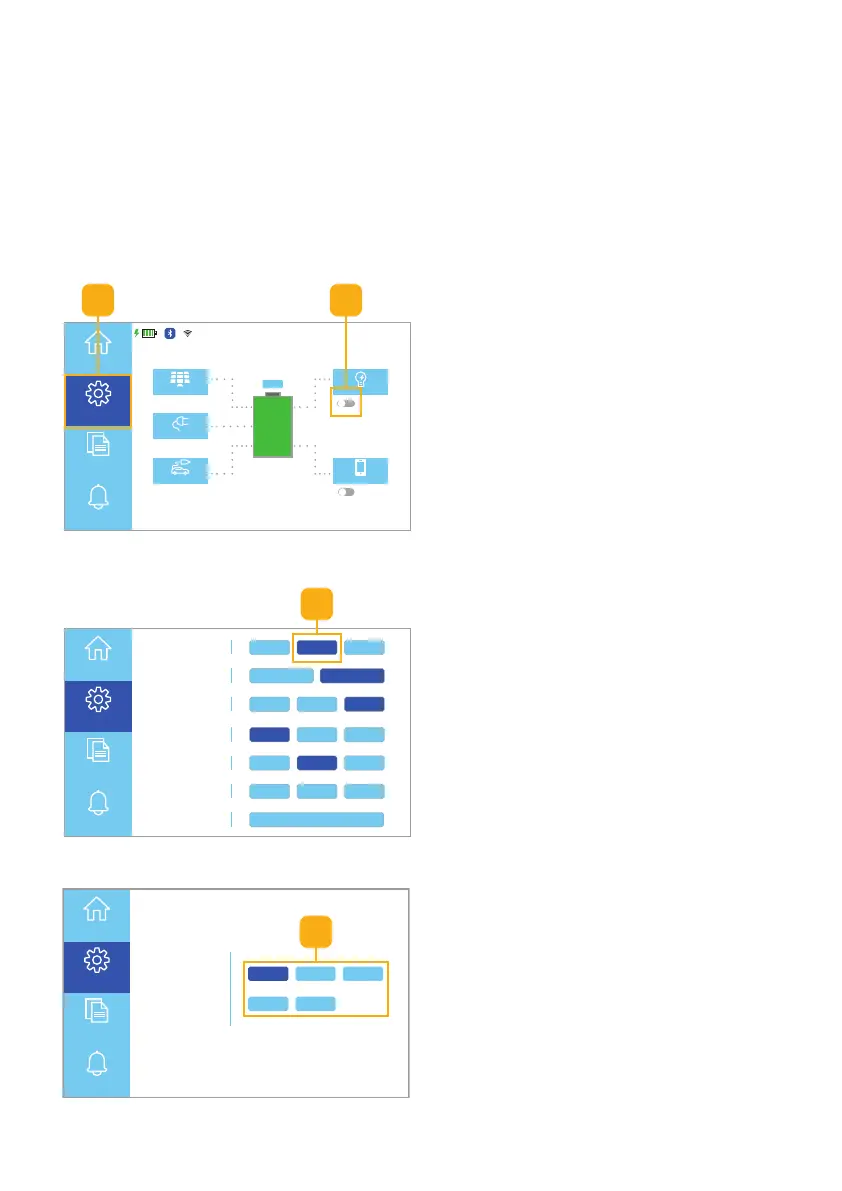
1. On the Homepage UI, toggle the AC
Output switch to OFF (Fig. 6.11).
2. Select the Settings button to
access the Settings menu.
Fig. 6.11 Turn AC output switch OFF
3. From the Settings menu, select the
AC F.C. button (Fig. 6.12).
Working Mode UPS AC F.C. Bat First
Unattended 90% ON OFF
Language
中文
English España
Display Settings
Date/Time Brightness
Sound
WiFi
Reset
ON OFFEnergy Saver
Parallel Mode Single P. Split P. 3 Phase
Home
Settings
Information
Alerts
3
AC
Charging Source
(Amps Available)
20A 25A
5A 10A 15A
Home
Settings
Information
Alerts
Fig. 6.12 Select AC F.C. button
Fig. 6.13 Select maximum AC power
4. Select the available amperage of
your AC Charging Source (Fig. 6.13).
Note: AC Input will not exceed the
rated amperage of the charging
source (Ex. For a standard U.S.
Wall Outlet, please select “15A.”
For a 30A RV Outlet, you may
select “25A.”)
Important! Ensure the AC Output is
toggled to the OFF position.
4
12



 To Next Page