25
The Select Program Screen
Display Example #19
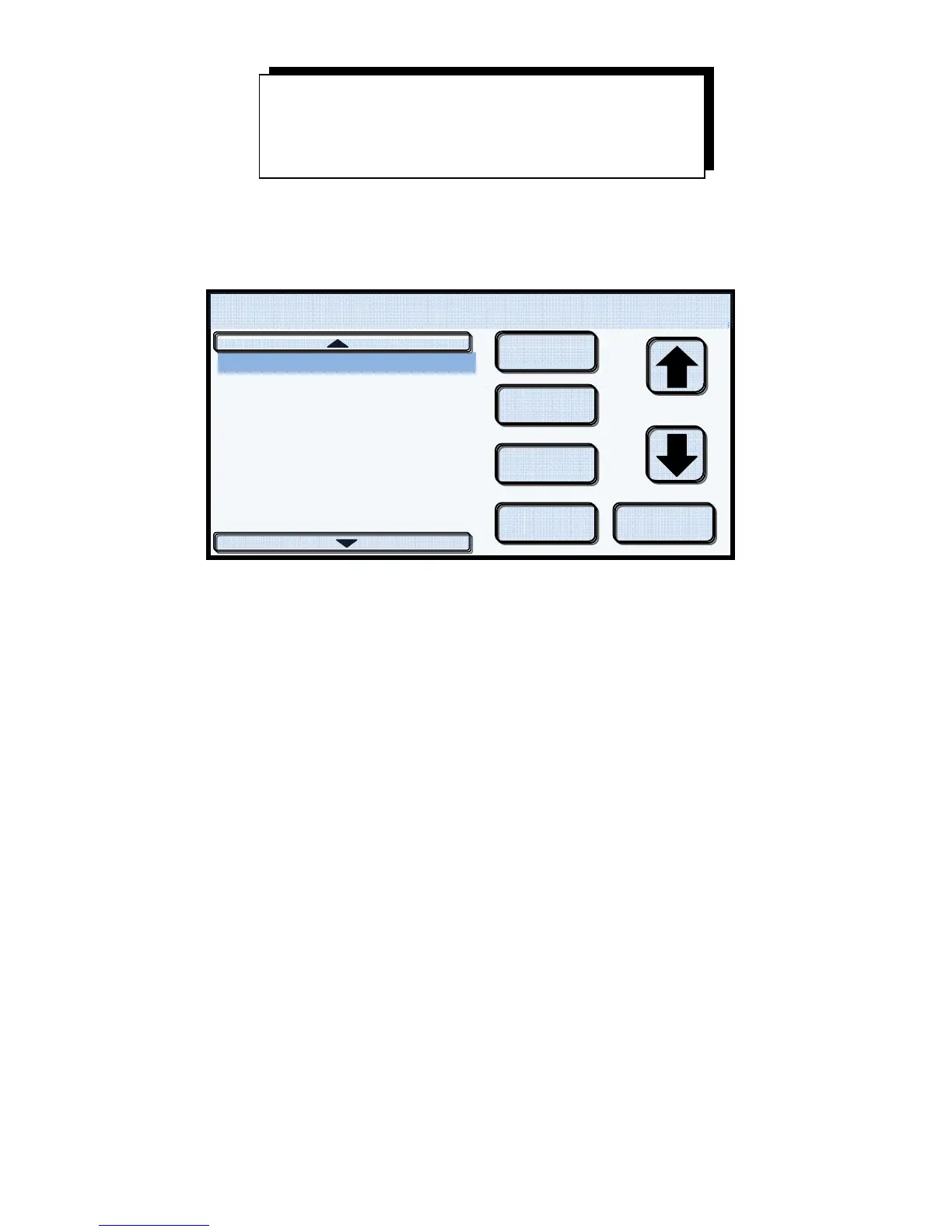
Touching the Porcelain button from the Main Screen brings up the Select Program Screen. This screen
is the heart of a powerful and highly intuitive control center that brings total functionality to Create,
Run, Modify or Delete programs at the touch of your finger tip.
The left side of the Select Program Screen
Located on the left half of the screen is the program list. The SUMMIT Porcelain Furnace and the
Summit Press features 80 user programmable program locations. The numbers at the far left represents
the program locations from 1 to 80. Eight (8) locations are displayed per page with 10 pages, thus
providing 80 programs.
Easy access to the additional 9 pages is accomplished by touching the up or down arrows located at the
top and bottom of the program list. The program locations, or slots, start with “001 – 008”. To view
program slots “009 – 016” or “071 – 080” touch the up or down arrows located at the top and bottom
of the program list. With repeated touches of the up or down arrows, you can view the remaining
program pages in ascending or descending order. The program pages will wrap around, meaning that if
you start at the 1
st
program screen, programs 001 – 008 and wish to view program 075, press the up
arrow to wrap around to the last program page, displaying programs “071 – 080”. Pressing anywhere
within a program line will select that program location. The selected location will be highlighted to
confirm your selection. Display Example #19 shows that location 009 has been selected.
NOTE! The Summit Press furnace allows for the creation and running of both porcelain and pressing
programs. To distinguish between porcelain and pressing programs, an “*” will follow all pressing
program names as shown in Display Example #19. Program #16 is a pressing program.
Porcelain & Pressing
Programs
08/13/12
4
1
4
009
010 VM 13 1ST BAKE
011 VM 13 2ND BAKE
012 VM 13 GLAZE
013 VM 13 2ND GLAZE
014 MEDIUM CORRECTIVE
015 NAT ENAMEL BAKE
016 TEST 1* (On Pressing Only)
Select Pro
ram 450 C 0cmH
Create
Modify
Delete
Run Cancel
Doo


 To Next Page