308DUO V1.1.0
Synchronous Balance Charger/Discharger
Extra Function
Log Files Manage
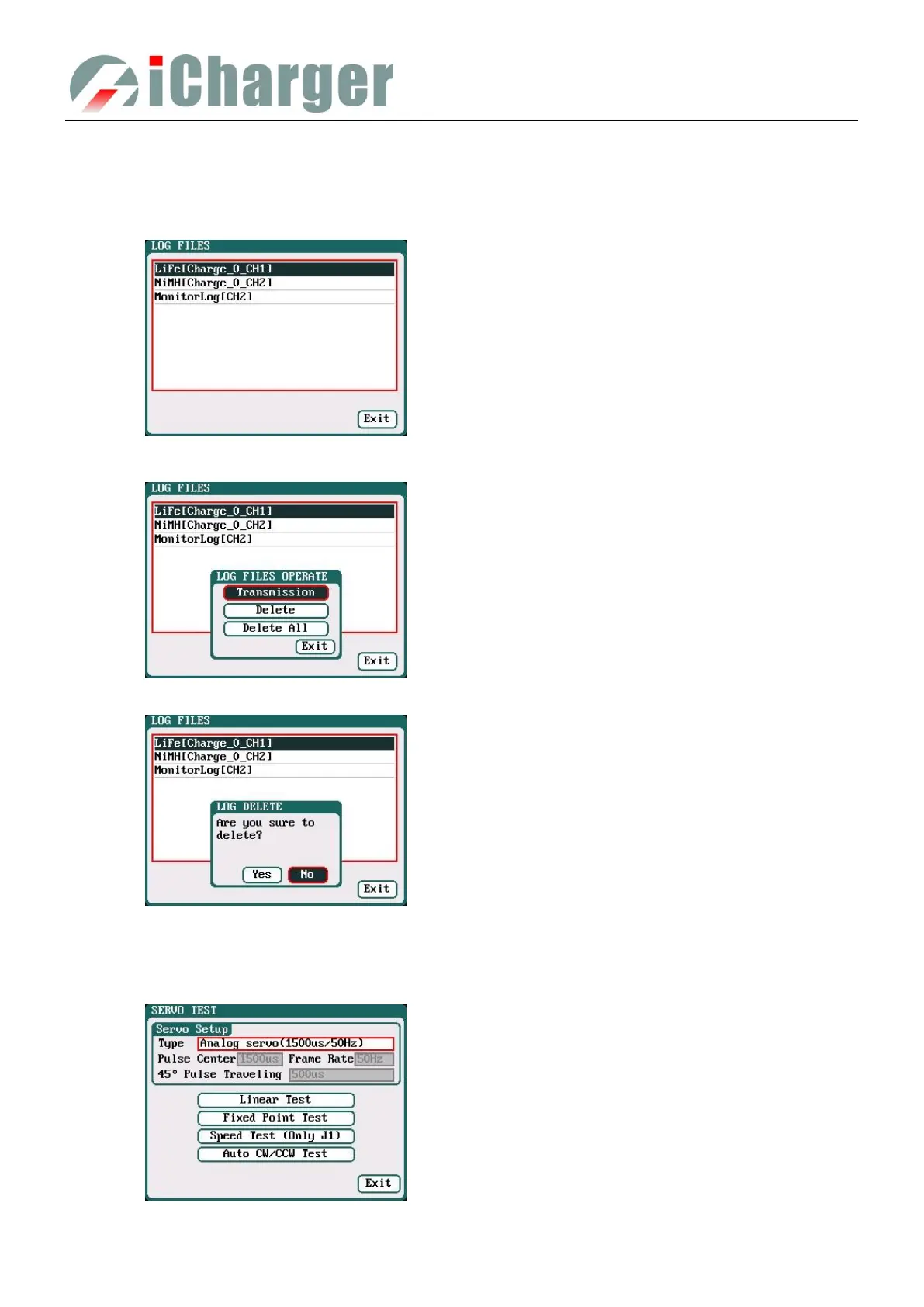
Select SYSTEM MENU→Extra Function→LOG FILES to enter the manage interface.
First select and click the .TXT files when managing log files, and the system will pop up the LOG FILES OP dialog box.
Select Delete to pop up the LOG FILE DELETE dialog box, Select Yes to delete this file, select No to cancel.
Servo Test
Select SYSTEM MENU→Extra Function→SERVO TEST to enter servo test interface; insert Servo into J1 or J2 port to
test (only J1 port supports Speed Test, J2 can also be used as an external power source).
Log Files Manage Dialog
Transmission: transmission to PC
Delete: delete files
Delete All: delete all files
The charger must be connected with computer via
USB when select Transmission and the client
software must have identified to the charger.
Type: Analog servo (1500us/50Hz)
Digital servo (1500us/333Hz)
Digital servo (760us/560Hz)
User: Pulse Center: 700us-1600us
Frame Rate: 40Hz-700Hz
45
°
Pulse Traveling:100us-1000us



 To Next Page