12
4
SCAN
D Scan Resume function
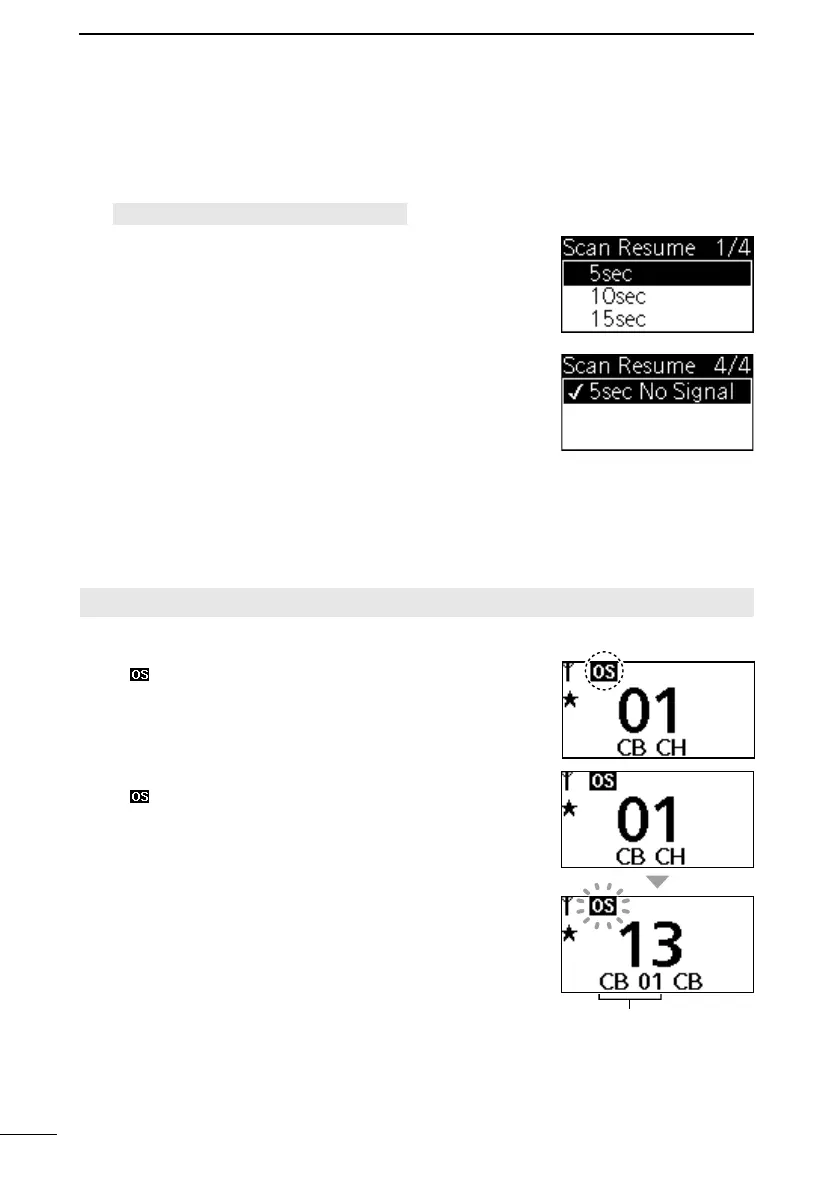
1. Open the “Scan Resume” screen.
[MENU] > Settings > Scan Resume
2. Push [▲] or [▼] to select a Scan Resume option, and
then push [ENT] to set it.
• 5sec: Scan pauses for 5 seconds when a
signal is detected, and then resumes.
• 10sec: Scan pauses for 10 seconds when a
signal is detected, and then resumes.
• 15sec: Scan pauses for 15 seconds when a
signal is detected, and then resumes.
• 5sec No Signal: Scan pauses until the signal
disappears, and then resumes after 5
seconds.
L Push [CLEAR] to return to the previous screen.
■ Open Scan
The Open Scan automatically searches for transmitted signals and enables you to locate
new stations for communication or listening.
IMPORTANT: The Open Scan can transmit on a start channel or busy channel.
1. Select “Open Scan” in the “Scan Mode” menu. (p. 11)
• “ ” is displayed on the operating screen.
2. Push [SCAN] to start the Open Scan.
• “ ” blinks.
3. When receiving a signal, the scan pauses and
resumes, according to the selected Scan Resume
function. (pp. 12, 27)
4. Push [SCAN] to stop the scan.
Scan start channel
■ Scanning preparation



 To Next Page