36
9
CONNECTIONS AND INSTALLATION
■ Mounting the transceiver
D Using the supplied mounting brackets
Youcanmountthetransceiveronaatsurfaceusingthemountingbracketssupplied
with your transceiver.
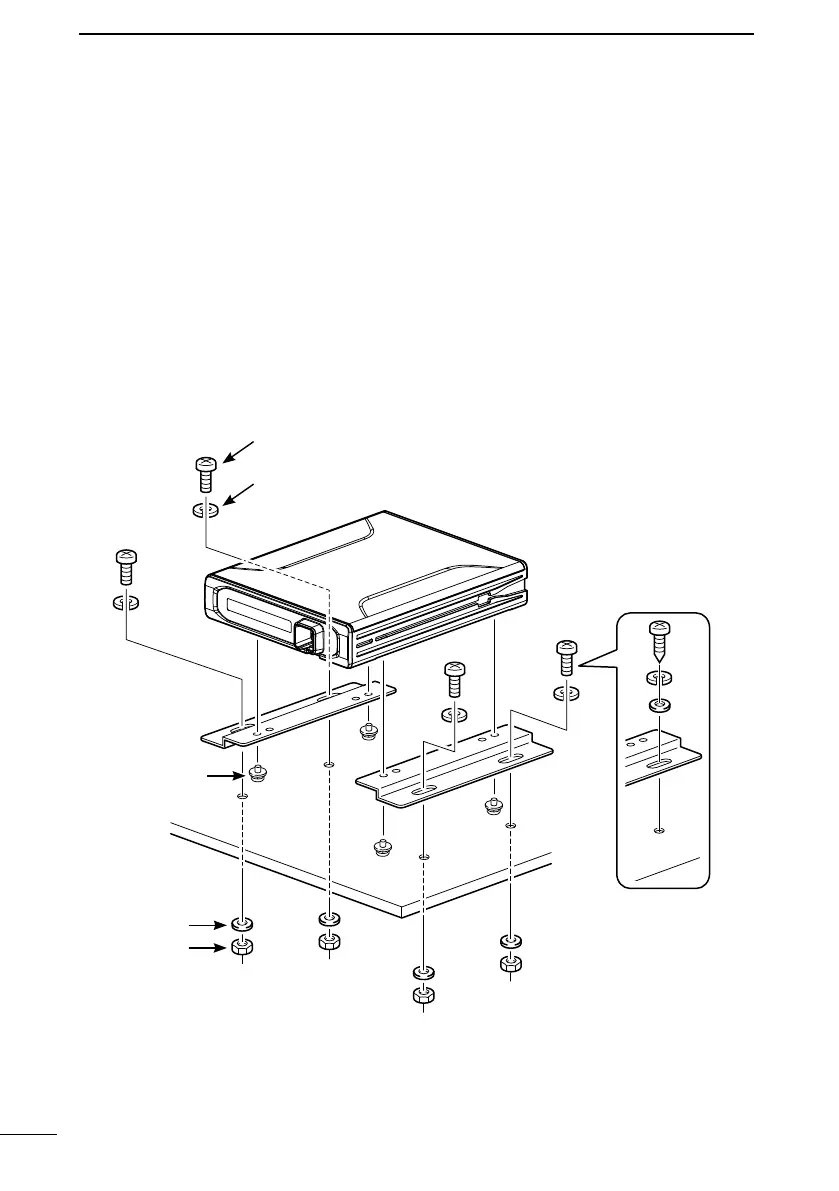
1. Drill 4 holes on a flat surface where you want to install the mounting brackets.
L When using the supplied nuts: approximately 5.5 ~ 6 mm (d)
When using the supplied self-tapping screws: approximately 2 ~ 3 mm (d)
2. Attach the mounting brackets to the transceiver using the supplied screws (3 × 6 mm).
3. Mount the mounting brackets with the transceiver securely on the flat surface using
the supplied screws, nuts, and washers.
Mounting example:
When using
self-tapping screws
(5 × 20 mm)
Flat washer
Spring washer
Nut
Screws
(5 × 12 mm)
Screws
(3 × 6 mm)



 To Next Page