27
4
RECEIVE AND TRANSMIT
2001 NEW 2001 NEW
■ Operating CW
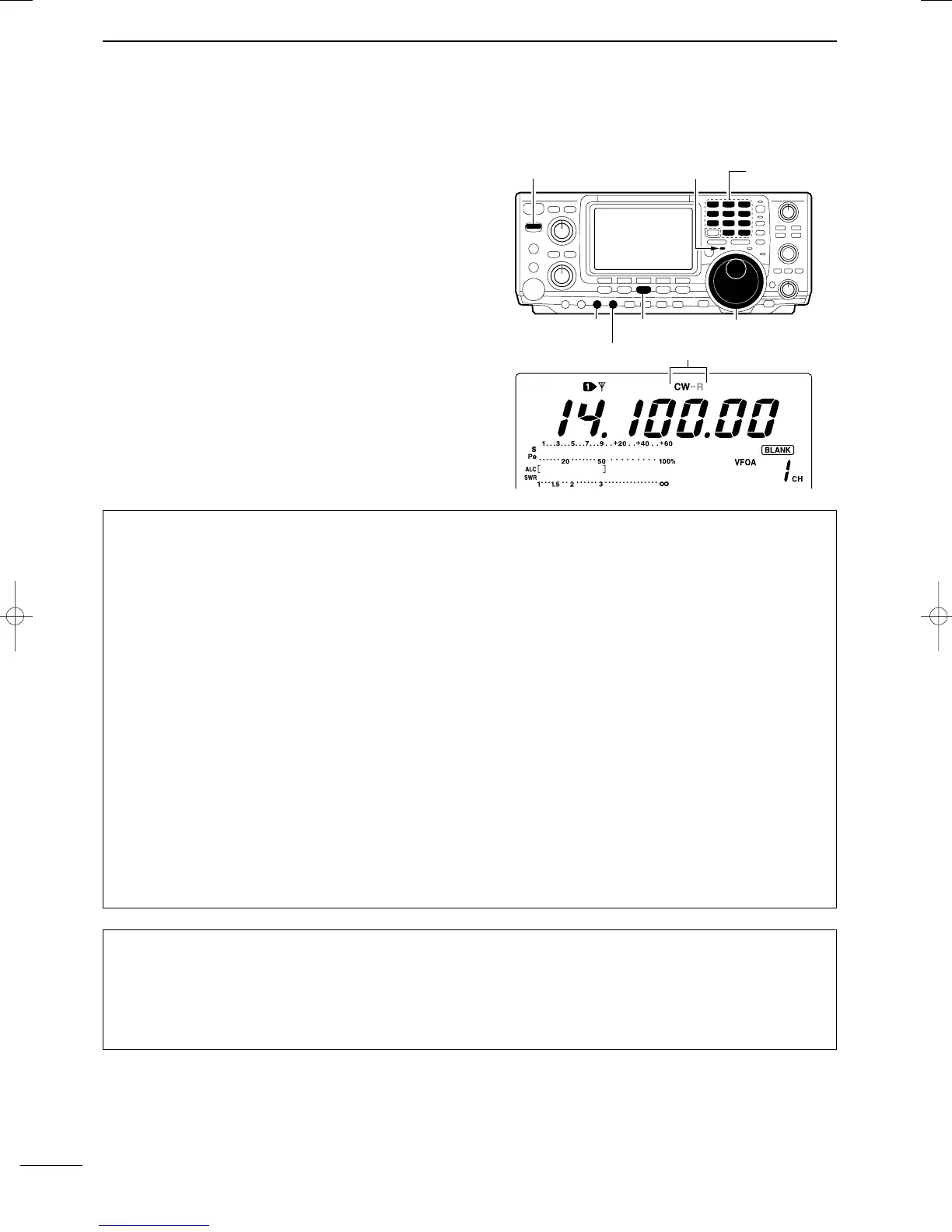
q Push a band key to select the desired band.
w Push [CW/RTTY] to select CW.
•After CW mode is selected, push [CW/RTTY] for 1 sec.
to toggle between CW and CW-R modes.
e Rotate [AF] to set audio to a comfortable listening
level.
r Rotate the tuning dial to simultaneously tune a de-
sired signal and its side tone.
• S-meter indicates received signal strength.
t Push [TRANSMIT] to transmit.
• The TX indicator lights red.
y Use the electric keyer or paddle to key your CW sig-
nals.
• The Po meter indicates transmitted CW signal strength.
u Adjust CW speed with [KEY SPEED].
i Push [TRANSMIT] to return to receive.
Band keys[TX] indicator[TRANSMIT]
[CW PITCH]
[KEY SPEED]
[CW/RTTY]
Tuning dial
“CW” or “CW-R” appears
DD
Convenient functions for receive
• Preamp and attenuator (p. 48)
➥ Push [P.AMP/ATT] several times to set the pre-
amp OFF, preamp 1 ON or preamp 2 ON.
•“P.AMP1,” “P.AMP2” or “P.AMP” appears when the
preamp 1, preamp 2 or preamp is set to ON, respec-
tively. (depending on operating frequency band)
➥
Push [P.AMP/ATT] for 1 sec. to set the attenuator
ON.
•Push [P.AMP/ATT] momentarily to turn the attenuator
OFF.
•“ATT” appears when the attenuator is set to ON.
• Noise blanker (p. 51)
➥ Push [NB] to turn the noise blanker ON and OFF.
•“NB” appears when the noise blanker is set to ON.
• Push [NB] for 1 sec. to enter noise blanker set mode.
• Noise reduction (p. 53)
➥ Push [NR] to turn the noise reduction ON and
OFF.
•Rotate [NR] control to adjust the noise reduction level.
•“NR” appears when the noise reduction is set to ON.
• Auto notch filter (p. 53)
➥ Push [A/NOTCH] to turn the auto or manual
notch function ON and OFF.
•Rotate [NOTCH] control to set the attenuating fre-
quency for manual notch operation.
• Twin PBT (passband tuning) (p. 52)
➥ Rotate [TWIN PBT] controls (inner/outer).
• Push [PBTC] to clear the settings.
• AGC (auto gain control) (p. 49)
➥ While M1 is selected with [MENU], push
[F1 AGC] several times to select AGC F,
AGC M, AGC S or AGC OFF.
•
1
⁄4 function (p. 21)
➥ While M1 is selected with [MENU], push
[F3 1/4] to turn the
1
⁄4 function ON and OFF.
DD
Convenient functions for transmit
• Break-in function (p. 56)
➥ Push [VOX/BK-IN] several times to set the break-
in OFF, semi break-in or full break-in.
•“BK-IN” or “F BK-IN” appears when the semi break-in
or full break-in is set to ON, respectively.
IC-746PRO.qxd 02.4.2 11:31 Page 27



 To Next Page