EasyManua.ls Logo

Icom IC-7400 - User Manual

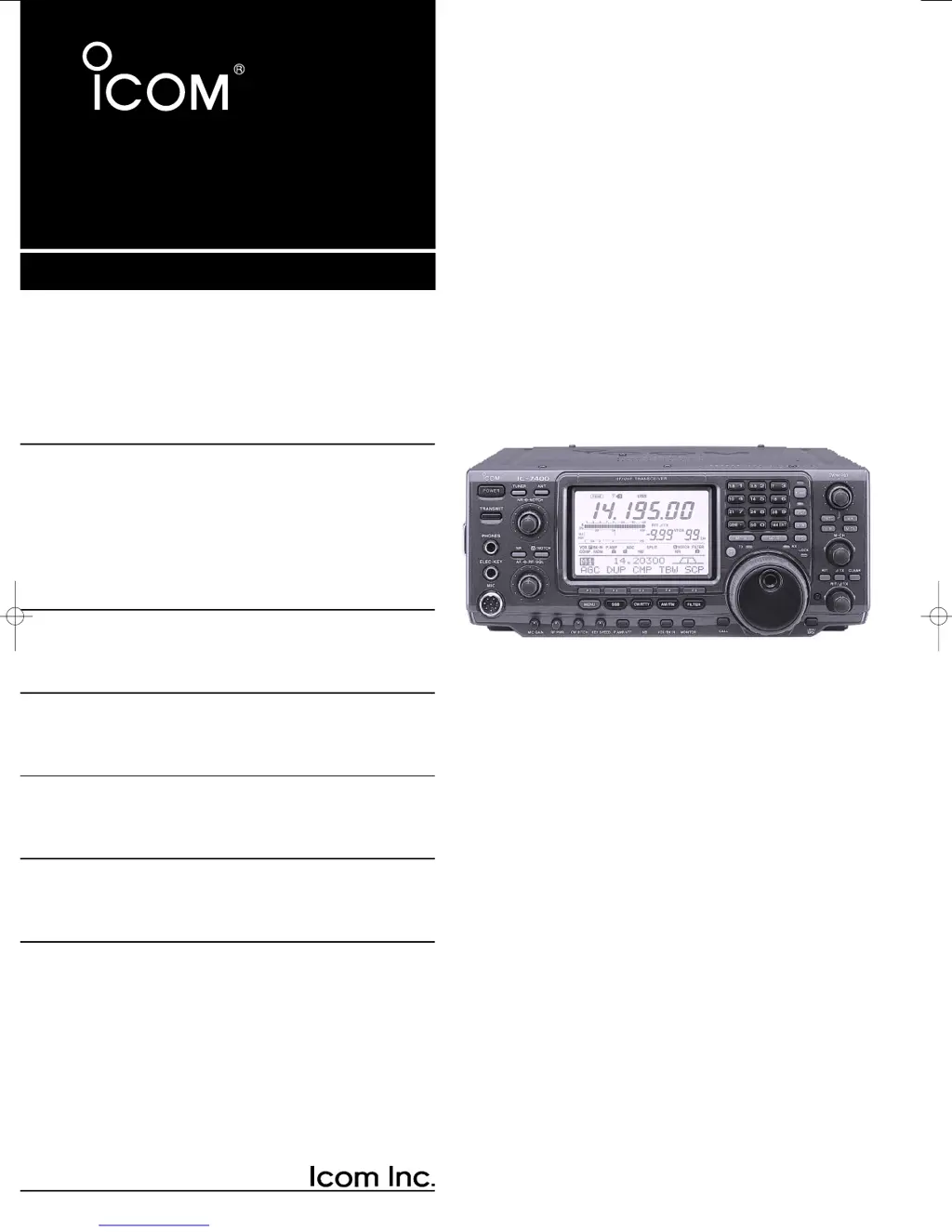
Icom IC-7400
116 pages
Print Icon
To Next Page IconTo Next Page
Loading...
2001 NEW
HF/VHF
ALL MODE TRANSCEIVER
i7400
INSTRUCTION MANUAL
IC-7400.qxd 02.4.2 11:34 Page 1

Table of Contents

Other manuals for Icom IC-7400

Questions and Answers

  • P
    paulparsonsAug 19, 2025
    Why is the Icom IC-7400 Transceiver output power too low?
    • J
      Jessica LoweryAug 19, 2025
      If the output power of your Icom Transceiver is too low, there are several possible causes. Make sure that [RF PWR] and [MIC GAIN] are not set too far counterclockwise; if so, rotate [RF PWR] clockwise and set [MIC GAIN] to a suitable position. Also, ensure that you've selected an antenna suitable for the operating frequency and that the antenna is properly tuned by pushing [TUNER] for 1 second to manually tune it.
  • W
    wendy49Aug 21, 2025
    Why is the Icom IC-7400 Transceiver frequency not changing?
    • R
      Rebecca BaileyAug 21, 2025
      If the displayed frequency on your Icom Transceiver isn't changing properly, it might be due to several reasons. First, check if the dial lock function is activated and, if so, turn it OFF by pushing [LOCK/SPCH]. Next, ensure that a set mode screen isn't selected; exit the set mode by pushing [MENU] several times. If neither of these solves the problem, try resetting the CPU.
  • S
    Steven LiuAug 25, 2025
    How to fix an Icom Transceiver that won't power on?
    • L
      lucasparkAug 25, 2025
      If the Icom Transceiver's power doesn't turn on when you press the power switch, the issue might be due to a disconnected power cable or a blown fuse. Ensure the DC power cable is correctly re-connected. If the issue persists, check the fuse and replace it with a spare fuse after identifying the cause of the blow.
  • C
    Cody AllenAug 26, 2025
    Why is the Icom IC-7400 sensitivity so low?
    • J
      Jaclyn TurnerAug 26, 2025
      If you're experiencing low sensitivity on your Icom Transceiver, and only strong signals are audible, the issue might stem from antenna connectivity, selection, or tuning. First, ensure the antenna is correctly connected. Then, verify that you've selected an antenna suitable for the operating frequency. If problems persist, manually tune the antenna by pushing the [TUNER] button for 1 second. Finally, check if the attenuator is activated and if so, deactivate it by pushing [P.AMP/ATT] for 1 second to select 'ATT OFF'.
  • F
    fernandolewisAug 27, 2025
    How to troubleshoot no sound from Icom IC-7400 speaker?
    • X
      xdonovanAug 28, 2025
      If no sound is coming from the speaker of your Icom Transceiver, there are a few potential causes. First, check that the volume level isn't too low by rotating [AF] clockwise. Next, ensure the squelch isn't closed by turning [RF/SQL] to the 10 o’clock position. Finally, make sure the transceiver isn't stuck in transmitting mode by pushing [TRANSMIT] to receive, or check the SEND line of an external unit.
  • R
    Reginald GoodmanAug 29, 2025
    What to do if Icom Transceiver received audio is unclear?
    • R
      Rhonda ChandlerAug 30, 2025
      If the received audio on your Icom Transceiver is unclear or distorted, it could be due to several factors. Begin by selecting a suitable operating mode. If the problem persists, reset the PBT function by pushing [PBTC] for 1 second. Also, turn the noise blanker OFF by pushing [NB], especially if receiving a strong signal. Check if the preamp is activated and turn it OFF by pushing [P.AMP/ATT] once or twice. Finally, adjust the [NR] control for maximum readability if noise reduction is activated.
  • N
    Nicholas RodriguezAug 31, 2025
    Why can't I access a repeater with my Icom IC-7400?
    • M
      Michelle LopezSep 1, 2025
      If you cannot access a repeater with your Icom Transceiver, the split frequency or duplex function might not be activated. Push [SPLIT] and/or [F2 DUP] (in M1) to turn the function ON. If that doesn't work, the programmed subaudible tone frequency may be wrong; reset the frequency using set mode.
  • I
    isaiah80Sep 2, 2025
    Why can't I contact another station with my Icom IC-7400 Transceiver?
    • E
      Elizabeth WeaverSep 2, 2025
      If you're unable to make contact with another station using your Icom Transceiver, check if the RIT or ?TX function is activated and turn it OFF by pushing [RIT] or [?TX]. Also, verify whether the split frequency and/or duplex function are activated, and if so, turn them OFF by pushing [SPLIT] and/or [F2 DUP] (in M1).
  • L
    Louis KerrSep 4, 2025
    Why is the Icom IC-7400 transmit signal distorted?
    • T
      troy12Sep 5, 2025
      If the transmit signal from your Icom Transceiver is unclear or distorted, it's possible that the [MIC GAIN] is set too far clockwise. Adjust [MIC GAIN] to a suitable position.
  • R
    Ruth HamiltonSep 7, 2025
    Why does the [ANT] switch not function on my Icom IC-7400 Transceiver?
    • M
      Michelle ColeSep 7, 2025
      If the [ANT] switch on your Icom Transceiver isn't functioning, it's possible that the antenna switch hasn't been activated. Set the antenna switch in set mode to “Auto” or “Manual.”

Summary

Foreword and Precautions

Precautions

Essential safety guidelines for operating the transceiver to prevent hazards.

Quick Reference Guide - Installation

Installation Steps

Steps for setting up the transceiver, including grounding and antenna connections.

Quick Reference Guide - Operation

Basic Operation

Basic operational steps for using the transceiver.

Panel Description - Front Panel

Front Panel Controls

Detailed description of all controls and indicators on the front of the transceiver.

Panel Description - Rear Panel

Rear Panel Connectors

Description of rear panel connectors for antennas, power, and accessories.

Panel Description - LCD Display

LCD Display Indicators

Explanation of the transceiver's display elements and indicators.

Installation and Connections

Antenna Connection

Guidelines for connecting the antenna system for optimal performance.

Basic Operation

Initial Power-Up and Reset

Procedure for resetting the transceiver's CPU to factory defaults.

Basic Operation (continued)

Selecting Operating Band

How to select the desired operating band using the band stacking registers.

Basic Operation (continued)

VFO and Memory Mode Selection

Switching between VFO and memory modes for frequency selection.

Receive and Transmit

Operating SSB Mode

Step-by-step guide to operating the transceiver in SSB mode.

Receive and Transmit (continued)

Operating CW Mode

Guide for operating the transceiver in CW mode, including keying.

Functions for Receive

IF Filter Selection

Selecting and adjusting IF filters for optimal signal clarity.

Functions for Transmit

VOX Function

Enabling voice-operated transmission for hands-free operation.

Memory Operation

Memory Channels Overview

Overview of memory channels for storing frequencies and modes.

Scans

Scan Types

Explanation of different scan modes like programmed, memory, and ∂F scan.

Antenna Tuner Operation

Antenna Tuner Operation

How to operate the internal automatic antenna tuner.

Data Communication

Packet (AFSK) Operation

Operating packet (AFSK) communications with a TNC.

Set Mode

General Set Mode

Accessing and configuring general transceiver settings.

Maintenance

Troubleshooting

A guide to diagnosing and resolving common operational problems.

Specifications

General Specifications

General specifications including frequency coverage, modes, and power.

About CE Compliance

Installation Notes

Notes on installation and safety compliance related to CE regulations.

Icom IC-7400 Specifications

General IconGeneral
Frequency Range TX1.8-54 MHz
Frequency Range RX0.03-60 MHz
ModesSSB, CW, RTTY, AM, FM
Output Power100W (HF/50MHz), 50W (144MHz)
Receiver TypeTriple conversion superheterodyne
Antenna ConnectorSO-239
IF RejectionMore than 70 dB
Supply Voltage13.8 V DC ±15%
Current Drain RX1.5 A
Image RejectionMore than 70 dB
Audio Output Power2 W
Current Drain TX20 A
Sensitivity0.13 μV (SSB/CW)
SelectivitySSB: 2.4 kHz

Related product manuals