72
8
SCANS
2001 NEW
■
∂∂
F scan operation and Fine ∂F scan
∂F scan searches for signals within the specified
range with the displayed VFO or memory channel fre-
quency as for center frequency. The frequency range
is specified by the span.
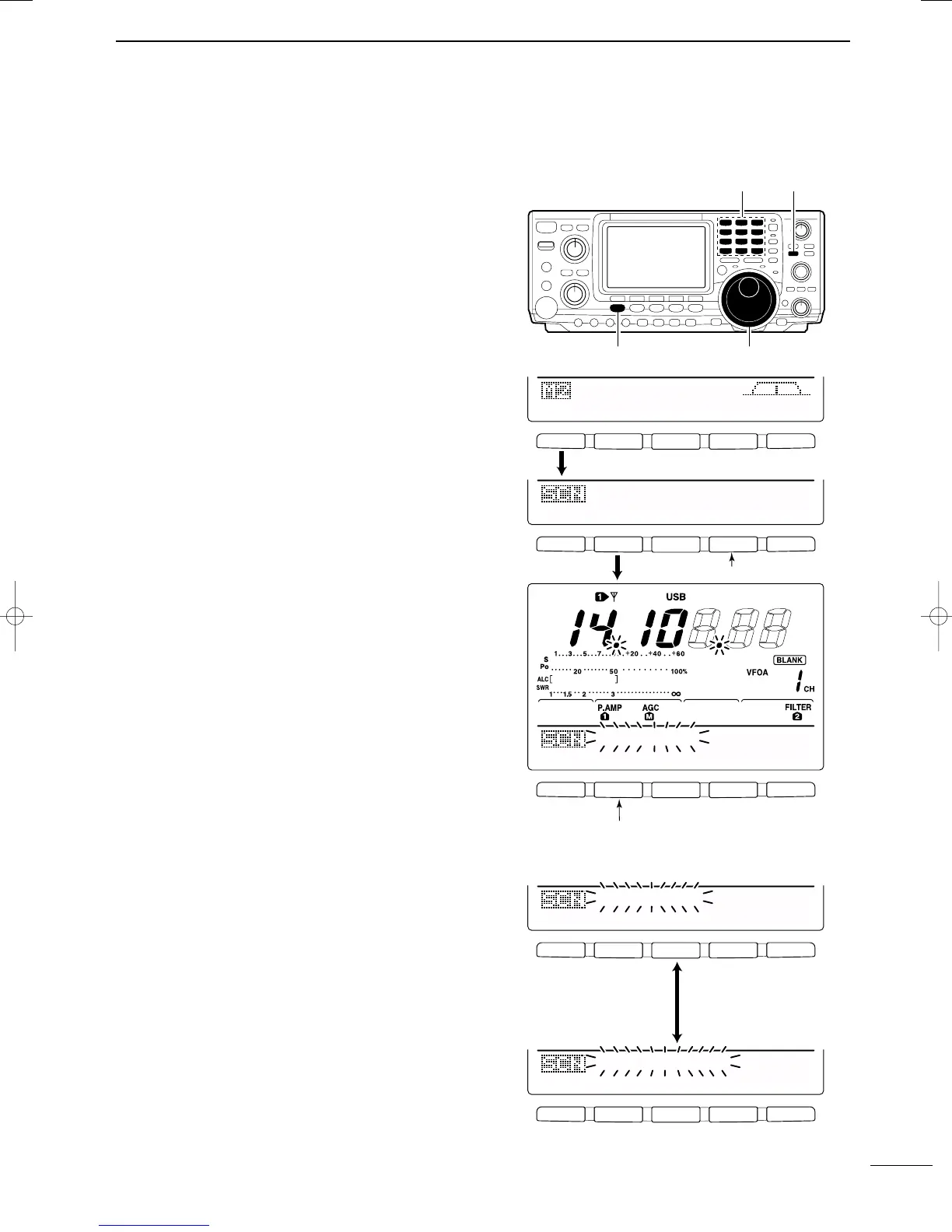
q Push [V/M] to select VFO mode or memory mode,
as desired.
w Set center frequency of the ∂F scan.
e Push [MENU] to select M2.
r Push [F1 SCN] to select the scan menu.
• See p. 68 for scan condition.
•If the [RF/SQL] control function is set as “AUTO,” the
squelch is always open in SSB, CW and RTTY modes.
t Set the ∂F span by pushing [F4 SPN].
•±5 kHz, ±10 kHz, ±20 kHz, ±50 kHz, ±100 kHz,
±500 kHz and ±1 MHz are selectable.
y Push [F2 ∂F] to start the ∂F scan.
• Decimal points blink while scanning.
u When the scan detects a signal, the scan stops,
pauses or ignores it depending on the VSC, resume
setting and the squelch condition.
i Push [F2 ∂F] to cancel the ∂F scan.
•Rotating the tuning dial during scan also cancels scan
operation.
DD
About the Fine
∂∂
F scan
During ∂F scan, when a signal is received, scan con-
tinues, but the tuning step is temporarily set to 10 Hz.
q Follow steps q to y above to start programmed
scan.
w During ∂F scan, push [F3 FIN] to switch between
∂F scan and fine ∂F scan operation.
e Push [F2 ∂F] to cancel the scan.
•Rotating the tuning dial during scan also cancels scan
operation.
Keypad
Tuning dial
[MENU]
[V/M]
F 1
F
2F
3
F
4
F
5
F 1
F 2 F 3 F 4 F 5
F 1
F
2F
3
F
4
F
5
SCN
MEM
SWR
TCN
VSC
PRO
∂
F
FIN
SPN
SET
∂
F:±1Ok
PRO
∂
F
FIN
SPN
SET
∂
F
SCAN
Push [F1]
Push [F2] to start/cancel the scanning.
Push [F2]
Push [F4] to select the span.
F 1
F
2F
3
F
4
F
5
F 1
F
2F
3
F
4
F
5
PRO
∂
F
FIN
SPN
SET
∂
F
SCAN
PRO
∂
F
FIN
SPN
SET
F-
∂
F
SCAN
Push [F3] to switch
between programmed
scan and fine pro-
grammed scan.
IC-7400.qxd 02.4.2 11:35 Page 72



 To Next Page