66
7
MEMORY OPERATION
2001 NEW
■ Assigning memory names
All memory channels (including scan edges) can be
tagged with alphanumeric names of up to 9 characters
each.
[EXAMPLE]: Programming “DX spot” into memory
channel 99.
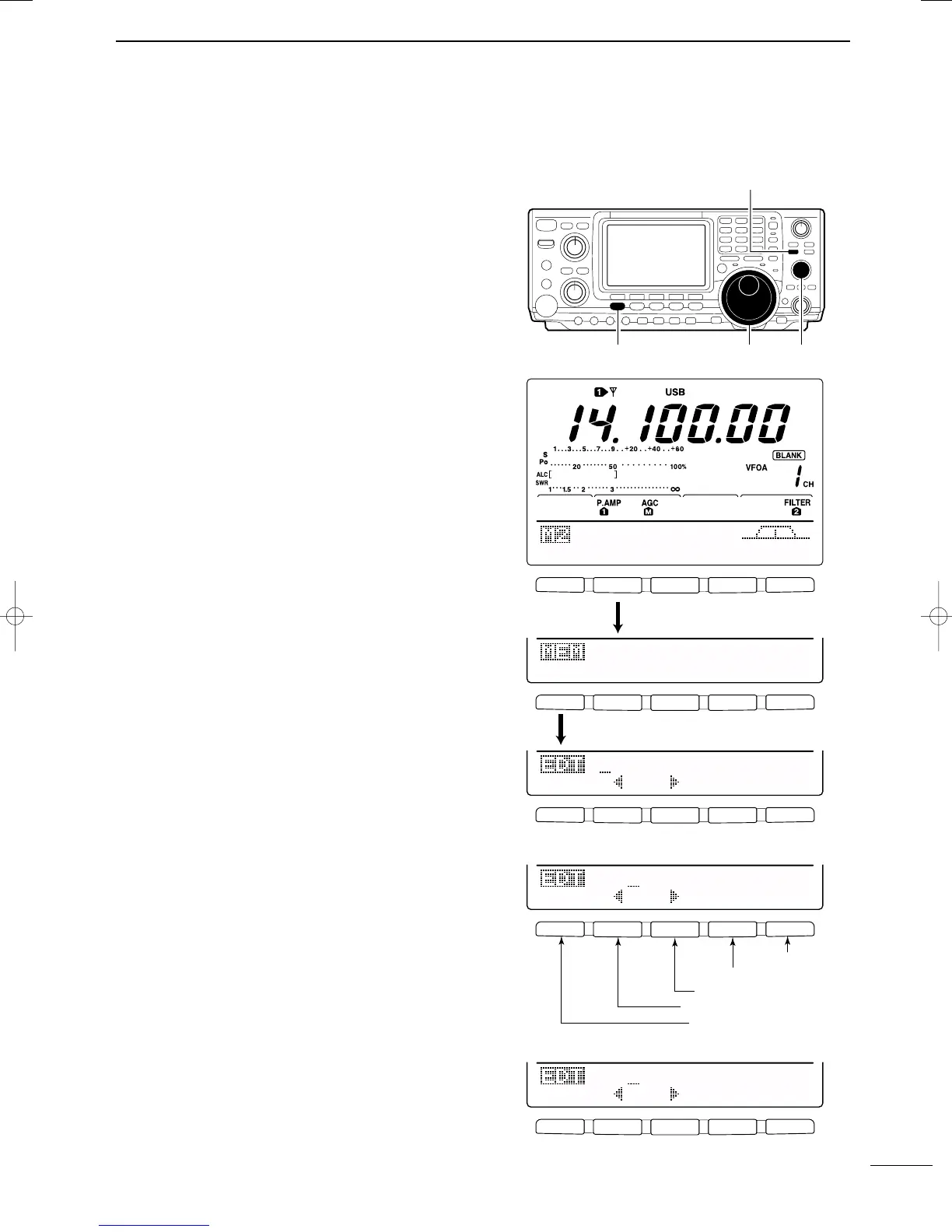
q Push [V/M] to select memory mode, if necessary.
w Rotate [M-CH] to select memory channel 99.
e Push [MENU] several times to select M2.
r Push [F2 MEM] to select the memory name screen.
t Push [F1 EDT] to edit memory channel name.
• A cursor appears and blinks.
•Memory channel names of blank channels cannot be
edited.
y Push [F1] several times to select the type of char-
acters for input.
•“ABC” inputs capital letters A to Z.
•“abc” inputs small letters a to z.
•“etc” is used to input other characters— ! # $ % & ¥ ? ”
’ ` ^ + – ✱ / . , : ; = < > ( ) [ ] { } | _
–
are available.
•Use the keypad to directly input numerals, “0” to “9,” in-
cluding a decimal point.
u Rotate the tuning dial to select the first character for
input.
i Push [F2 ç] or [F3 å] to move the cursor forwards
or backwards, respectively.
•Push [F5 SPC] to input a space and [F4 DEL] to delete
the selected character.
o Repeat steps w to i to program another memory
channel’s name, if desired.
!0 Push [MENU] to set the memory channel name and
return to the memory name menu.
• Push [MENU] 1 more times to return to M2.
[V/M]
Tuning dial
[M-CH][MENU]
F 1
F
2F
3
F
4
F
5
F 1
F
2F
3
F
4
F
5
F 1
F
2F
3
F
4
F
5
F 1
F
2F
3
F
4
F
5
F 1
F 2 F 3 F 4 F 5
SCN
MEM
SWR
TCN
VSC
EDT
(
)
SEL
14.195OO
USB
ABC
DEL
SPC
Push [F2 MEM]
Push [F2 MEM]
ABC
DEL
SPC
DX
• During assigning a memory name
abc
DEL
SPC
DX
spot
• After assigning a memory name
Input space
Delete a character
Move cursor forwards
Move cursor backwards
Selects character type
IC-7400.qxd 02.4.2 11:35 Page 66


 To Next Page