44
4
RECEIVE AND TRANSMIT
2001 NEW
■ Repeater operation
A repeater amplifies received signals and retransmits
them at a different frequency. When using a repeater,
the transmit frequency is shifted from the receive fre-
quency by an offset frequency. A repeater can be ac-
cessed using split frequency operation with the shift
frequency set to the repeater’s offset frequency.
q Push a band key to select the desired band.
w Push [A/B] to select VFO A.
e Push [AM/FM] to select FM.
• Pushing [AM/FM] toggles between AM and FM.
r Rotate the tuning dial to set the repeater transmit
frequency.
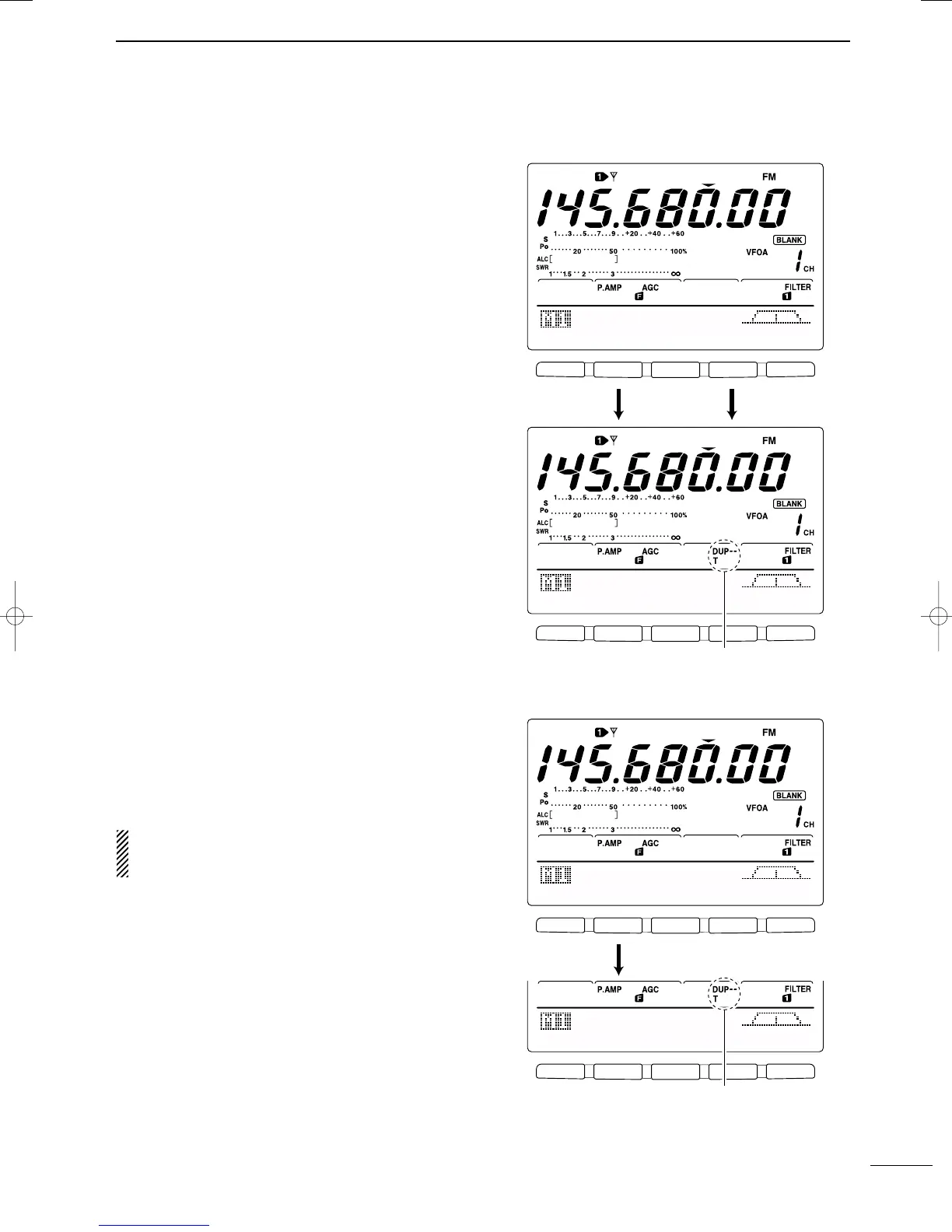
t While M1 is selected, push [F2 DUP] several times
to set the offset direction.
•“DUP–” or “DUP+” appears
•0.100 MHz for HF, 0.500 MHz for 50 MHz and
0.600 MHz for 144 MHz band is set by default in set
mode. (p. 83)
y Push [F4 TON] to turn the repeater tone ON.
•“T” appears.
•Set the tone frequency in tone frequency set mode in
advance, if desired. (p. 45) 88.5 Hz is set by default.
To transmit a 1750 Hz European repeater tone,
push [F4 TON] while transmitting.
u Communicate in the normal way.
DD
One-touch repeater function
This function allows you to set repeater operation with
push of one switch.
➥ To set the transceiver for repeater operation using
the one-touch repeater function, follow the steps q
to r as above, then push [F2 DUP] for 1 sec.
Set the offset shift direction and frequency in ad-
vance (p. 83) as well as the tone frequency (see
p. 45).
F 1
F 2 F 3 F 4 F 5
F 1
F 2 F 3 F 4 F 5
AGC
DUP
CMP
TON
SCP
AGC
DUP
CMP
TON
SCP
145.O8OOO
Push [F2], [F4]
Appears
F 1
F 2 F 3 F 4 F 5
F 1
F 2 F 3 F 4 F 5
AGC
DUP
CMP
TON
SCP
AGC
DUP
CMP
TON
SCP
145.O8OOO
Push [F2] for 1 sec.
Appears
IC-746PRO.qxd 02.4.2 11:31 Page 44



 To Next Page