72
8
SCANS
2001 NEW
■ Memory scan operation (Memory mode)
Memory scan searches through memory channel 1 to
99 for signals. Blank (unprogrammed) memory chan-
nels are skipped.
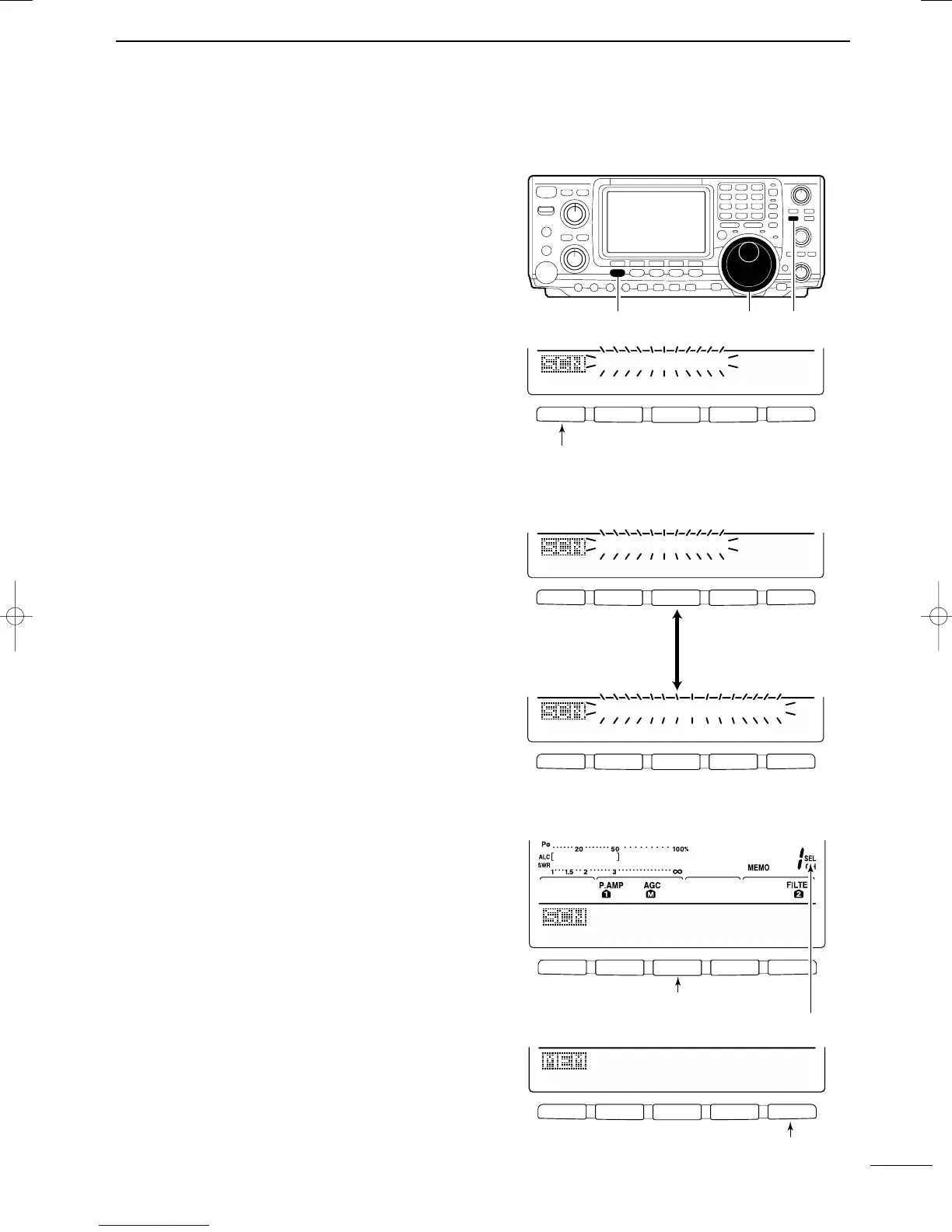
q Push [V/M] to select memory mode, if necessary.
w Push [MENU] to select M2.
e Push [F1 SCN] to select the scan menu.
• See p. 69 for scan condition.
•If the [RF/SQL] control function is set as “AUTO,” the
squelch is always open in SSB, CW and RTTY modes.
r Push [F1 MEM] to start the memory scan.
• The MHz and kHz decimal points blink while scanning.
•At least 2 memory channels must be programmed for
memory scan to proceed.
t To cancel the scan, push [F1 MEM].
•Rotating the tuning dial during scan also cancels scan
operation.
■ Select memory scan
Select memory scan searches through memory chan-
nels set as “select,” for signals. See below for setting
and deleting select memory channels.
q Follow the steps q to r above to start memory
scan.
w During memory scan, push [F3 SEL] to switch be-
tween memory scan and select memory scan.
•At least 2 memory channels must be set as the select
channel.
e Push [F1 MEM] to cancel the scan.
•Rotating the tuning dial during scan also cancels scan
operation.
DD
Setting/Cancelling select memory channels
All memory channels, except scan edges (P1 and P2),
can be set as a select memory channels.
➥ While the scan menu is selected, push [F3 SEL] to
set/cancel the displayed memory channel as a se-
lect channel; or while memory name screen is indi-
cated, push [F5 SEL] to set/cancel the displayed
memory channel as a select memory channel.
•“SEL” appears when the channel is set as a select mem-
ory channel.
•“SEL” disappears when cancelled.
•Push [F3 SEL]/[F5 SEL] for 1 sec to cancel all select
memory settings.
F 1
F
2F
3
F
4
F
5
MEM
∂
F
SEL
SPN
SET
MEMO
SCAN
Push [F1] to start/cancel the scanning.
F 1
F
2F
3
F
4
F
5
F 1
F
2F
3
F
4
F
5
MEM
∂
F
SEL
SPN
SET
MEMO
SCAN
MEM
∂
F
SEL
SPN
SET
SEL-MEMO
SCAN
Push [F3] to switch
between memory scan
and select memory
scan.
F 1
F
2F
3
F
4
F
5
F 1
F
2F
3
F
4
F
5
∂
F:±1Ok
MEM
∂
F
SEL
SPN
SET
Push [F3] to set/cancel as a select channel.
Select memory inidcator
Push [F3] to set/cancel as a select channel.
EDT
(
)
SEL
14.195OO
USB
• Scan menu
• Memory name screen
IC-746PRO.qxd 02.4.2 11:31 Page 72



 To Next Page