29
4
RECEIVE AND TRANSMIT
2001 NEW 2001 NEW
■ Electronic keyer functions
The transceiver has a number of convenient functions
for the electronic keyer that can be accessed from the
memory keyer menu.
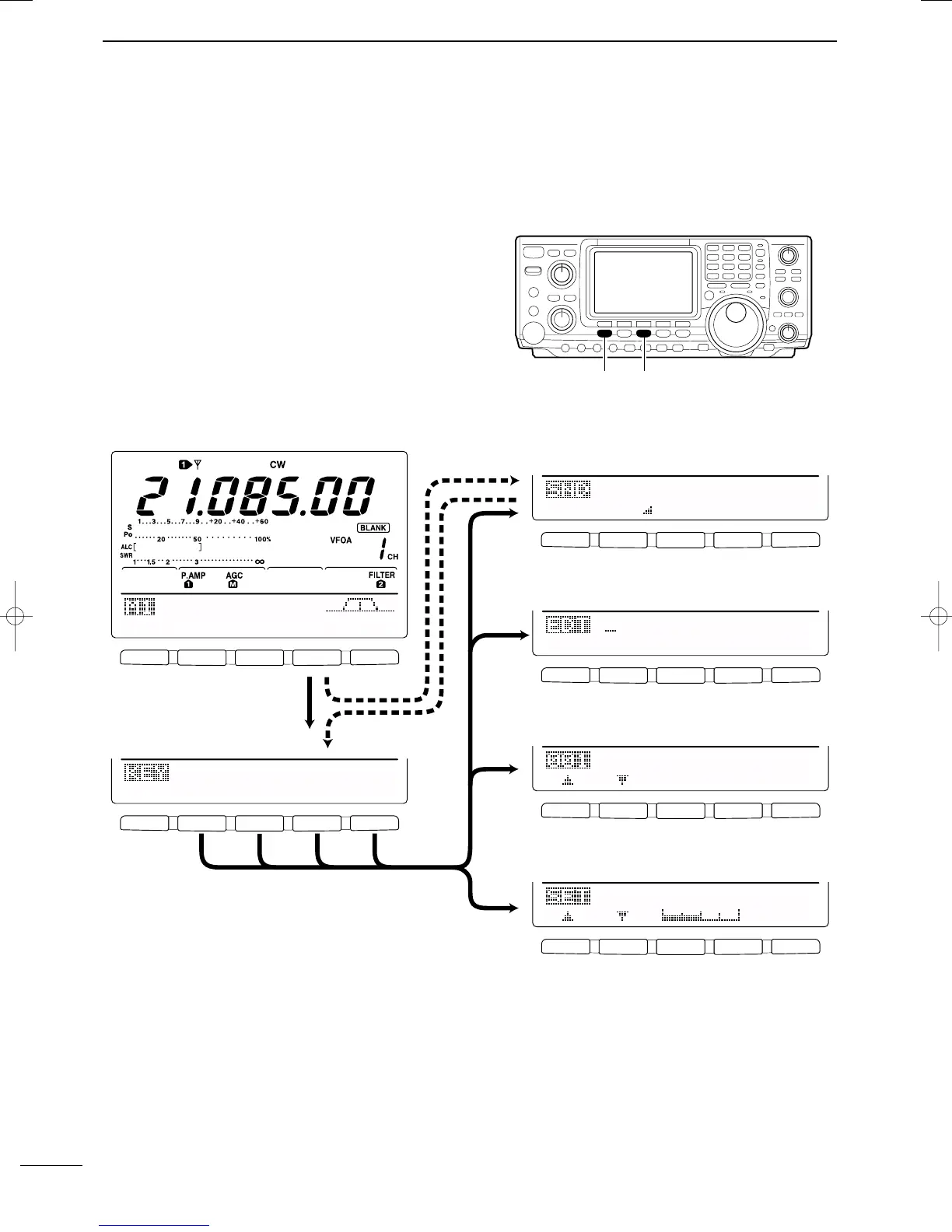
q Push [CW/RTTY] to select CW mode.
w Push [MENU] to select M1.
e Push [F4 KEY] to select the memory keyer menu.
•The selectable menu can be changed with the keyer
send menu in the set mode. (p. 87)
r Push one of the multi-function keys ([F1] to [F5]) to
select an item in the memory keyer menu. See the
diagram below.
• Push [MENU] to return to the previous indication.
DD
IN CW MODE
F
1F
2F
3F
4F
5
F
1F
2F
3F
4F
5
F
1F
2F
3F
4F
5
F
1F
2F
3F
4F
5
F
1F
2F
3F
4F
5
F
1F
2F
3F
4F
5
AGC
DUP
1/4
KEY
SCP
M1
M2
M3
M4
-1
5O%1
Side
Tone
Level
Normal1
Number
Style
CQ
TEST
CQ
TEST
M1
ç
å
DEL
SPC
Push [F4]
Push [MENU]
Push
[F4]
Push
[F2]
Push
[F3]
Push
[F5]
• Keyer send menu (p. 30)
SND
EDT
001
SET
• Memory keyer menu
• Keyer set mode (p. 33)
• Contest number set mode (p. 32)
• Edit menu (p. 31)
IC-746PRO.qxd 02.4.2 11:31 Page 29



 To Next Page