EasyManua.ls Logo

Icom IC-M127 - Basic Operation Guide; Powering On and Channel Selection

Icom IC-M127
48 pages
Print Icon
To Next Page IconTo Next Page
To Previous Page IconTo Previous Page
Loading...
o
|
3
@
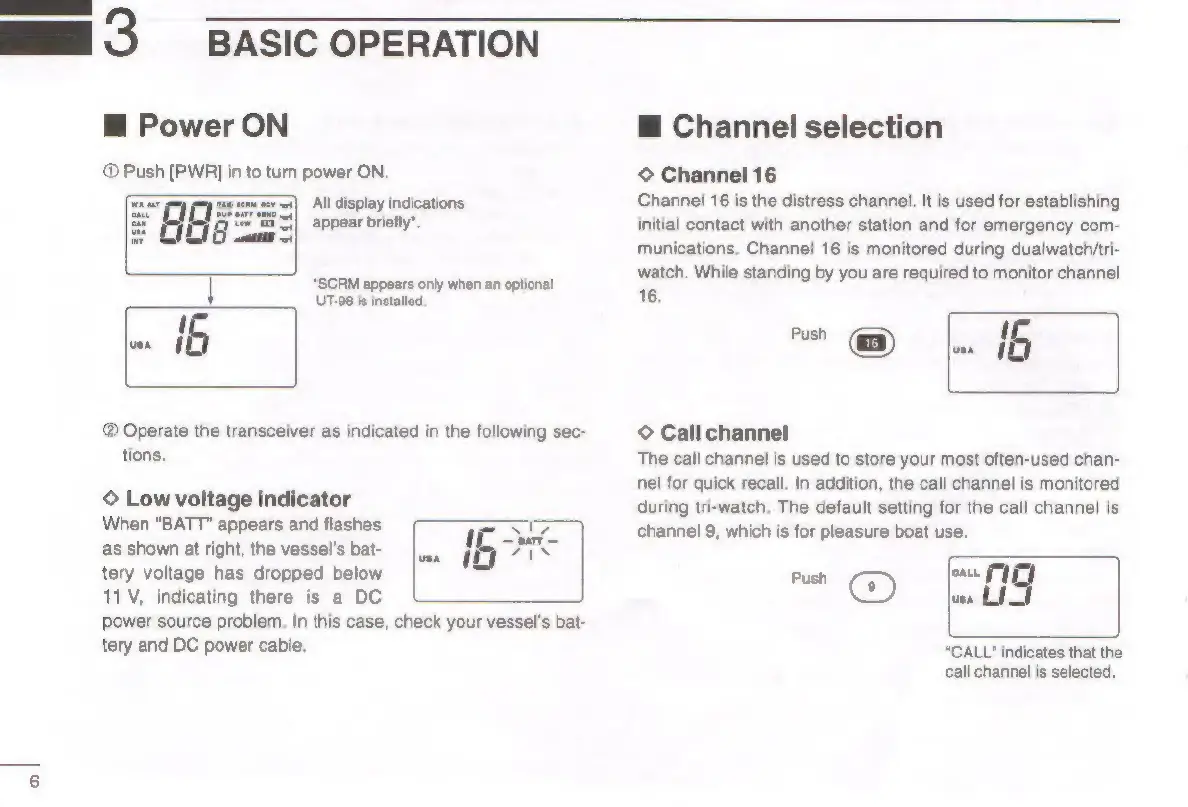
Power
ON
@
Push
[PWR]
in
to
turn
power
ON.
All
display
indications
appear
briefly’.
BASIC
OPERATION
*SCRM
appears
only
when
an
optional
UT-08
is
installed,
®
Operate
the
transceiver
as
indicated
in
the
following
sec-
tions.
©
Low
voltage
indicator
When
“BATT”
appears
and
flashes
as
shown
at
right,
the
vessel's
bat-
tery
voltage
has
dropped
below
11V,
indicating
there
is
a
DC
power
source
problem,
In
this
case,
check
your
vessel's
bat-
tery
and
DC
power
cable.
@
Channel
selection
©
Channel
16
Channel
16
is
the
distress
channel.
It
is
used
for
establishing
initial
contact
with
another
station
and
for
emergency
com-
munications.
Channel
16
is
monitored
during
dualwatch/tri-
watch.
While
standing
by
you
are
required
to
monitor
channel
16.
-
6
|
©
Call
channel
The
call
channel
is
used
to
store
your
most
often-used
chan-
nel
for
quick
recall.
In
addition,
the
call
channel
is
monitored
during
tri-watch,
The
default
setting
for
the
call
channel
is
channel
9,
which
is
for
pleasure
boat
use.
Push
CG)
rt
ves
Lf
“CALL"
indicates
that
the
call
channel
is
selected.