EasyManua.ls Logo

Icom IC-M127 - Panel Description and Controls; Front Panel Layout and Functions

Icom IC-M127
48 pages
Print Icon
To Next Page IconTo Next Page
To Previous Page IconTo Previous Page
Loading...
—P
i
|
PANEL
DESCRIPTION
@
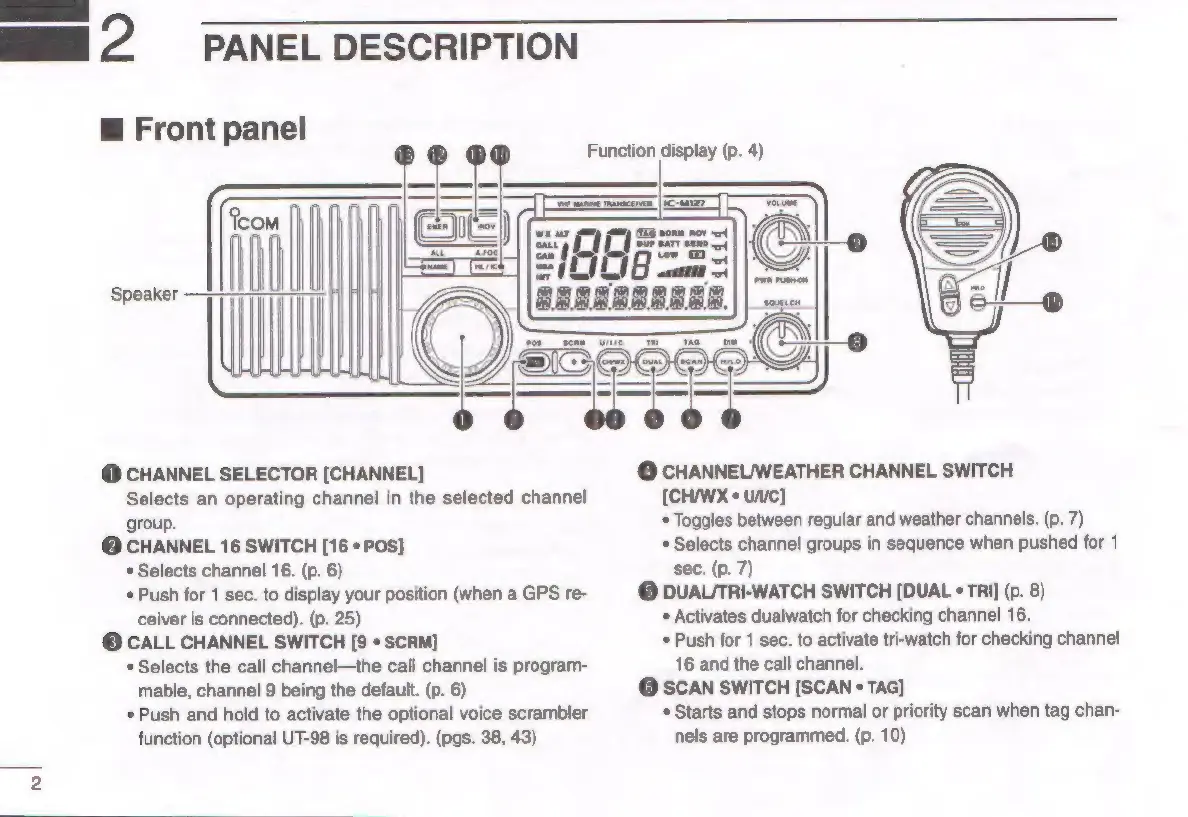
Front
panel
Function
display
(p.
4)
Speaker
@
CHANNEL
SELECTOR
[CHANNEL]
Selects
an
operating
channel
in
the
selected
channel
group,
@
CHANNEL
16
SWITCH
[16
*
POS]
*
Selects
channel
16.
(p.
6)
Push
for
1
sec.
to
display
your
position
(when
a
GPS
re-
ceiver
is
connected).
(p.
25)
©
CALL
CHANNEL
SWITCH
[9
*
SCRM]
*
Selects
the
call
channel—the
call
channel
is
program-
mable,
channel
9
being
the
default.
(p.
6)
*
Push
and
hold
to
activate
the
optional
voice
scrambler
function
(optional
UT-98
is
required).
(pgs.
38,
43)
@
CHANNEL/WEATHER
CHANNEL
SWITCH
[CH/WX
+
unc]
*
Toggles
between
regular
and
weather
channels.
(p.
7)
*
Selects
channel
groups
in
sequence
when
pushed
for
1
sec.
(p.
7)
©
DUALTRI-WATCH
SWITCH
[DUAL
*
TRI]
(p.
8)
*
Activates
dualwatch
for
checking
channel
16.
*
Push
for
1
sec.
to
activate
tri-watch
for
checking
channel
16
and
the
call
channel.
@
SCAN
SWITCH
[SCAN
«
TAG]
*
Starts
and
stops
normal
or
priority
scan
when
tag
chan-
nels
are
programmed.
(p.
10)

Related product manuals