14
7
8
16
15
14
13
12
11
10
9
6
5
4
3
2
1
7
CONNECTIONS AND MAINTENANCE
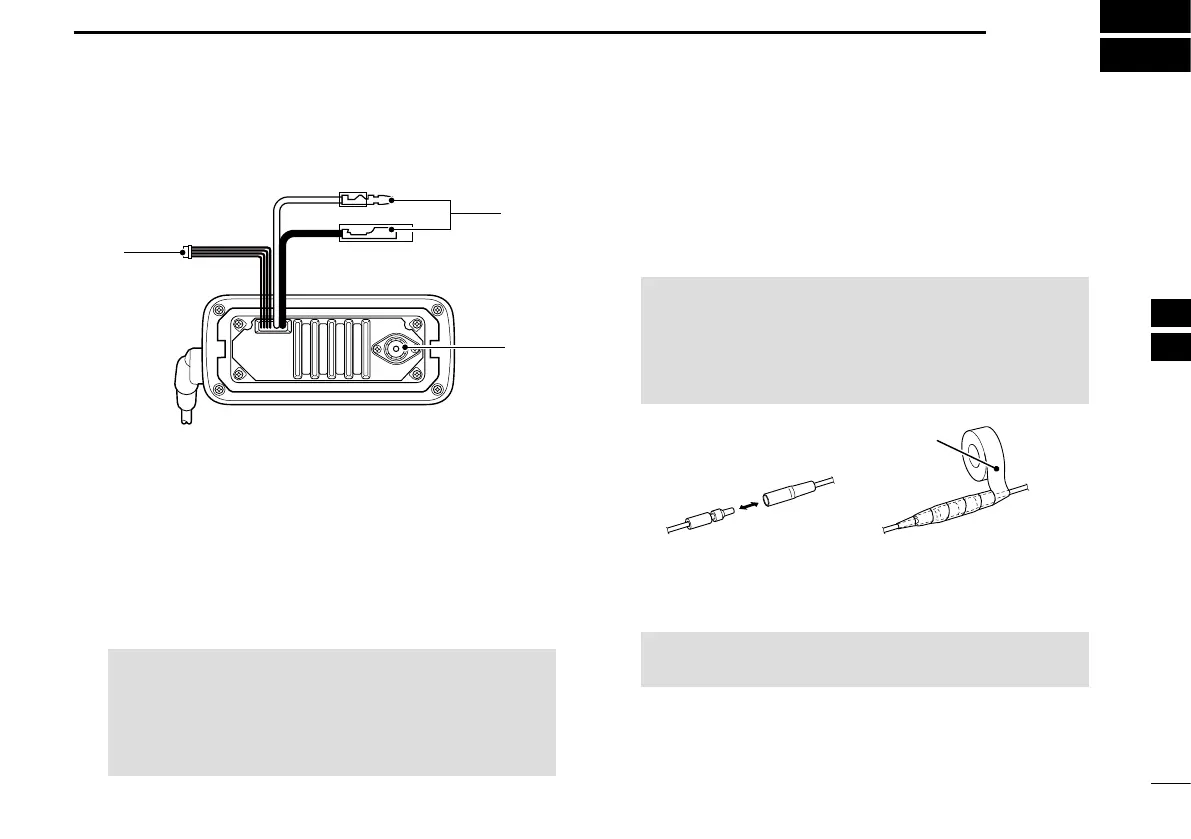
■ Connections
q AF OUT LEADS
Blue: External Speaker (+)
Gray: External Speaker (–)
Connects to an external speaker.
Yellow: Data line
Green: Data line
Used only for maintenance purposes.
NOTE: AF out leads
The connectors are attached to keep the
leads together. Before connecting to a piece
of equipment, cut the leads to remove the
connectors, if desired.
w DC POWER CONNECTORS
Connects the supplied DC power cable to an
external 13.8 V DC power source.
CAUTION: After connecting the DC power
cable and external speaker lead, cover the
connector and leads with a vulcanizing tape, as
shown below, to prevent water seeping into the
connector.
Rubber vulcanizing
tape
e ANTENNA CONNECTOR
Connects to a marine VHF antenna.
CAUTION: Transmitting without an antenna may
damage the transceiver.
q
w
e


 To Next Page