24
8
BATTERY CHARGING
D AD-123 installation (continued)
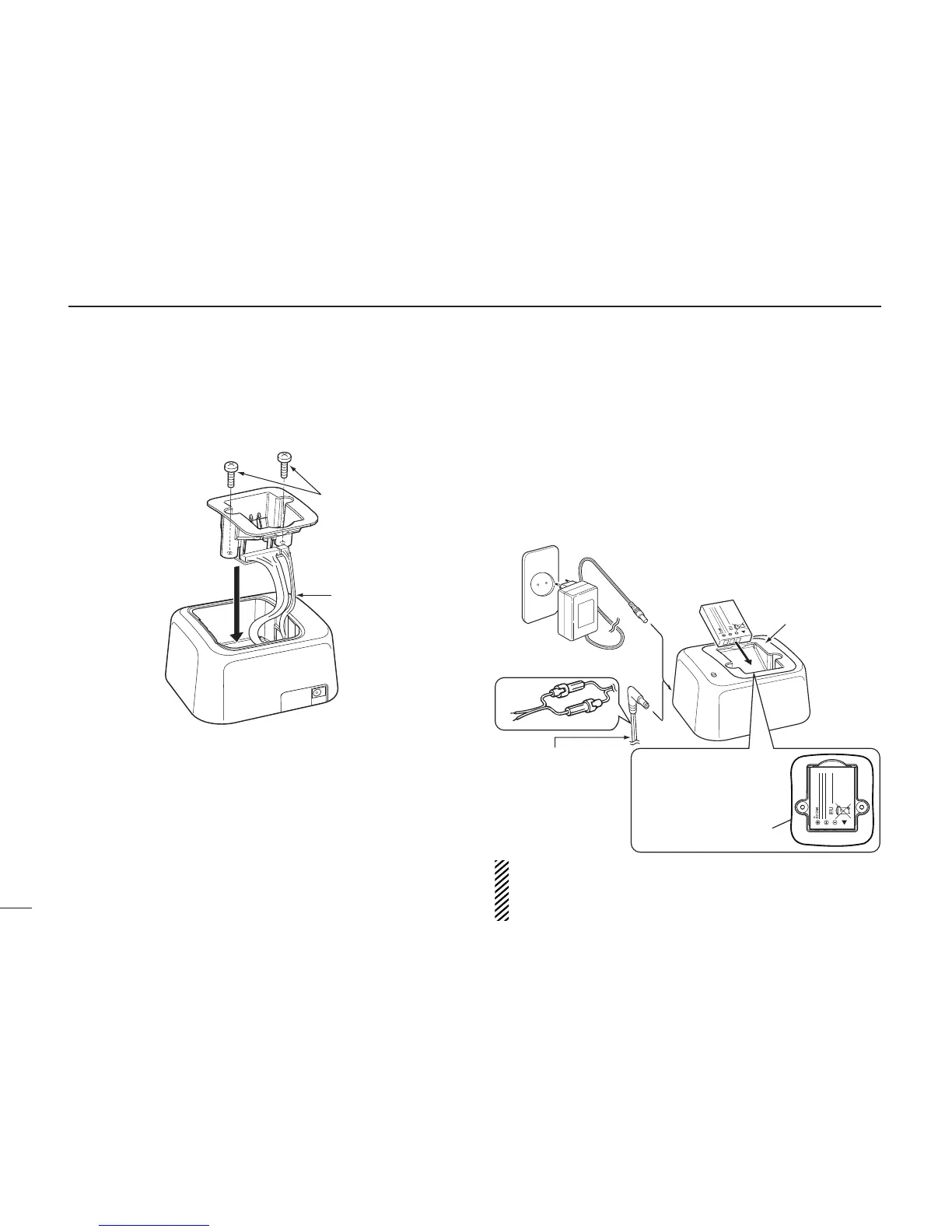
w Install the AD-123 into the holder space of the BC-119N
or BC-121N with the supplied screws as shown.
D Charging
• For BC-119N
The optional BC-119N provides rapid charging of the Li-ion
battery pack. (Charging time: Approximately 2.5 hours)
The following items are additionally required:
• AD-123 CHARGER ADAPTER (purchase separately)
• An AC adapter (may be supplied with BC-119N depending on ver-
sion) or the DC power cable (OPC-515L/CP-23L).
xx
AD-123 charger adapter is
installed in the BC-119N.
Optional OPC-515L
(for 13.8 V power
source) or CP-23L
(for 12 V cigarette
lighter socket) can
be used instead of
the AC adapter.
See the instruction manual for details of
the charger, LED indication,
operation, etc.
IMPORTANT!:
Ensure the battery pack
snaps flat in the AD-123.
BP-266
BC-119N
BP-266
White: +
Black: _
(Not supplied or different types are
supplied, depending on the version.)
CAUTION: When using the OPC-515L DC power cable
NEVER reverse the polarity of an OPC-515L connected between
a power source and the battery charger. This will ruin the charger.
White line: + Black line: –



 To Next Page