23
8
BATTERY CHARGING
1
2
3
4
5
6
7
8
9
10
11
12
13
14
15
16
■ Supplied battery charger
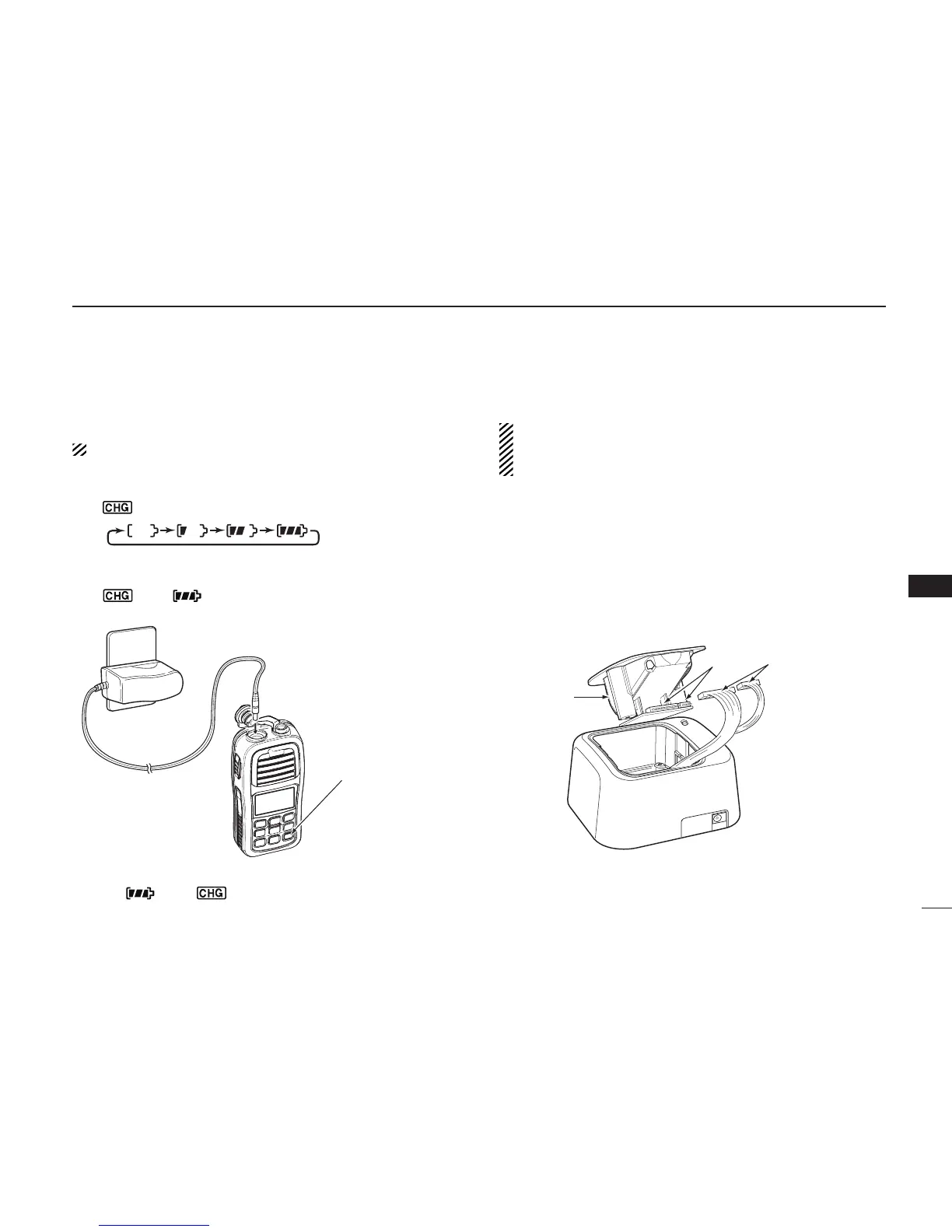
D Charging
Do not use a charger other than the specifi ed one.
q Turn OFF the transceiver's power.
w Connect the charger as shown below.
• “ ” appears, and the battery icon scrolls while charging.
e The charging is completed in approximately 8.5 hours,
depending on the remaining capacity before charging.
• “ ” and “ ” appear, and “FL” is also displayed on the
function display when charging is completed.
Charger*
[DC] jack
Power OFF
*Not supplied or different types are supplied, depending on the version.
NOTE: “ ” and “ ” blink, and “Er” is also displayed on
the function display, when the battery pack is not attached.
■ Optional battery charger
Do not place the charger on a surface with any vibration.
Otherwise the battery pack might come out of the
charger, or the charger itself might fall.
D AD-123 installation
The AD-123 CHARGER ADAPTER must be installed into the
BC-119N
DESKTOP CHARGER or BC-121N MULTI-CHARGER
before charging.
q Connect the AD-123 and the BC-119N or BC-121N as
shown.



 To Next Page