iconBIT XDS8003D User Manual! English
33
4. Upgrading the Firmware
The firmware is the operating system (OS) installed on the device. Firmware upgrades can
bring new features, improvements and bug fixes.
Normal upgrading
1) Download the firmware from our website and extract it.
2) Copy ‘install.img’ to the root directory of a FAT32 formatted USB stick, and connect it to
one of the USB HOST ports of the player.
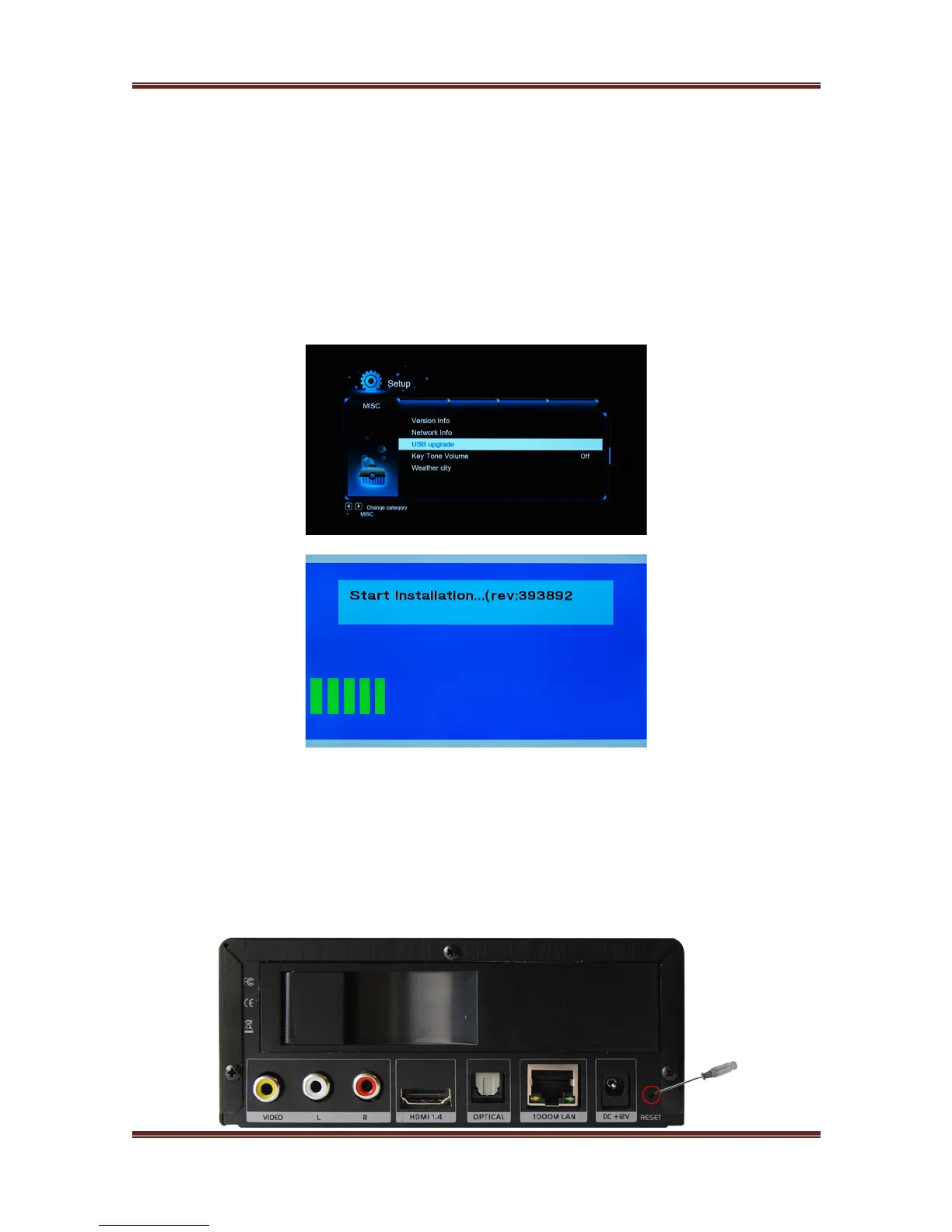
3) In home menu, Select Setup ! MISC !USB upgrade ! Press OK to confirm.
Note: DO NOT remove the power cord during the firmware process. This might damage
your player and result in an incorrect firmware flash!
Force upgrading
1) Re-format your USB flash disk.
2) Save the upgrading file ‘install.img’ to the root directory of your USB flash disk.
3) Turn off the power, then plug the USB flash disk into one USB hosts of the player.
4) Find Reset hole beside the power jack (see picture below), press the reset hole with one
needle and hold it. Meanwhile, turn on the player power is on.



 To Next Page