iData 50 User Manual
- 17 -
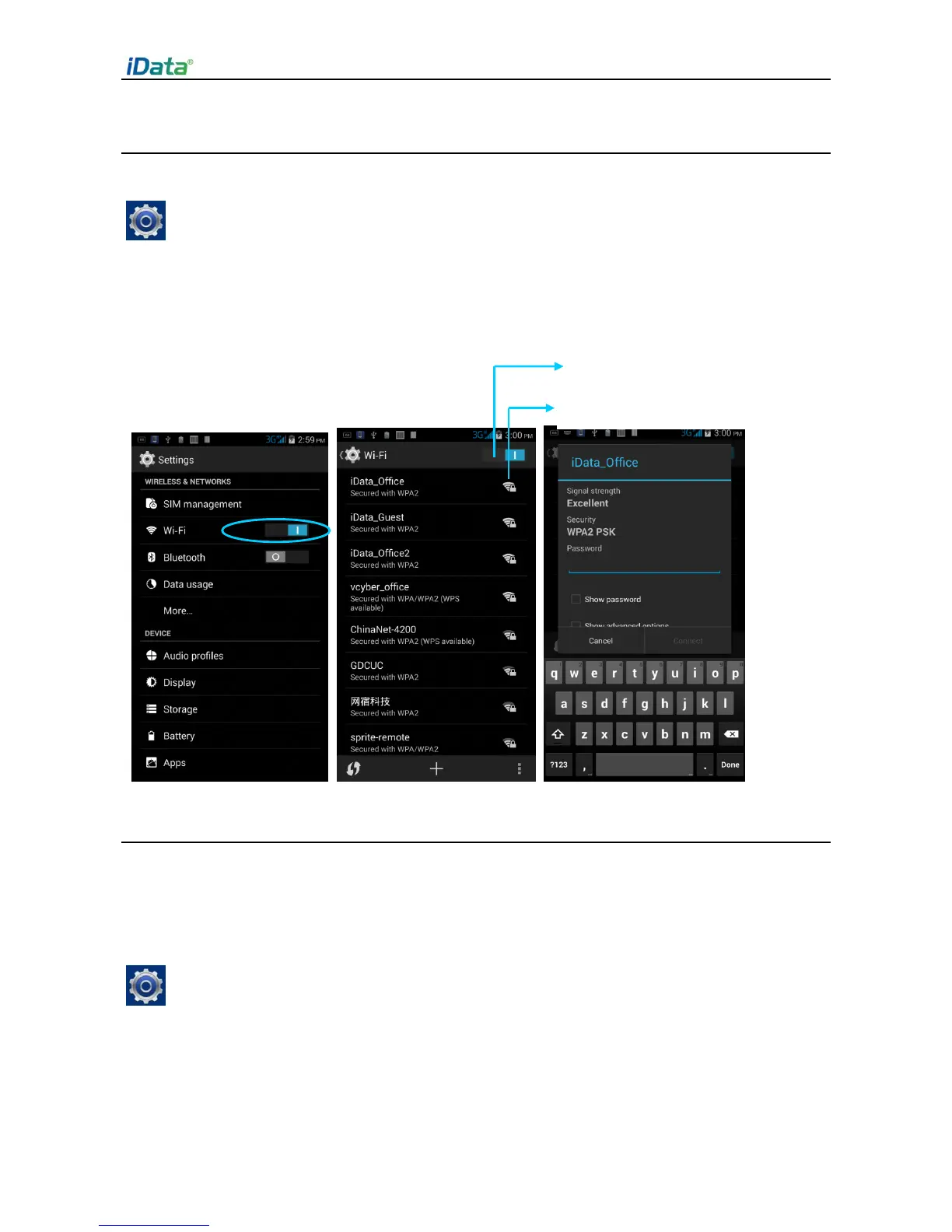
4.2 Wi-Fi Network Connection
1. Find the following icon.
2. Select
Settings
>
WIRELESS & NETWORKS
>
WLAN
.
3. Click
Enable/disable WLAN
. The iData 50 starts to search for networks. If WLAN is
enabled, click
Scan
. The iData 50 lists networks in the range of search.
4. Click a network and enter the password in the dialog box that is displayed.
5.
Click
Connect
. The Wi-Fi connection is completed.
4.3 Bluetooth
After you enable the Bluetooth function on the iData 50, you can establish wireless
connections with other Bluetooth devices such as computers and mobile phones. In the
scope without solid obstacles, the effect of Bluetooth connections is good.
1. Find the following icon.
2. Select
Setting
>
WIRELESS & NETWORKS
>
Bluetooth
.
3. Click the icon for enabling/disabling Bluetooth to enable Bluetooth and search for other
Bluetooth devices.
4. In the list of searched devices, click a device to pair the device.


 To Next Page