24
xtra
- Installation & Servicing
INSTALLATION
Service Mode
27
STANDARD CONTROLS ACCESS CONT'D
L 6 0 H 8 0
or
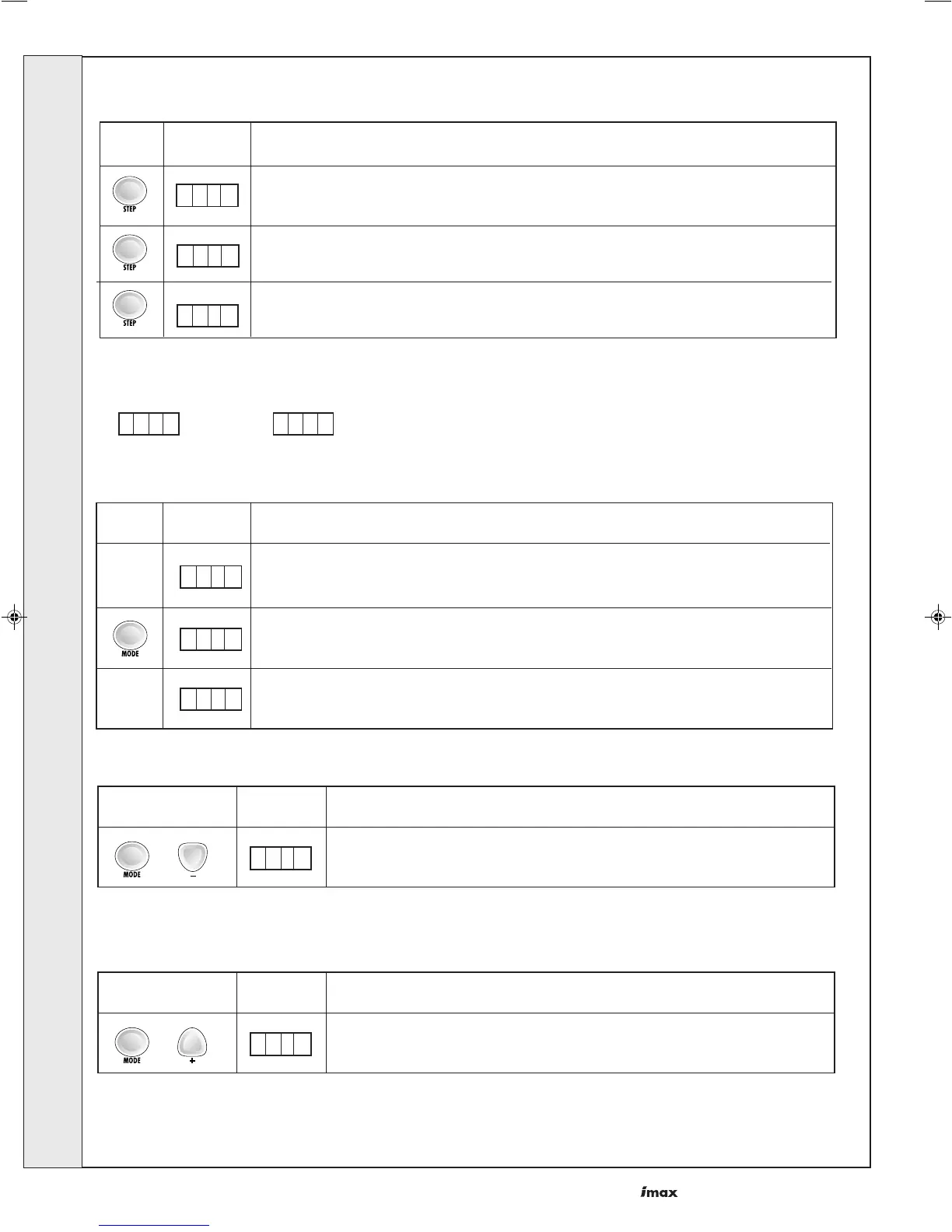
It is possible for servicing purposes to run the boiler on maximum or minimum loads.
This mode is entered from normal operating mode.
As found
Press Display Description
Standby display
X X X X
S t b y
0 2 8
Normal Display
several times
Press the 'mode' and '-' button simultaneously for 3 seconds.
L 6 0
Press Display
Description
'Min. Load'. Run for 15 mins
*
Press the 'mode' and '+' button simultaneously for 3 seconds.
H 8 0
Press Display
Description
'Max. Load'. Run for 15 mins
*
OR
*Last 3 digits are actual flow temperature
This mode will end automatically after 15 minutes. Alternatively to escape sooner press the '+' and '-' simultaneously.
In order to set the boiler to a fixed fan speed proceed to CODE MODE (Page 25) and select 'PARA' mode 47 (Page 26).
Wait a few
seconds
Press Display Description
Info mode cont'd.........
Burner Run Hours, DHW
100 thousands/10 thousands
N. 0 0
Burner Run Hours, DHW
thousands/hundreds
Burner Run Hours, DHW
tens/units
I. 0 0
I . 0 0
INSTALLATION



 To Next Page