8
DD3S Series Display Units
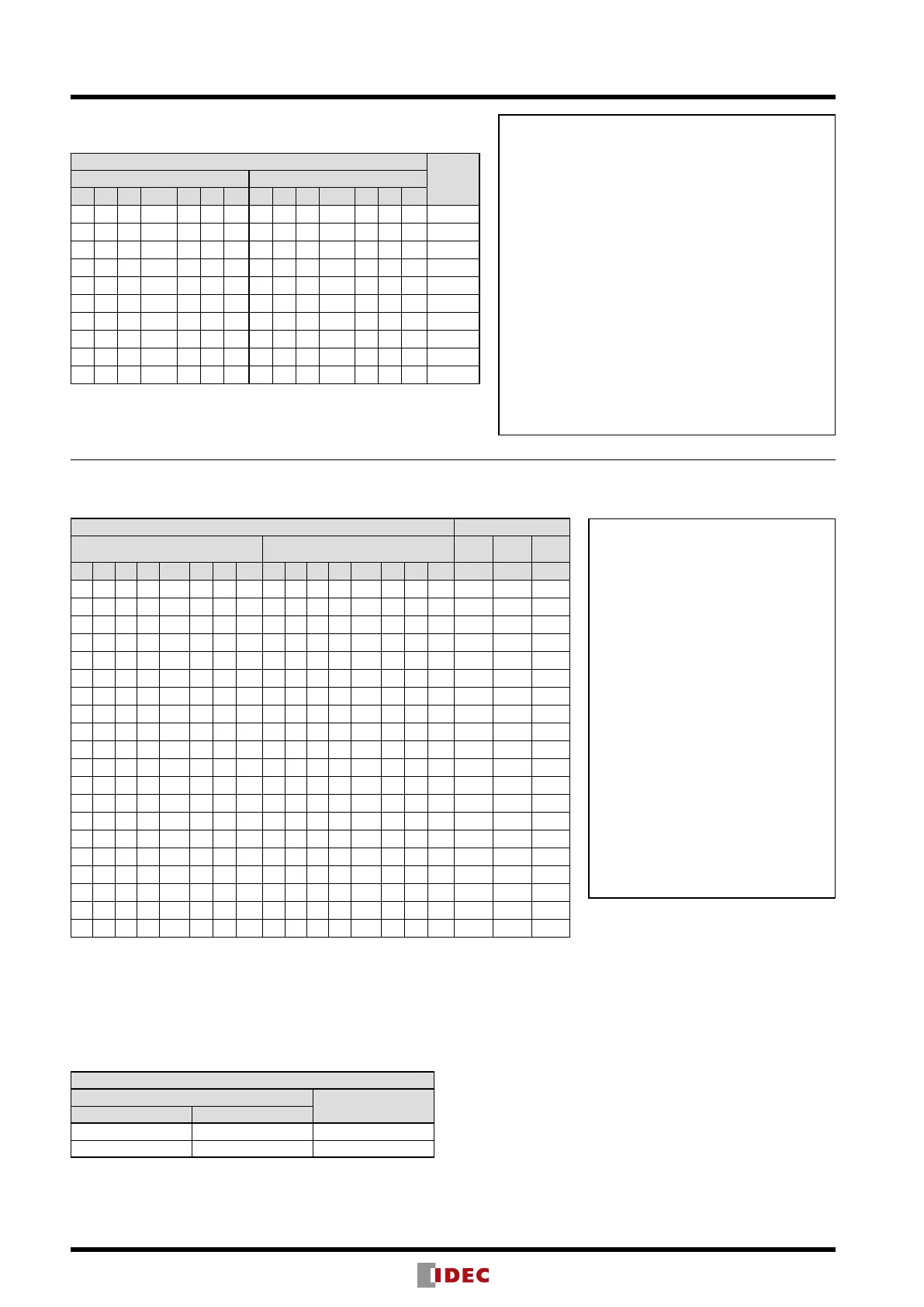
Function Table
Binary Display Unit (Standard)
Data Input
LED
Display
Positive Logic Negative Logic
1 + – Latch LT BL DP 1 + – Latch LT BL DP
× × × × H × × × × × × L × × +1.
× × × × L H × × × × × H L × blank
× × × × L L H × × × × H H L
*.
L L L L L L L H H H H H H H blank
L L H L L L L H H L H H H H
-
L H × L L L L H L × H H H H +
H L L L L L L L H H H H H H 1
H L H L L L L L H L H H H H
-
1
H H × L L L L L L × H H H H +1
× × × H L L L × × × L H H H maintain
Note 1: × indicates the display is not affected by voltage level of H or L.
Note 2: * A decimal point is displayed with any character.
Input Functions
1, +, and – Inputs
When the 1, +, or – input is set to level H for the positive
logic or level L for the negative logic, the 1, +, or – display
is turned on, respectively.
Latch Input
When the Latch input is set to level H for the positive logic
or level L for the negative logic, the 1, +, or – display at the
time is maintained. (DP input is independent.)
LT (Light Test) Input
When the LT input is set to level H for the positive logic or
level L for the negative logic, the entire display turns on.
BL (Blank) Input
When the BL input is set to level H for the positive logic
or level L for the negative logic, the entire display turns off
regardless of other inputs.
DP (Decimal Point) Input
When the DP input is set to level H for the positive logic or
level L for the negative logic, the decimal point turns on.
Decimal/Hexadecimal/Extra Decimal Display Units
(Standard, 2-color Alternate, and Zero-suppress)
Data Input LED Display
Positive Logic Negative Logic Dec. Hex.
Extra
Dec.
D C B A Latch LT BL DP D C B A Latch LT BL DP
× × × × × H × × × × × × × L × × 8. 8. 8.
× × × × × L H × × × × × × H L × blank blank blank
× × × × × L L H × × × × × H H L
*. *. *.
L L L L L L L L H H H H H H H H 0 0 0
L L L H L L L L H H H L H H H H 1 1 1
L L H L L L L L H H L H H H H H 2 2 2
L L H H L L L L H H L L H H H H 3 3 3
L H L L L L L L H L H H H H H H 4 4 4
L H L H L L L L H L H L H H H H 5 5 5
L H H L L L L L H L L H H H H H 6 6 6
L H H H L L L L H L L L H H H H 7 7 7
H L L L L L L L L H H H H H H H 8 8 8
H L L H L L L L L H H L H H H H 9 9 9
H L H L L L L L L H L H H H H H blank A –
H L H H L L L L L H L L H H H H blank b _
H H L L L L L L L L H H H H H H blank C
¯
H H L H L L L L L L H L H H H H blank d
=
H H H L L L L L L L L H H H H H blank E
=
H H H H L L L L L L L L H H H H blank F blank
× × × × H L L L × × × × L H H
H
maintain maintain maintain
Note 1: × indicates the display is not affected by voltage level of H or L.
Note 2: * A decimal point is displayed with any character.
Note 3: The 2-color alternate does not have the LT terminal.
(2-color Alternate Unit)
The display color is switched between red and green using the R/G (No. 6) terminal.
For other inputs, refer to the above table.
The 2-color alternate unit does not have an LT terminal.
Decimal/Hexadecimal/Extra Decimal
R/G Input
Display Color
Positive Logic Negative Logic
L H Red
H L Green
Input Functions
A, B, C, and D (binary code) Inputs
These inputs are decimal or data
corresponding to 1, 2, 4, and 8,
respectively.
Latch Input
When the Latch input is set to level H
for the positive logic or level L for the
negative logic, the display at the time is
maintained. (DP input is independent.)
LT (Light Test) Input
When the LT input is set to level H for the
positive logic or level L for the negative
logic, the entire display turns on.
BL (Blank) Input
When the BL input is set to level H
for the positive logic or level L for the
negative logic, the entire display turns off
regardless of other inputs.
DP (Decimal Point) Input
When the DP input is set to level H for the
positive logic or level L for the negative
logic, the decimal point turns on.


 To Next Page