29
DD96 Series Display Units
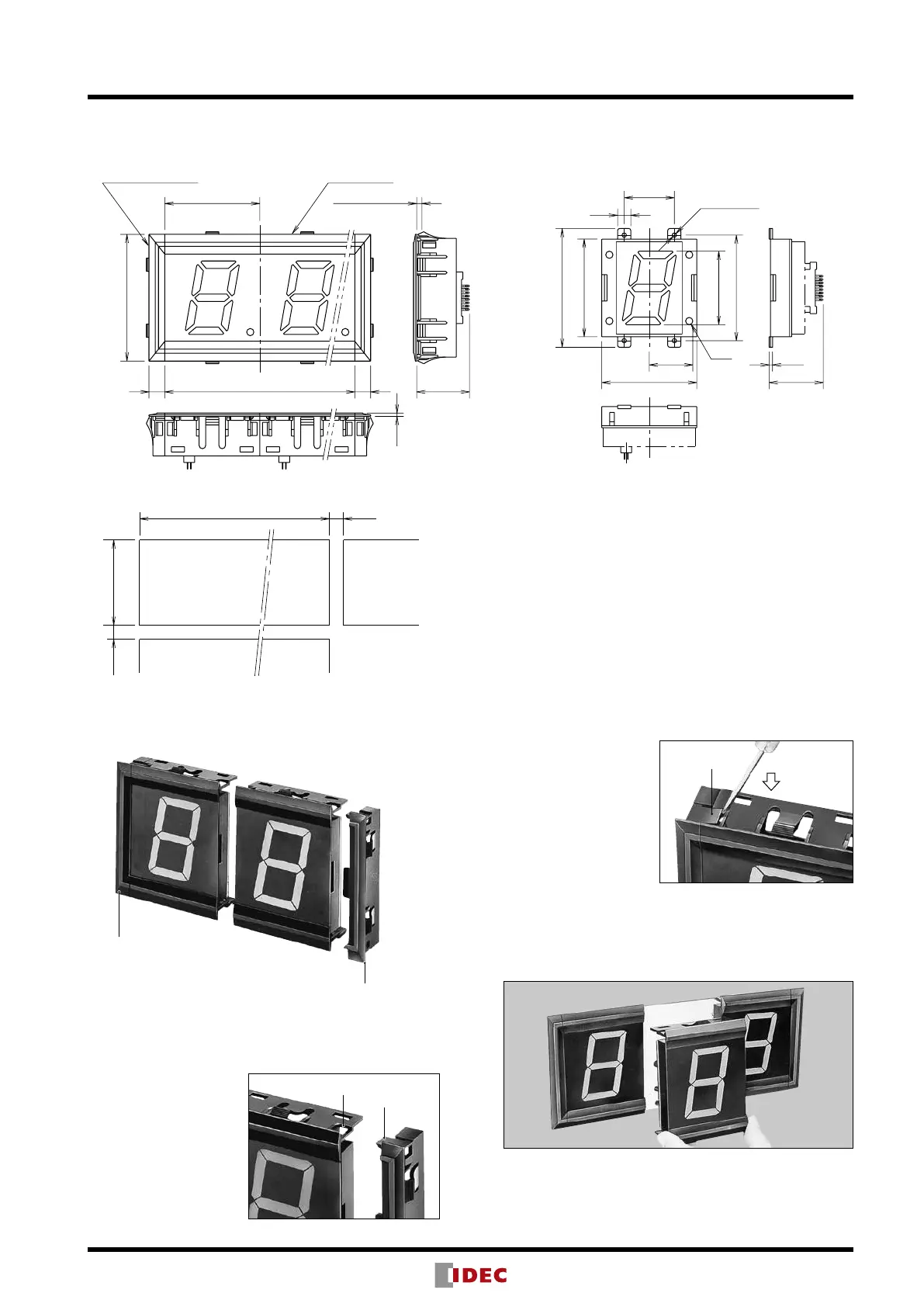
72
12 72 × N12
Approx.
40
96
2.5
N: No. of digits (8 digits maximum)
Panel Thickness:
0.8 to 4
DP
33
72
10
38
74
57
80
2.6
4-
ø
3.3 Hole
Approx. 41
0
-0
+0.5
+0.5
72N + 20.5
92.5
10 min.
10 min. (When mounting more than 8 digits)
Dimensions & Panel Cut-out
Front Mount
(Panel Cut-out)
Rear Mount
All dimensions in mm.
Latch
Instructions
Unit Combination
End Plate
End Plate
DD96-W-B (pair)
Only end plates snap onto DD96 display units; display units
cannot be combined with each other by snap t. DD96 rear mount
units do not require end plate.
[Installing End Plates]
Press the end plate onto
the side of the display
unit.
[Removing End Plates]
Disengage the latches
on top and bottom of
the end plate using a
screwdriver. Do not apply
excessive force to the
latches, or the latches
may be damaged.
Panel Mounting
Install end plates onto display units at both ends and install the
units into panel cut-out, then install display units in the middle.
Recess
Latch


 To Next Page